Wells
Well (single)
Functions
- xtgeo.well_from_file(wfile, fformat=None, mdlogname=None, zonelogname=None, lognames='all', lognames_strict=False, strict=False)[source]
Make an instance of a Well directly from file import.
- Parameters:
wfile (
str|Path) – File path for well, either a string or a pathlib.Path instancefformat (
str|None) – “rms_ascii”, “csv”, or “hdf5”. If None (default), auto-detect from file extension or file signature.mdlogname (
str|None) – Name of Measured Depth log, if anyzonelogname (
str|None) – Name of Zonelog, if anylognames (
str|list[str] |None) – Name or list of lognames to import, default is “all”lognames_strict (
bool|None) – If True, all lognames must be present.strict (
bool|None) – If True, then import will fail if zonelogname or mdlogname are asked for but those names are not present in wells.
- Return type:
Example:
>>> import xtgeo
>>> import pathlib
>>> welldir = pathlib.Path("../foo")
>>> mywell = xtgeo.well_from_file(welldir / "OP_1.w")
Changed in version 2.1: Added
lognamesandlognames_strictChanged in version 2.1:
strictnow defaults to False
- xtgeo.well_from_roxar(project, name, trajectory='Drilled trajectory', logrun='log', lognames='all', lognames_strict=False, inclmd=False, inclsurvey=False)[source]
This makes an instance of a Well directly from Roxar RMS.
Note this method works only when inside RMS, or when RMS license is activated (through the roxar environment).
- Parameters:
project (
str|object) – Path to project or magic theprojectvariable in RMS.name (
str) – Name of Well, as shown in RMS.trajectory (
str|None) – Name of trajectory in RMS.logrun (
str|None) – Name of logrun in RMS.lognames (
str|list[str] |None) – List of lognames to import, or use ‘all’ for all present logslognames_strict (
bool|None) – If True and log is not in lognames is a list, an Exception will be raised.inclmd (
bool|None) – If True, a Measured Depth log will be included.inclsurvey (
bool|None) – If True, logs for azimuth and deviation will be included.
- Return type:
- Returns:
Well instance.
Example:
# inside RMS:
import xtgeo
mylogs = ['ZONELOG', 'GR', 'Facies']
mywell = xtgeo.well_from_roxar(
    project, "31_3-1", trajectory="Drilled", logrun="log", lognames=mylogs
)
Changed in version 2.1: lognames defaults to “all”, not None
Classes
- class xtgeo.Well(rkb=0.0, xpos=0.0, ypos=0.0, wname='', df=None, mdlogname=None, zonelogname=None, wlogtypes=None, wlogrecords=None, filesrc=None)[source]
Bases:
objectClass for a single well in the XTGeo framework.
The well logs are stored in a Pandas dataframe, which make manipulation easy and fast.
The well trajectory are here represented as first 3 columns in the dataframe, and XYZ have pre-defined names:
X_UTME,Y_UTMN,Z_TVDSS.Other geometry logs may has also ‘semi-defined’ names, but this is not a strict rule:
M_MDEPTHorQ_MDEPTH: Measured depth, either real/true (M_xx) or quasi computed/estimated (Q_xx). The Quasi may be incorrect for all uses, but sufficient for some computations.Similar for
M_INCL,Q_INCL,M_AZI,Q_ASI.All Pandas values (yes, discrete also!) are currently stored as float64 format, and undefined values are Nan. Integers are stored as Float due to the (historic) lacking support for ‘Integer Nan’.
Note there is a method that can return a dataframe (copy) with Integer and Float columns, see
get_filled_dataframe().The instance can be made either from file or by specification:
>>> well1 = xtgeo.well_from_file(well_dir + '/OP_1.w')
>>> well2 = xtgeo.Well(rkb=32.0, xpos=1234.0, ypos=4567.0, wname="Foo",
            df: mydataframe, ...)
- Parameters:
rkb (
float) – Well RKB heightxpos (
float) – Well head X posypos (
float) – Well head Y poswname (
str) – well namedf (
DataFrame|None) – A pandas dataframe with log values, expects columns to include ‘X_UTME’, ‘Y_UTMN’, ‘Z_TVDSS’ for x, y and z coordinates. Other columns should be log values.filesrc (
str|Path|None) – source file if anymdlogname (
str|None) – Name of Measured Depth log, if any.zonelogname (
str|None) – Name of Zonelog, if anywlogtypes (
dict[str,str] |None) – dictionary of log types, ‘DISC’ (discrete) or ‘CONT’ (continuous), defaults to to ‘CONT’.wlogrecords (
dict[str,str] |None) – dictionary of codes for ‘DISC’ logs, None for no codes given, defaults to None.
Public Data Attributes:
xnameReturn or set name of X coordinate column.
ynameReturn or set name of Y coordinate column.
znameReturn or set name of Z coordinate column.
metadataReturn metadata object instance of type MetaDataRegularSurface.
rkbReturns RKB height for the well (read only).
xposReturns well header X position (read only).
yposReturns well header Y position (read only).
wellnameReturns well name, read only.
nameReturns or set (rename) a well name.
wnameReturns or set (rename) a well name.
safewellnameGet well name on syntax safe form; '/' and spaces replaced with '_'.
xwellnameSee safewellname.
shortwellnameWell name on a short form where blockname/spaces removed (read only).
truewellnameReturns well name on the assummed form aka '31/2-E-4 AH2'.
mdlognameReturns name of MD log, if any (None if missing).
zonelognameReturns or sets name of zone log, return None if missing.
dataframeReturns or set the Pandas dataframe object for all logs.
nrowReturns the Pandas dataframe object number of rows.
ncolReturns the Pandas dataframe object number of columns.
nlogsReturns the Pandas dataframe object number of columns.
lognames_allReturns dataframe column names as list, including mandatory coords.
lognamesReturns the Pandas dataframe column as list excluding coords.
wlogtypesReturns wlogtypes
wlogrecordsReturns wlogrecords
Public Methods:
ensure_consistency()Ensure consistency for the instance.
get_short_wellname(wellname)Well name on a short name form where blockname and spaces are removed.
describe([flush])Describe an instance by printing to stdout.
to_file(wfile[, fformat, compression])Export well to file or memory stream.
to_hdf(wfile[, compression])Export well to HDF based file.
to_roxar(project, wname[, lognames, ...])Export (save/store) a well to a roxar project.
get_lognames()Get the lognames for all logs.
get_wlogs()Get a compound dictionary with well log metadata.
set_wlogs(wlogs)Set a compound dictionary with well log metadata.
isdiscrete(logname)Return True of log is discrete, otherwise False.
copy()Copy a Well instance to a new unique Well instance.
rename_log(lname, newname)Rename a log, e.g. Poro to PORO.
create_log(lname[, logtype, logrecord, ...])Create a new log with initial values.
copy_log(lname, newname[, force])Copy a log from an existing to a name
delete_log(lname)Delete/remove an existing log, or list of logs.
delete_logs(lname)Delete/remove an existing log, or list of logs.
get_logtype(lname)Returns the type of a given log (e.g. DISC or CONT), None if not present.
set_logtype(lname, ltype)Sets the type of a give log (e.g. DISC or CONT).
get_logrecord(lname)Returns the record (dict) of a given log name, None if not exists.
set_logrecord(lname, newdict)Sets the record (dict) of a given discrete log.
get_logrecord_codename(lname, key)Returns the name entry of a log record, for a given key.
get_dataframe([copy])Get a copy (default) or a view of the dataframe.
get_filled_dataframe([fill_value, ...])Fill the Nan's in the dataframe with real UNDEF values.
set_dataframe(dfr)Set the dataframe.
create_relative_hlen()Make a relative length of a well, as a log.
geometrics()Compute some well geometrical arrays MD, INCL, AZI, as logs.
truncate_parallel_path(other[, xtol, ytol, ...])Truncate the part of the well trajectory that is ~parallel with other.
may_overlap(other)Consider if well overlap in X Y coordinates with other well, True/False.
limit_tvd(tvdmin, tvdmax)Truncate the part of the well that is outside tvdmin, tvdmax.
downsample([interval, keeplast])Downsample by sampling every N'th element (coarsen only).
rescale([delta, tvdrange])Rescale (refine or coarse) by sampling a delta along the trajectory, in MD.
get_polygons([skipname])Return a Polygons object from the well trajectory.
get_fence_polyline([sampling, nextend, ...])Return a fence polyline as a numpy array, a Polygons object or a bool.
create_surf_distance_log(surf[, name])Make a log that is vertical distance to a regular surface.
report_zonation_holes([threshold])Reports if well has holes in zonation, less or equal to N samples.
get_zonation_points([tops, incl_limit, ...])Extract zonation points from Zonelog and make a marker list.
get_zone_interval(zonevalue[, resample, ...])Extract the X Y Z ID line (polyline) segment for a given zonevalue.
get_fraction_per_zone(dlogname, dcodes[, ...])Get fraction of a discrete parameter, e.g. a facies, per zone.
mask_shoulderbeds(inputlogs, targetlogs[, ...])Mask data around zone boundaries or other discrete log boundaries.
get_surface_picks(surf)Return
Pointsobj where well crosses the surface (horizon picks).make_ijk_from_grid(grid[, grid_id, activeonly])Look through a Grid and add grid I J K as discrete logs.
get_cell_intersections(grid[, ...])Compute where this well's trajectory enters and exits each grid cell.
make_zone_qual_log(zqname)Create a zone quality/indicator (flag) log.
get_gridproperties(gridprops[, grid, prop_id])Look through a Grid and add a set of grid properties as logs.
- __init__(rkb=0.0, xpos=0.0, ypos=0.0, wname='', df=None, mdlogname=None, zonelogname=None, wlogtypes=None, wlogrecords=None, filesrc=None)[source]
- copy_log(lname, newname, force=True)[source]
Copy a log from an existing to a name
If the new log already exists, it will be silently overwritten, unless the option force=False.
- Parameters:
lname (
str) – name of existing lognewname (
str) – name of new log
- Return type:
bool- Returns:
True if a new log is made (either new or force overwrite an existing) or False if the new log already exists, and
force=False.
Note:
A copy can also be done directly in the dataframe, but with less
consistency checks; hence this method is recommended
- create_log(lname, logtype='CONT', logrecord=None, value=0.0, force=True)[source]
Create a new log with initial values.
If the logname already exists, it will be silently overwritten, unless the option force=False.
- Parameters:
lname (
str) – name of new loglogtype (
str) – Must be ‘CONT’ (default) or ‘DISC’ (discrete)logrecord (
dict|None) – A dictionary of key: values for ‘DISC’ logsvalue (
float) – initial value to setforce (
bool) – If True, and lname exists, it will be overwritten, if False, no new log will be made. Will return False.
- Return type:
bool- Returns:
True ff a new log is made (either new or force overwrite an existing) or False if the new log already exists, and
force=False.
Note:
A new log can also be created by adding it to the dataframe directly, but
with less control over e.g. logrecord
- create_relative_hlen()[source]
Make a relative length of a well, as a log.
The first well og entry defines zero, then the horizontal length is computed relative to that by simple geometric methods.
- create_surf_distance_log(surf, name='DIST_SURF')[source]
Make a log that is vertical distance to a regular surface.
If the trajectory is above the surface (i.e. more shallow), then the distance sign is positive.
- Parameters:
surf (
object) – The RegularSurface instance.name (
str|None) – The name of the new log. If it exists it will be overwritten.
Example:
mywell.rescale()  # optional
thesurf = xtgeo.surface_from_file("some.gri")
mywell.create_surf_distance_log(thesurf, name="sdiff")
- property dataframe
Returns or set the Pandas dataframe object for all logs.
- delete_log(lname)[source]
Delete/remove an existing log, or list of logs.
Will continue silently if a log does not exist.
- Parameters:
lname (
str|list[str]) – A logname or a list of lognames- Return type:
int- Returns:
Number of logs deleted
Note:
A log can also be deleted by simply removing it from the dataframe.
- delete_logs(lname)
Delete/remove an existing log, or list of logs.
Will continue silently if a log does not exist.
- Parameters:
lname (
str|list[str]) – A logname or a list of lognames- Return type:
int- Returns:
Number of logs deleted
Note:
A log can also be deleted by simply removing it from the dataframe.
- downsample(interval=4, keeplast=True)[source]
Downsample by sampling every N’th element (coarsen only).
- Parameters:
interval (int) – Sampling interval.
keeplast (bool) – If True, the last element from the original dataframe is kept, to avoid that the well is shortened.
- geometrics()[source]
Compute some well geometrical arrays MD, INCL, AZI, as logs.
These are kind of quasi measurements hence the logs will named with a Q in front as Q_MDEPTH, Q_INCL, and Q_AZI.
These logs will be added to the dataframe. If the mdlogname attribute does not exist in advance, it will be set to ‘Q_MDEPTH’.
- Returns:
False if geometrics cannot be computed
- get_cell_intersections(grid, sampling_step=1.0, refine_iters=20, active_only=False, zerobased=False)[source]
Compute where this well’s trajectory enters and exits each grid cell.
Walks the well polyline through the 3D corner-point grid and returns, for every cell the trajectory passes through, the (X, Y, Z) coordinates and Measured Depth (MD) at which the well enters and exits that cell.
The implementation is a hybrid algorithm: an analytic ray-tracing fast path is used for convex (planar-faced) cells, with automatic fallback to a sample-and-bisect scheme on distorted/non-convex cells.
- Parameters:
grid (
Grid) – A XTGeo Grid instance.sampling_step (
float) – Sampling step length used by the bisection fallback, in the same units as the well coordinates. Smaller values give higher accuracy on distorted cells at the cost of speed. The ray-tracing fast path is unaffected by this. Must be > 0.refine_iters (
int) – Maximum number of bisection iterations used by the fallback to localize a cell-boundary crossing.active_only (
bool) – If True, cells with ACTNUM=0 are skipped from the output (the trajectory still travels through them, but they are not reported).zerobased (
bool) – If True, I/J/K indices start from 0. If False (default), they start from 1, consistent with other XTGeo grid methods such asGrid.get_ijk().
- Return type:
DataFrame- Returns:
A
pandas.DataFramewith one row per (cell, traversal), sorted in trajectory order. Columns:I,J,K: cell indices (int). 1-based by default, 0-based ifzerobased=True.ENTRY_EASTING,ENTRY_NORTHING,ENTRY_TVD,ENTRY_MD: where the trajectory enters the cell.EXIT_EASTING,EXIT_NORTHING,EXIT_TVD,EXIT_MD: where it exits.LENGTH_MD:EXIT_MD - ENTRY_MD(in-cell traversal length).
Note
Rows where any of X, Y, Z, or MD is NaN (common for undefined samples in well data) are automatically removed before processing.
- Raises:
ValueError – If the well has no MD log, if
sampling_stepis not positive, or ifrefine_itersis negative. A trajectory with fewer than 2 finite samples returns an empty DataFrame (not an error).
Example:
grid = xtgeo.grid_from_file("mygrid.roff")
well = xtgeo.well_from_file("mywell.rmswell", mdlogname="MD")
df = well.get_cell_intersections(grid, active_only=True)
print(df.head())
- get_dataframe(copy=True)[source]
Get a copy (default) or a view of the dataframe.
- Parameters:
copy (
bool) – If True, return a deep copy. A view (copy=False) will be faster and more memory efficient, but less “safe” for some cases when manipulating dataframes.
Changed in version 3.7: Added copy keyword
- get_fence_polyline(sampling=20.0, nextend=2, tvdmin=None, asnumpy=True)[source]
Return a fence polyline as a numpy array, a Polygons object or a bool.
The result will aim for a regular sampling interval, useful for extracting fence plots (cross-sections).
- Parameters:
sampling (float) – Sampling interval i.e. horizonal distance (input)
nextend (int) – Number if sampling to extend; e.g. 2 * 20
tvdmin (float) – Minimum TVD starting point.
as_numpy (bool) – If True, a numpy array, otherwise a Polygons object with 5 columns where the 2 last are HLEN and POLY_ID and the POLY_ID will be set to 0.
- Return type:
ndarray|Polygons|bool- Returns:
A numpy array of shape (NLEN, 5) in F order, Or a Polygons object with 5 columns If not possible, return False
Changed in version 2.1: improved algorithm
- get_filled_dataframe(fill_value=1e+33, fill_value_int=2000000000)[source]
Fill the Nan’s in the dataframe with real UNDEF values.
This module returns a copy of the dataframe in the object; it does not change the instance.
Note that DISC logs will be casted to columns with integer as datatype.
- Returns:
- A pandas dataframe where Nan er replaces with preset
high XTGeo UNDEF values, or user defined values.
- get_fraction_per_zone(dlogname, dcodes, zonelist=None, incl_limit=80, count_limit=3, zonelogname=None)[source]
Get fraction of a discrete parameter, e.g. a facies, per zone.
It can be constrained by an inclination.
Also, it needs to be evaluated only of ZONE is complete; either INCREASE or DECREASE ; hence a quality flag is made and applied.
- Parameters:
dlogname (str) – Name of discrete log, e.g. ‘FACIES’
dnames (list of int) – Codes of facies (or similar) to report for
zonelist (list of int) – Zones to use
incl_limit (float) – Inclination limit for well path.
count_limit (int) – Minimum number of counts required per segment for valid calculations
zonelogname (str). If None, the Well() – applied
- Returns:
A pandas dataframe (ready for the xyz/Points class), None if a zonelog is missing or or dlogname is missing, list is zero length for any reason.
- get_gridproperties(gridprops, grid=('ICELL', 'JCELL', 'KCELL'), prop_id='_model')[source]
Look through a Grid and add a set of grid properties as logs.
The name of the logs will …
This can be done to sample model properties along a well.
- Parameters:
gridprops (Grid) – A XTGeo GridProperties instance (a collection of properties) or a single GridProperty instance
grid (Grid or tuple) – A XTGeo Grid instance or a reference via tuple. If this is tuple with log names, it states that these logs already contains the gridcell IJK numbering.
prop_id (str) – Add a tag (optional) to the current log name, e.g as PORO_model, where _model is the tag.
- Raises:
None –
Added in version 2.1.
- get_logrecord(lname)[source]
Returns the record (dict) of a given log name, None if not exists.
- Return type:
dict[int,str] |Sequence[str] |None
- get_logrecord_codename(lname, key)[source]
Returns the name entry of a log record, for a given key.
Example:
# get the name for zonelog entry no 4:
zname = well.get_logrecord_codename('ZONELOG', 4)
- Return type:
str|None
- get_logtype(lname)[source]
Returns the type of a given log (e.g. DISC or CONT), None if not present.
- Return type:
str|None
- get_polygons(skipname=False)[source]
Return a Polygons object from the well trajectory.
- Parameters:
skipname (bool) – If True then name column is omitted
Added in version 2.1.
Changed in version 2.13: Added skipname key
- static get_short_wellname(wellname)[source]
Well name on a short name form where blockname and spaces are removed.
This should cope with both North Sea style and Haltenbanken style. E.g.: ‘31/2-G-5 AH’ -> ‘G-5AH’, ‘6472_11-F-23_AH_T2’ -> ‘F-23AHT2’
- get_surface_picks(surf)[source]
Return
Pointsobj where well crosses the surface (horizon picks).There may be several points in the Points() dataframe attribute. Also a
DIRECTIONcolumn will show 1 if surface is penetrated from above, and -1 if penetrated from below.- Parameters:
surf (RegularSurface) – The surface instance
- Returns:
A
Pointsinstance, or None if no crossing points
Added in version 2.8.
- get_wlogs()[source]
Get a compound dictionary with well log metadata.
The result will be an dict on the form:
{"X_UTME": ["CONT", None], ... "Facies": ["DISC", {1: "BG", 2: "SAND"}]}- Return type:
dict
- get_zonation_points(tops=True, incl_limit=80, top_prefix='Top', zonelist=None, use_undef=False)[source]
Extract zonation points from Zonelog and make a marker list.
Currently it is either ‘Tops’ or ‘Zone’ (thicknesses); default is tops (i.e. tops=True).
The zonelist can be a list of zones, or a tuple with two members specifying first and last member. Note however that the zonation shall be without jumps and increasing. E.g.:
zonelist=(1, 5)  # meaning [1, 2, 3, 4, 5]
# or
zonelist=[1, 2, 3, 4]
# while _not_ legal:
zonelist=[1, 4, 8]
Zone numbers less than 0 are not accepted
- Parameters:
tops (bool) – If True then compute tops, else (thickness) points.
incl_limit (float) – If given, and usezone is True, the max angle of inclination to be used as input to zonation points.
top_prefix (str) – As well logs usually have isochore (zone) name, this prefix could be Top, e.g. ‘SO43’ –> ‘TopSO43’
zonelist (list of int or tuple) – Zones to use
use_undef (bool) – If True, then transition from UNDEF is also used.
- Returns:
A pandas dataframe (ready for the xyz/Points class), None if a zonelog is missing
- get_zone_interval(zonevalue, resample=1, extralogs=None)[source]
Extract the X Y Z ID line (polyline) segment for a given zonevalue.
- Parameters:
zonevalue (int) – The zone value to extract
resample (int) – If given, downsample every N’th sample to make polylines smaller in terms of bit and bytes. 1 = No downsampling.
extralogs (list of str) – List of extra log names to include
- Returns:
A pandas dataframe X Y Z ID (ready for the xyz/Polygon class), None if a zonelog is missing or actual zone does dot exist in the well.
- isdiscrete(logname)[source]
Return True of log is discrete, otherwise False.
- Parameters:
logname (str) – Name of log to check if discrete or not
Added in version 2.2.0.
- limit_tvd(tvdmin, tvdmax)[source]
Truncate the part of the well that is outside tvdmin, tvdmax.
Range will be in tvdmin <= tvd <= tvdmax.
- Parameters:
tvdmin (float) – Minimum TVD
tvdmax (float) – Maximum TVD
- property lognames
Returns the Pandas dataframe column as list excluding coords.
- Type:
list
- property lognames_all
Returns dataframe column names as list, including mandatory coords.
- Type:
list
- make_ijk_from_grid(grid, grid_id='', activeonly=True, **kwargs)[source]
Look through a Grid and add grid I J K as discrete logs.
Note that the the grid counting has base 1 (first row is 1 etc).
By default, log (i.e. column names in the dataframe) will be ICELL, JCELL, KCELL, but you can add a tag (ID) to that name.
- Parameters:
grid (Grid) – A XTGeo Grid instance
grid_id (str) – Add a tag (optional) to the current log name
activeonly (bool) – If True, only active cells are applied (algorithm 2 only)
- Raises:
RuntimeError – ‘Error from C routine, code is …’
Changed in version 2.9: Added keys for and activeonly
- make_zone_qual_log(zqname)[source]
Create a zone quality/indicator (flag) log.
This routine looks through to zone log and flag intervals according to neighbouring zones:
0: Undetermined flag
- 1: Zonelog interval numbering increases,
e.g. for zone 2: 1 1 1 1 2 2 2 2 2 5 5 5 5 5
- 2: Zonelog interval numbering decreases,
e.g. for zone 2: 6 6 6 2 2 2 2 1 1 1
3: Interval is a U turning point, e.g. 0 0 0 2 2 2 1 1 1
4: Interval is a inverse U turning point, 3 3 3 2 2 2 5 5
- 9: Interval is bounded by one or more missing sections,
e.g. 1 1 1 2 2 2 -999 -999
If a log with the name exists, it will be silently replaced
- Parameters:
zqname (str) – Name of quality log
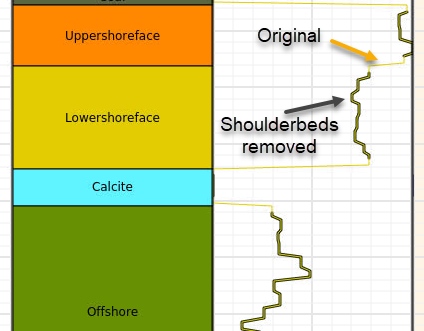
- mask_shoulderbeds(inputlogs, targetlogs, nsamples=2, strict=False)[source]
Mask data around zone boundaries or other discrete log boundaries.
This operates on number of samples, hence the actual distance which is masked depends on the sampling interval (ie. count) or on distance measures. Distance measures are TVD (true vertical depth) or MD (measured depth).
- Parameters:
inputlogs (
list[str]) – List of input logs, must be of discrete type.targetlogs (
list[str]) – List of logs where mask is applied.nsamples (
int|dict[str,float] |None) – Number of samples around boundaries to filter, per side, i.e. value 2 means 2 above and 2 below, in total 4 samples. As alternative specify nsamples indirectly with a relative distance, as a dictionary with one record, as {“tvd”: 0.5} or {“md”: 0.7}.strict (
bool|None) – If True, will raise Exception of any of the input or target log names are missing.
- Return type:
bool- Returns:
- True if any operation has been done. False in case nothing has been done,
e.g. no targetlogs for this particular well and
strictis False.
- Raises:
ValueError – Various messages when wrong or inconsistent input.
Example
>>> mywell1 = Well(well_dir + '/OP_1.w')
>>> mywell2 = Well(well_dir + '/OP_2.w')
>>> did_succeed = mywell1.mask_shoulderbeds(["Zonelog", "Facies"], ["Perm"])
>>> did_succeed = mywell2.mask_shoulderbeds(
...     ["Zonelog"],
...     ["Perm"],
...     nsamples={"tvd": 0.8}
... )
- may_overlap(other)[source]
Consider if well overlap in X Y coordinates with other well, True/False.
- property mdlogname
Returns name of MD log, if any (None if missing).
- Type:
str
- property metadata
Return metadata object instance of type MetaDataRegularSurface.
- property name
Returns or set (rename) a well name.
- property ncol
Returns the Pandas dataframe object number of columns.
- Type:
int
- property nlogs
Returns the Pandas dataframe object number of columns.
- Type:
int
- property nrow
Returns the Pandas dataframe object number of rows.
- Type:
int
- report_zonation_holes(threshold=5)[source]
Reports if well has holes in zonation, less or equal to N samples.
Zonation may have holes due to various reasons, and usually a few undef samples indicates that something is wrong. This method reports well and start interval of the “holes”
The well shall have zonelog from import (via zonelogname attribute) and preferly a MD log (via mdlogname attribute); however if the latter is not present, a report withou MD values will be present.
- Parameters:
threshold (int) – Number of samples (max.) that defines a hole, e.g. 5 means that undef samples in the range [1, 5] (including 5) is applied
- Returns:
A Pandas dataframe as a report. None if no list is made.
- Raises:
RuntimeError if zonelog is not present –
- rescale(delta=0.15, tvdrange=None)[source]
Rescale (refine or coarse) by sampling a delta along the trajectory, in MD.
- Parameters:
delta (float) – Step length
tvdrange (tuple of floats) – Resampling can be limited to TVD interval
Changed in version 2.2: Added tvdrange
- property rkb
Returns RKB height for the well (read only).
- property safewellname
Get well name on syntax safe form; ‘/’ and spaces replaced with ‘_’.
- set_logrecord(lname, newdict)[source]
Sets the record (dict) of a given discrete log.
- Return type:
None
- set_logtype(lname, ltype)[source]
Sets the type of a give log (e.g. DISC or CONT).
- Return type:
None
- set_wlogs(wlogs)[source]
Set a compound dictionary with well log metadata.
This operation is somewhat risky as it may lead to inconsistency, so use with care! Typically, one will use
get_wlogs()first and then modify some attributes.- Parameters:
wlogs (
dict) – Input data dictionary- Raises:
ValueError – Invalid log type found in input:
ValueError – Invalid log record found in input:
ValueError – Invalid input key found:
ValueError – Invalid log record found in input:
- property shortwellname
Well name on a short form where blockname/spaces removed (read only).
This should cope with both North Sea style and Haltenbanken style.
E.g.: ‘31/2-G-5 AH’ -> ‘G-5AH’, ‘6472_11-F-23_AH_T2’ -> ‘F-23AHT2’
- Type:
str
- to_file(wfile, fformat='rms_ascii', compression='lzf')[source]
Export well to file or memory stream.
- Parameters:
wfile (
str|Path|BytesIO) – File name or stream.fformat (
str|None) – File format (‘rms_ascii’/’rmswell’, ‘csv’, ‘hdf/hdf5/h5’).compression (
str|None) – Compression for HDF5 format only. Default is ‘lzf’.
Example:
>>> xwell = Well(well_dir + '/OP_1.w')
>>> dfr = xwell.get_dataframe()
>>> dfr['Poro'] += 0.1
>>> xwell.set_dataframe(dfr)
>>> filename = xwell.to_file(outdir + "/somefile_copy.rmswell")
- to_hdf(wfile, compression='lzf')[source]
Export well to HDF based file.
Deprecated since version 4.19: (approx) Use
to_file()withfformat='hdf5'instead. This method is redundant and will be removed in version 5.0.Warning
This implementation is currently experimental and only recommended for testing.
- Parameters:
wfile (
str|Path) – HDF File name to write to export to.compression (
str|None) – Compression type (default ‘lzf’).
- Return type:
Path- Returns:
A Path instance to actual file applied.
Added in version 2.14.
- to_roxar(project, wname, lognames='all', realisation=0, trajectory='Drilled trajectory', logrun='log', update_option=None)[source]
Export (save/store) a well to a roxar project.
Note this method works only when inside RMS, or when RMS license is activated in terminal.
The current implementation will either update the existing well (then well log array size must not change), or it will make a new well in RMS.
- Parameters:
project (
Any) – Magic string ‘project’ or file path to projectwname (
str) – Name of well, as shown in RMS.lognames (
str|list[str]) – List of lognames to save, or use simply ‘all’ for current logs for this well. Default is ‘all’realisation (
int) – Currently inactivetrajectory (
str) – Name of trajectory in RMS, default is “Drilled trajectory”logrun (
str) – Name of logrun in RMS, default is “log”update_option (str) – None | “overwrite” | “append”. This only applies when the well (wname) exists in RMS, and rules are based on name matching. Default is None which means that all well logs in RMS are emptied and then replaced with the content from xtgeo. The “overwrite” option will replace logs in RMS with logs from xtgeo, and append new if they do not exist in RMS. The “append” option will only append logs if name does not exist in RMS already. Reading only a subset of logs and then use “overwrite” or “append” may speed up execution significantly.
Note
When project is file path (direct access, outside RMS) then
to_roxar()will implicitly do a project save. Otherwise, the project will not be saved until the user do an explicit project save action.Example:
# assume that existing logs in RMS are ["PORO", "PERMH", "GR", "DT", "FAC"]
# read only one existing log (faster)

wll = xtgeo.well_from_roxar(project, "WELL1", lognames=["PORO"])
dfr = wll.get_dataframe()
dfr["PORO"] += 0.2  # add 0.2 to PORO log
wll.set_dataframe(dfr)
wll.create_log("NEW", value=0.333)  # create a new log with constant value

# the "option" is a variable... for output, ``lognames="all"`` is default
if option is None:
    # remove all current logs in RMS; only logs will be PORO and NEW
    wll.to_roxar(project, "WELL1", update_option=option)
elif option == "overwrite":
    # keep all original logs but update PORO and add NEW
    wll.to_roxar(project, "WELL1", update_option=option)
elif option == "append":
    # keep all original logs as they were (incl. PORO) and add NEW
    wll.to_roxar(project, "WELL1", update_option=option)
Note
The keywords
lognamesandupdate_optionwill interactAdded in version 2.12.
Changed in version 2.15: Saving to new wells enabled (earlier only modifying existing)
Changed in version 3.5: Add key
update_option
- property truewellname
Returns well name on the assummed form aka ‘31/2-E-4 AH2’.
- truncate_parallel_path(other, xtol=None, ytol=None, ztol=None, itol=None, atol=None)[source]
Truncate the part of the well trajectory that is ~parallel with other.
- Parameters:
other (Well) – Other well to compare with
xtol (float) – Tolerance in X (East) coord for measuring unit
ytol (float) – Tolerance in Y (North) coord for measuring unit
ztol (float) – Tolerance in Z (TVD) coord for measuring unit
itol (float) – Tolerance in inclination (degrees)
atol (float) – Tolerance in azimuth (degrees)
- property wellname
Returns well name, read only.
- Type:
str
- property wlogrecords
Returns wlogrecords
- property wlogtypes
Returns wlogtypes
- property wname
Returns or set (rename) a well name.
- property xname
Return or set name of X coordinate column.
- property xpos
Returns well header X position (read only).
- property xwellname
See safewellname.
- property yname
Return or set name of Y coordinate column.
- property ypos
Returns well header Y position (read only).
- property zname
Return or set name of Z coordinate column.
- property zonelogname
Returns or sets name of zone log, return None if missing.
- Type:
str
Wells (multiple)
Functions
- xtgeo.wells_from_files(filelist, *args, **kwargs)[source]
Import wells from a list of files (filelist).
- Creates a Wells object from a list of filenames. Remaining arguments are
the same as
xtgeo.well_from_file().
- Parameters:
filelist (list of filenames) – List with file names
Example
Here the from_file method is used to initiate the object directly:
>>> mywells = Wells(
...     [well_dir + '/OP_1.w', well_dir + '/OP_2.w']
... )
- xtgeo.wells_from_stacked_file(wfile, fformat=None)[source]
Import multiple wells from a single concatenated (stacked) file.
This function reads files that contain multiple wells in a single file, as created by
Wells.to_stacked_file().For CSV format, expects a WELLNAME column to identify each well. For RMS ASCII format, reads multiple well entries, each with its own header.
- Parameters:
wfile (
Union[str,Path,StringIO,BytesIO]) – File name or stream.fformat (
str|None) – File format (‘rmswell’ or ‘csv’). If None, auto-detect from file extension or signature.
- Return type:
- Returns:
Wells instance containing all wells from the file.
Example:
>>> wells = xtgeo.wells_from_stacked_file("all_wells.csv", fformat="csv")
>>> wells = xtgeo.wells_from_stacked_file("all_wells.rmswell")
Added in version 4.19: (approximate)
Classes
- class xtgeo.Wells(wells=None)[source]
Bases:
objectClass for a collection of Well objects, for operations that involves a number of wells.
See also the
xtgeo.well.Wellclass.- Parameters:
wells (
list[Well]) – The list of Well objects.
Public Data Attributes:
namesReturns a list of well names (read only).
wellsReturns or sets a list of XTGeo Well objects, None if empty.
Public Methods:
describe([flush])Describe an instance by printing to stdout
copy()Copy a Wells instance to a new unique instance (a deep copy).
get_well(name)Get a Well() instance by name, or None
get_dataframe([filled, fill_value1, fill_value2])Get a big dataframe for all wells or blocked wells in instance, with well name as first column
to_stacked_file(wfile[, fformat])Export multiple wells to a single concatenated (stacked) file.
quickplot([filename, title])Fast plot of wells using matplotlib.
limit_tvd(tvdmin, tvdmax)Limit TVD to be in range tvdmin, tvdmax for all wells
downsample([interval, keeplast])Downsample by sampling every N'th element (coarsen only), all wells.
wellintersections([wfilter, showprogress])Get intersections between wells, return as dataframe table.
- downsample(interval=4, keeplast=True)[source]
Downsample by sampling every N’th element (coarsen only), all wells.
- get_dataframe(filled=False, fill_value1=-999, fill_value2=-9999)[source]
Get a big dataframe for all wells or blocked wells in instance, with well name as first column
- Parameters:
filled (bool) – If True, then NaN’s are replaces with values
fill_value1 (int) – Only applied if filled=True, for logs that have missing values
fill_value2 (int) – Only applied if filled=True, when logs are missing completely for that well.
- property names
Returns a list of well names (read only).
Example:
namelist = wells.names
for prop in namelist:
    print ('Well name is {}'.format(name))
- quickplot(filename=None, title='QuickPlot')[source]
Fast plot of wells using matplotlib.
- Parameters:
filename (str) – Name of plot file; None will plot to screen.
title (str) – Title of plot
- to_stacked_file(wfile, fformat='rms_ascii')[source]
Export multiple wells to a single concatenated (stacked) file.
For CSV format, all wells are combined into a single table with a WELLNAME column to identify each well.
For RMS ASCII format, each well is written sequentially in the standard RMS well format (with its own header and data section).
- Parameters:
wfile (
Union[str,Path,StringIO,BytesIO]) – File name or stream.fformat (
str|None) – File format (‘rms_ascii’/’rmswell’ or ‘csv’). HDF5 format is not supported for multiple wells.
- Return type:
Path|BytesIO|StringIO- Returns:
Path to the file that was written.
Example:
>>> wells = Wells([well1, well2, well3])
>>> wells.to_stacked_file("all_wells.csv", fformat="csv")
>>> wells.to_stacked_file("all_wells.rmswell", fformat="rms_ascii")
Added in version 4.19: (approximate)
- wellintersections(wfilter=None, showprogress=False)[source]
Get intersections between wells, return as dataframe table.
Notes on wfilter: A wfilter is settings to improve result. In particular to remove parts of trajectories that are parallel.
- wfilter = {‘parallel’: {‘xtol’: 4.0, ‘ytol’: 4.0, ‘ztol’:2.0,
‘itol’:10, ‘atol’:2}}
Here xtol is tolerance in X coordinate; further Y tolerance, Z tolerance, (I)nclination tolerance, and (A)zimuth tolerance.
- Parameters:
tvdrange (tuple of floats) – Search interval. One is often just interested in the reservoir section.
wfilter (dict) – A dictionrary for filter options, in order to improve result. See example above.
showprogress (bool) – Will show progress to screen if enabled.
- Returns:
- A Pandas dataframe object, with columns WELL, CWELL and UTMX UTMY
TVD coordinates for CWELL where CWELL crosses WELL, and also MDEPTH for the WELL.
- property wells
Returns or sets a list of XTGeo Well objects, None if empty.
Blocked well (single)
Functions
- xtgeo.blockedwell_from_file(bwfile, fformat=None, mdlogname=None, zonelogname=None, strict=False, lognames='all', lognames_strict=False)[source]
Make an instance of a BlockedWell directly from file import.
- Parameters:
bwfile (str) – Name of file
fformat (str) – File format: rms_ascii, csv, hdf5. If None (default), auto-detect from file extension or file signature.
mdlogname (str) – See
Well.from_file()zonelogname (str) – See
Well.from_file()strict (bool) – See
Well.from_file()lognames – Name or list of lognames to import, default is “all”
lognames_strict – If True, require all logs in lognames to be present
Example:
>>> import xtgeo
>>> well3 = xtgeo.blockedwell_from_file(well_dir + '/OP_1.bw')
- xtgeo.blockedwell_from_roxar(project, gname, bwname, wname, lognames=None, ijk=True, realisation=0)[source]
This makes an instance of a BlockedWell directly from Roxar RMS.
For arguments, see
BlockedWell.from_roxar().Example:
# inside RMS:
import xtgeo
mylogs = ['ZONELOG', 'GR', 'Facies']
mybw = xtgeo.blockedwell_from_roxar(project, 'Simgrid', 'BW', '31_3-1',
                                    lognames=mylogs)
Classes
- class xtgeo.BlockedWell(*args, **kwargs)[source]
Bases:
WellClass for a blocked well in the XTGeo framework, subclassed from the Well class.
Similar to Wells, the blocked well logs are stored as Pandas dataframe, which make manipulation easy and fast.
For blocked well logs, the numbers of rows cannot be changed if you want to save the result in RMS, as this is derived from the grid. Also the blocked well icon must exist before save.
The well trajectory are here represented as logs, and XYZ have magic names as default: X_UTME, Y_UTMN, Z_TVDSS, which are the three first Pandas columns.
Other geometry logs has also ‘semi-magic’ names:
M_MDEPTH or Q_MDEPTH: Measured depth, either real/true (M…) or quasi computed/estimated (Q…). The Quasi computations may be incorrect for all uses, but sufficient for some computations.
Similar for M_INCL, Q_INCL, M_AZI, Q_AZI.
I_INDEX, J_INDEX, K_INDEX: They are grid indices. For practical reasons they are treated as a CONT logs, since the min/max grid indices usually are unknown, and hence making a code index is not trivial.
All Pandas values (yes, discrete also!) are stored as float32 or float64 format, and undefined values are Nan. Integers are stored as Float due to the lacking support for ‘Integer Nan’ (currently lacking in Pandas, but may come in later Pandas versions).
Note there is a method that can return a dataframe (copy) with Integer and Float columns, see
get_filled_dataframe().The instance can be made either from file or:
>>> well1 = xtgeo.blockedwell_from_file(well_dir + '/OP_1.bw') # RMS ascii well
If in RMS, instance can be made also from RMS icon:
well4 = xtgeo.blockedwell_from_roxar(
    project,
    'gridname',
    'bwname',
    'wellname',
)
Public Data Attributes:
gridnameReturns or set (rename) the grid name that the blocked wells belongs to.
Inherited from
WellxnameReturn or set name of X coordinate column.
ynameReturn or set name of Y coordinate column.
znameReturn or set name of Z coordinate column.
metadataReturn metadata object instance of type MetaDataRegularSurface.
rkbReturns RKB height for the well (read only).
xposReturns well header X position (read only).
yposReturns well header Y position (read only).
wellnameReturns well name, read only.
nameReturns or set (rename) a well name.
wnameReturns or set (rename) a well name.
safewellnameGet well name on syntax safe form; '/' and spaces replaced with '_'.
xwellnameSee safewellname.
shortwellnameWell name on a short form where blockname/spaces removed (read only).
truewellnameReturns well name on the assummed form aka '31/2-E-4 AH2'.
mdlognameReturns name of MD log, if any (None if missing).
zonelognameReturns or sets name of zone log, return None if missing.
dataframeReturns or set the Pandas dataframe object for all logs.
nrowReturns the Pandas dataframe object number of rows.
ncolReturns the Pandas dataframe object number of columns.
nlogsReturns the Pandas dataframe object number of columns.
lognames_allReturns dataframe column names as list, including mandatory coords.
lognamesReturns the Pandas dataframe column as list excluding coords.
wlogtypesReturns wlogtypes
wlogrecordsReturns wlogrecords
Public Methods:
to_file(bwfile[, fformat, compression])Export BlockedWell to file.
copy()Copy a Well instance to a new unique Well instance.
to_roxar(project, gridname, bwname, wname[, ...])Set (export) a single blocked well item inside roxar project.
Inherited from
Wellensure_consistency()Ensure consistency for the instance.
get_short_wellname(wellname)Well name on a short name form where blockname and spaces are removed.
describe([flush])Describe an instance by printing to stdout.
to_file(wfile[, fformat, compression])Export well to file or memory stream.
to_hdf(wfile[, compression])Export well to HDF based file.
to_roxar(project, wname[, lognames, ...])Export (save/store) a well to a roxar project.
get_lognames()Get the lognames for all logs.
get_wlogs()Get a compound dictionary with well log metadata.
set_wlogs(wlogs)Set a compound dictionary with well log metadata.
isdiscrete(logname)Return True of log is discrete, otherwise False.
copy()Copy a Well instance to a new unique Well instance.
rename_log(lname, newname)Rename a log, e.g. Poro to PORO.
create_log(lname[, logtype, logrecord, ...])Create a new log with initial values.
copy_log(lname, newname[, force])Copy a log from an existing to a name
delete_log(lname)Delete/remove an existing log, or list of logs.
delete_logs(lname)Delete/remove an existing log, or list of logs.
get_logtype(lname)Returns the type of a given log (e.g. DISC or CONT), None if not present.
set_logtype(lname, ltype)Sets the type of a give log (e.g. DISC or CONT).
get_logrecord(lname)Returns the record (dict) of a given log name, None if not exists.
set_logrecord(lname, newdict)Sets the record (dict) of a given discrete log.
get_logrecord_codename(lname, key)Returns the name entry of a log record, for a given key.
get_dataframe([copy])Get a copy (default) or a view of the dataframe.
get_filled_dataframe([fill_value, ...])Fill the Nan's in the dataframe with real UNDEF values.
set_dataframe(dfr)Set the dataframe.
create_relative_hlen()Make a relative length of a well, as a log.
geometrics()Compute some well geometrical arrays MD, INCL, AZI, as logs.
truncate_parallel_path(other[, xtol, ytol, ...])Truncate the part of the well trajectory that is ~parallel with other.
may_overlap(other)Consider if well overlap in X Y coordinates with other well, True/False.
limit_tvd(tvdmin, tvdmax)Truncate the part of the well that is outside tvdmin, tvdmax.
downsample([interval, keeplast])Downsample by sampling every N'th element (coarsen only).
rescale([delta, tvdrange])Rescale (refine or coarse) by sampling a delta along the trajectory, in MD.
get_polygons([skipname])Return a Polygons object from the well trajectory.
get_fence_polyline([sampling, nextend, ...])Return a fence polyline as a numpy array, a Polygons object or a bool.
create_surf_distance_log(surf[, name])Make a log that is vertical distance to a regular surface.
report_zonation_holes([threshold])Reports if well has holes in zonation, less or equal to N samples.
get_zonation_points([tops, incl_limit, ...])Extract zonation points from Zonelog and make a marker list.
get_zone_interval(zonevalue[, resample, ...])Extract the X Y Z ID line (polyline) segment for a given zonevalue.
get_fraction_per_zone(dlogname, dcodes[, ...])Get fraction of a discrete parameter, e.g. a facies, per zone.
mask_shoulderbeds(inputlogs, targetlogs[, ...])Mask data around zone boundaries or other discrete log boundaries.
get_surface_picks(surf)Return
Pointsobj where well crosses the surface (horizon picks).make_ijk_from_grid(grid[, grid_id, activeonly])Look through a Grid and add grid I J K as discrete logs.
get_cell_intersections(grid[, ...])Compute where this well's trajectory enters and exits each grid cell.
make_zone_qual_log(zqname)Create a zone quality/indicator (flag) log.
get_gridproperties(gridprops[, grid, prop_id])Look through a Grid and add a set of grid properties as logs.
- copy_log(lname, newname, force=True)
Copy a log from an existing to a name
If the new log already exists, it will be silently overwritten, unless the option force=False.
- Parameters:
lname (
str) – name of existing lognewname (
str) – name of new log
- Return type:
bool- Returns:
True if a new log is made (either new or force overwrite an existing) or False if the new log already exists, and
force=False.
Note:
A copy can also be done directly in the dataframe, but with less
consistency checks; hence this method is recommended
- create_log(lname, logtype='CONT', logrecord=None, value=0.0, force=True)
Create a new log with initial values.
If the logname already exists, it will be silently overwritten, unless the option force=False.
- Parameters:
lname (
str) – name of new loglogtype (
str) – Must be ‘CONT’ (default) or ‘DISC’ (discrete)logrecord (
dict|None) – A dictionary of key: values for ‘DISC’ logsvalue (
float) – initial value to setforce (
bool) – If True, and lname exists, it will be overwritten, if False, no new log will be made. Will return False.
- Return type:
bool- Returns:
True ff a new log is made (either new or force overwrite an existing) or False if the new log already exists, and
force=False.
Note:
A new log can also be created by adding it to the dataframe directly, but
with less control over e.g. logrecord
- create_relative_hlen()
Make a relative length of a well, as a log.
The first well og entry defines zero, then the horizontal length is computed relative to that by simple geometric methods.
- create_surf_distance_log(surf, name='DIST_SURF')
Make a log that is vertical distance to a regular surface.
If the trajectory is above the surface (i.e. more shallow), then the distance sign is positive.
- Parameters:
surf (
object) – The RegularSurface instance.name (
str|None) – The name of the new log. If it exists it will be overwritten.
Example:
mywell.rescale()  # optional
thesurf = xtgeo.surface_from_file("some.gri")
mywell.create_surf_distance_log(thesurf, name="sdiff")
- property dataframe
Returns or set the Pandas dataframe object for all logs.
- delete_log(lname)
Delete/remove an existing log, or list of logs.
Will continue silently if a log does not exist.
- Parameters:
lname (
str|list[str]) – A logname or a list of lognames- Return type:
int- Returns:
Number of logs deleted
Note:
A log can also be deleted by simply removing it from the dataframe.
- delete_logs(lname)
Delete/remove an existing log, or list of logs.
Will continue silently if a log does not exist.
- Parameters:
lname (
str|list[str]) – A logname or a list of lognames- Return type:
int- Returns:
Number of logs deleted
Note:
A log can also be deleted by simply removing it from the dataframe.
- describe(flush=True)
Describe an instance by printing to stdout.
- downsample(interval=4, keeplast=True)
Downsample by sampling every N’th element (coarsen only).
- Parameters:
interval (int) – Sampling interval.
keeplast (bool) – If True, the last element from the original dataframe is kept, to avoid that the well is shortened.
- ensure_consistency()
Ensure consistency for the instance.
Added in version 3.5.
- geometrics()
Compute some well geometrical arrays MD, INCL, AZI, as logs.
These are kind of quasi measurements hence the logs will named with a Q in front as Q_MDEPTH, Q_INCL, and Q_AZI.
These logs will be added to the dataframe. If the mdlogname attribute does not exist in advance, it will be set to ‘Q_MDEPTH’.
- Returns:
False if geometrics cannot be computed
- get_cell_intersections(grid, sampling_step=1.0, refine_iters=20, active_only=False, zerobased=False)
Compute where this well’s trajectory enters and exits each grid cell.
Walks the well polyline through the 3D corner-point grid and returns, for every cell the trajectory passes through, the (X, Y, Z) coordinates and Measured Depth (MD) at which the well enters and exits that cell.
The implementation is a hybrid algorithm: an analytic ray-tracing fast path is used for convex (planar-faced) cells, with automatic fallback to a sample-and-bisect scheme on distorted/non-convex cells.
- Parameters:
grid (
Grid) – A XTGeo Grid instance.sampling_step (
float) – Sampling step length used by the bisection fallback, in the same units as the well coordinates. Smaller values give higher accuracy on distorted cells at the cost of speed. The ray-tracing fast path is unaffected by this. Must be > 0.refine_iters (
int) – Maximum number of bisection iterations used by the fallback to localize a cell-boundary crossing.active_only (
bool) – If True, cells with ACTNUM=0 are skipped from the output (the trajectory still travels through them, but they are not reported).zerobased (
bool) – If True, I/J/K indices start from 0. If False (default), they start from 1, consistent with other XTGeo grid methods such asGrid.get_ijk().
- Return type:
DataFrame- Returns:
A
pandas.DataFramewith one row per (cell, traversal), sorted in trajectory order. Columns:I,J,K: cell indices (int). 1-based by default, 0-based ifzerobased=True.ENTRY_EASTING,ENTRY_NORTHING,ENTRY_TVD,ENTRY_MD: where the trajectory enters the cell.EXIT_EASTING,EXIT_NORTHING,EXIT_TVD,EXIT_MD: where it exits.LENGTH_MD:EXIT_MD - ENTRY_MD(in-cell traversal length).
Note
Rows where any of X, Y, Z, or MD is NaN (common for undefined samples in well data) are automatically removed before processing.
- Raises:
ValueError – If the well has no MD log, if
sampling_stepis not positive, or ifrefine_itersis negative. A trajectory with fewer than 2 finite samples returns an empty DataFrame (not an error).
Example:
grid = xtgeo.grid_from_file("mygrid.roff")
well = xtgeo.well_from_file("mywell.rmswell", mdlogname="MD")
df = well.get_cell_intersections(grid, active_only=True)
print(df.head())
- get_dataframe(copy=True)
Get a copy (default) or a view of the dataframe.
- Parameters:
copy (
bool) – If True, return a deep copy. A view (copy=False) will be faster and more memory efficient, but less “safe” for some cases when manipulating dataframes.
Changed in version 3.7: Added copy keyword
- get_fence_polyline(sampling=20.0, nextend=2, tvdmin=None, asnumpy=True)
Return a fence polyline as a numpy array, a Polygons object or a bool.
The result will aim for a regular sampling interval, useful for extracting fence plots (cross-sections).
- Parameters:
sampling (float) – Sampling interval i.e. horizonal distance (input)
nextend (int) – Number if sampling to extend; e.g. 2 * 20
tvdmin (float) – Minimum TVD starting point.
as_numpy (bool) – If True, a numpy array, otherwise a Polygons object with 5 columns where the 2 last are HLEN and POLY_ID and the POLY_ID will be set to 0.
- Return type:
ndarray|Polygons|bool- Returns:
A numpy array of shape (NLEN, 5) in F order, Or a Polygons object with 5 columns If not possible, return False
Changed in version 2.1: improved algorithm
- get_filled_dataframe(fill_value=1e+33, fill_value_int=2000000000)
Fill the Nan’s in the dataframe with real UNDEF values.
This module returns a copy of the dataframe in the object; it does not change the instance.
Note that DISC logs will be casted to columns with integer as datatype.
- Returns:
- A pandas dataframe where Nan er replaces with preset
high XTGeo UNDEF values, or user defined values.
- get_fraction_per_zone(dlogname, dcodes, zonelist=None, incl_limit=80, count_limit=3, zonelogname=None)
Get fraction of a discrete parameter, e.g. a facies, per zone.
It can be constrained by an inclination.
Also, it needs to be evaluated only of ZONE is complete; either INCREASE or DECREASE ; hence a quality flag is made and applied.
- Parameters:
dlogname (str) – Name of discrete log, e.g. ‘FACIES’
dnames (list of int) – Codes of facies (or similar) to report for
zonelist (list of int) – Zones to use
incl_limit (float) – Inclination limit for well path.
count_limit (int) – Minimum number of counts required per segment for valid calculations
zonelogname (str). If None, the Well() – applied
- Returns:
A pandas dataframe (ready for the xyz/Points class), None if a zonelog is missing or or dlogname is missing, list is zero length for any reason.
- get_gridproperties(gridprops, grid=('ICELL', 'JCELL', 'KCELL'), prop_id='_model')
Look through a Grid and add a set of grid properties as logs.
The name of the logs will …
This can be done to sample model properties along a well.
- Parameters:
gridprops (Grid) – A XTGeo GridProperties instance (a collection of properties) or a single GridProperty instance
grid (Grid or tuple) – A XTGeo Grid instance or a reference via tuple. If this is tuple with log names, it states that these logs already contains the gridcell IJK numbering.
prop_id (str) – Add a tag (optional) to the current log name, e.g as PORO_model, where _model is the tag.
- Raises:
None –
Added in version 2.1.
- get_lognames()
Get the lognames for all logs.
- get_logrecord(lname)
Returns the record (dict) of a given log name, None if not exists.
- Return type:
dict[int,str] |Sequence[str] |None
- get_logrecord_codename(lname, key)
Returns the name entry of a log record, for a given key.
Example:
# get the name for zonelog entry no 4:
zname = well.get_logrecord_codename('ZONELOG', 4)
- Return type:
str|None
- get_logtype(lname)
Returns the type of a given log (e.g. DISC or CONT), None if not present.
- Return type:
str|None
- get_polygons(skipname=False)
Return a Polygons object from the well trajectory.
- Parameters:
skipname (bool) – If True then name column is omitted
Added in version 2.1.
Changed in version 2.13: Added skipname key
- static get_short_wellname(wellname)
Well name on a short name form where blockname and spaces are removed.
This should cope with both North Sea style and Haltenbanken style. E.g.: ‘31/2-G-5 AH’ -> ‘G-5AH’, ‘6472_11-F-23_AH_T2’ -> ‘F-23AHT2’
- get_surface_picks(surf)
Return
Pointsobj where well crosses the surface (horizon picks).There may be several points in the Points() dataframe attribute. Also a
DIRECTIONcolumn will show 1 if surface is penetrated from above, and -1 if penetrated from below.- Parameters:
surf (RegularSurface) – The surface instance
- Returns:
A
Pointsinstance, or None if no crossing points
Added in version 2.8.
- get_wlogs()
Get a compound dictionary with well log metadata.
The result will be an dict on the form:
{"X_UTME": ["CONT", None], ... "Facies": ["DISC", {1: "BG", 2: "SAND"}]}- Return type:
dict
- get_zonation_points(tops=True, incl_limit=80, top_prefix='Top', zonelist=None, use_undef=False)
Extract zonation points from Zonelog and make a marker list.
Currently it is either ‘Tops’ or ‘Zone’ (thicknesses); default is tops (i.e. tops=True).
The zonelist can be a list of zones, or a tuple with two members specifying first and last member. Note however that the zonation shall be without jumps and increasing. E.g.:
zonelist=(1, 5)  # meaning [1, 2, 3, 4, 5]
# or
zonelist=[1, 2, 3, 4]
# while _not_ legal:
zonelist=[1, 4, 8]
Zone numbers less than 0 are not accepted
- Parameters:
tops (bool) – If True then compute tops, else (thickness) points.
incl_limit (float) – If given, and usezone is True, the max angle of inclination to be used as input to zonation points.
top_prefix (str) – As well logs usually have isochore (zone) name, this prefix could be Top, e.g. ‘SO43’ –> ‘TopSO43’
zonelist (list of int or tuple) – Zones to use
use_undef (bool) – If True, then transition from UNDEF is also used.
- Returns:
A pandas dataframe (ready for the xyz/Points class), None if a zonelog is missing
- get_zone_interval(zonevalue, resample=1, extralogs=None)
Extract the X Y Z ID line (polyline) segment for a given zonevalue.
- Parameters:
zonevalue (int) – The zone value to extract
resample (int) – If given, downsample every N’th sample to make polylines smaller in terms of bit and bytes. 1 = No downsampling.
extralogs (list of str) – List of extra log names to include
- Returns:
A pandas dataframe X Y Z ID (ready for the xyz/Polygon class), None if a zonelog is missing or actual zone does dot exist in the well.
- property gridname
Returns or set (rename) the grid name that the blocked wells belongs to.
- isdiscrete(logname)
Return True of log is discrete, otherwise False.
- Parameters:
logname (str) – Name of log to check if discrete or not
Added in version 2.2.0.
- limit_tvd(tvdmin, tvdmax)
Truncate the part of the well that is outside tvdmin, tvdmax.
Range will be in tvdmin <= tvd <= tvdmax.
- Parameters:
tvdmin (float) – Minimum TVD
tvdmax (float) – Maximum TVD
- property lognames
Returns the Pandas dataframe column as list excluding coords.
- Type:
list
- property lognames_all
Returns dataframe column names as list, including mandatory coords.
- Type:
list
- make_ijk_from_grid(grid, grid_id='', activeonly=True, **kwargs)
Look through a Grid and add grid I J K as discrete logs.
Note that the the grid counting has base 1 (first row is 1 etc).
By default, log (i.e. column names in the dataframe) will be ICELL, JCELL, KCELL, but you can add a tag (ID) to that name.
- Parameters:
grid (Grid) – A XTGeo Grid instance
grid_id (str) – Add a tag (optional) to the current log name
activeonly (bool) – If True, only active cells are applied (algorithm 2 only)
- Raises:
RuntimeError – ‘Error from C routine, code is …’
Changed in version 2.9: Added keys for and activeonly
- make_zone_qual_log(zqname)
Create a zone quality/indicator (flag) log.
This routine looks through to zone log and flag intervals according to neighbouring zones:
0: Undetermined flag
- 1: Zonelog interval numbering increases,
e.g. for zone 2: 1 1 1 1 2 2 2 2 2 5 5 5 5 5
- 2: Zonelog interval numbering decreases,
e.g. for zone 2: 6 6 6 2 2 2 2 1 1 1
3: Interval is a U turning point, e.g. 0 0 0 2 2 2 1 1 1
4: Interval is a inverse U turning point, 3 3 3 2 2 2 5 5
- 9: Interval is bounded by one or more missing sections,
e.g. 1 1 1 2 2 2 -999 -999
If a log with the name exists, it will be silently replaced
- Parameters:
zqname (str) – Name of quality log
- mask_shoulderbeds(inputlogs, targetlogs, nsamples=2, strict=False)
Mask data around zone boundaries or other discrete log boundaries.
This operates on number of samples, hence the actual distance which is masked depends on the sampling interval (ie. count) or on distance measures. Distance measures are TVD (true vertical depth) or MD (measured depth).
- Parameters:
inputlogs (
list[str]) – List of input logs, must be of discrete type.targetlogs (
list[str]) – List of logs where mask is applied.nsamples (
int|dict[str,float] |None) – Number of samples around boundaries to filter, per side, i.e. value 2 means 2 above and 2 below, in total 4 samples. As alternative specify nsamples indirectly with a relative distance, as a dictionary with one record, as {“tvd”: 0.5} or {“md”: 0.7}.strict (
bool|None) – If True, will raise Exception of any of the input or target log names are missing.
- Return type:
bool- Returns:
- True if any operation has been done. False in case nothing has been done,
e.g. no targetlogs for this particular well and
strictis False.
- Raises:
ValueError – Various messages when wrong or inconsistent input.
Example
>>> mywell1 = Well(well_dir + '/OP_1.w')
>>> mywell2 = Well(well_dir + '/OP_2.w')
>>> did_succeed = mywell1.mask_shoulderbeds(["Zonelog", "Facies"], ["Perm"])
>>> did_succeed = mywell2.mask_shoulderbeds(
...     ["Zonelog"],
...     ["Perm"],
...     nsamples={"tvd": 0.8}
... )
- may_overlap(other)
Consider if well overlap in X Y coordinates with other well, True/False.
- property mdlogname
Returns name of MD log, if any (None if missing).
- Type:
str
- property metadata
Return metadata object instance of type MetaDataRegularSurface.
- property name
Returns or set (rename) a well name.
- property ncol
Returns the Pandas dataframe object number of columns.
- Type:
int
- property nlogs
Returns the Pandas dataframe object number of columns.
- Type:
int
- property nrow
Returns the Pandas dataframe object number of rows.
- Type:
int
- rename_log(lname, newname)
Rename a log, e.g. Poro to PORO.
- report_zonation_holes(threshold=5)
Reports if well has holes in zonation, less or equal to N samples.
Zonation may have holes due to various reasons, and usually a few undef samples indicates that something is wrong. This method reports well and start interval of the “holes”
The well shall have zonelog from import (via zonelogname attribute) and preferly a MD log (via mdlogname attribute); however if the latter is not present, a report withou MD values will be present.
- Parameters:
threshold (int) – Number of samples (max.) that defines a hole, e.g. 5 means that undef samples in the range [1, 5] (including 5) is applied
- Returns:
A Pandas dataframe as a report. None if no list is made.
- Raises:
RuntimeError if zonelog is not present –
- rescale(delta=0.15, tvdrange=None)
Rescale (refine or coarse) by sampling a delta along the trajectory, in MD.
- Parameters:
delta (float) – Step length
tvdrange (tuple of floats) – Resampling can be limited to TVD interval
Changed in version 2.2: Added tvdrange
- property rkb
Returns RKB height for the well (read only).
- property safewellname
Get well name on syntax safe form; ‘/’ and spaces replaced with ‘_’.
- set_dataframe(dfr)
Set the dataframe.
- set_logrecord(lname, newdict)
Sets the record (dict) of a given discrete log.
- Return type:
None
- set_logtype(lname, ltype)
Sets the type of a give log (e.g. DISC or CONT).
- Return type:
None
- set_wlogs(wlogs)
Set a compound dictionary with well log metadata.
This operation is somewhat risky as it may lead to inconsistency, so use with care! Typically, one will use
get_wlogs()first and then modify some attributes.- Parameters:
wlogs (
dict) – Input data dictionary- Raises:
ValueError – Invalid log type found in input:
ValueError – Invalid log record found in input:
ValueError – Invalid input key found:
ValueError – Invalid log record found in input:
- property shortwellname
Well name on a short form where blockname/spaces removed (read only).
This should cope with both North Sea style and Haltenbanken style.
E.g.: ‘31/2-G-5 AH’ -> ‘G-5AH’, ‘6472_11-F-23_AH_T2’ -> ‘F-23AHT2’
- Type:
str
- to_file(bwfile, fformat=None, compression='lzf')[source]
Export BlockedWell to file.
- Parameters:
bwfile – File name or pathlib.Path or stream
fformat – File format (‘rms_ascii’/’rmswell’, ‘csv’, ‘hdf’/’hdf5’/’h5’). If None (default), uses ‘rms_ascii’.
compression (
str|None) – Compression for HDF5 format only. Default is ‘lzf’.
- Returns:
Path to file (or file object if stream was provided)
Example:
>>> mybw = xtgeo.blockedwell_from_file(well_dir + '/OP_1.bw')
>>> mybw.to_file(outdir + '/OP_1_copy.bw')
Changed in version 4.0: Added explicit to_file method for BlockedWell
- to_hdf(wfile, compression='lzf')
Export well to HDF based file.
Deprecated since version 4.19: (approx) Use
to_file()withfformat='hdf5'instead. This method is redundant and will be removed in version 5.0.Warning
This implementation is currently experimental and only recommended for testing.
- Parameters:
wfile (
str|Path) – HDF File name to write to export to.compression (
str|None) – Compression type (default ‘lzf’).
- Return type:
Path- Returns:
A Path instance to actual file applied.
Added in version 2.14.
- to_roxar(project, gridname, bwname, wname, lognames='all', realisation=0, ijk=False)[source]
Set (export) a single blocked well item inside roxar project.
Note this method works only when inside RMS, or when RMS license is activated. RMS will store blocked wells as a Gridmodel feature, not as a well.
Note
When project is file path (direct access, outside RMS) then
to_roxar()will implicitly do a project save. Otherwise, the project will not be saved until the user do an explicit project save action.- Parameters:
project (
Any) – Magic object ‘project’ or file path to projectgridname (
str) – Name of GridModel icon in RMSbwname (
str) – Name of Blocked Well icon in RMS, usually ‘BW’wname (
str) – Name of well, as shown in RMS.lognames (
str|list[str]) – List of lognames to include, or use ‘all’ for all current blocked logs for this well (except index logs). Default is “all”.realisation (
int) – Realisation index (0 is default)ijk (
bool) – If True, then also write special index logs if they exist, such as I_INDEX, J_INDEX, K_INDEX, etc. Default is False
- Return type:
None
- property truewellname
Returns well name on the assummed form aka ‘31/2-E-4 AH2’.
- truncate_parallel_path(other, xtol=None, ytol=None, ztol=None, itol=None, atol=None)
Truncate the part of the well trajectory that is ~parallel with other.
- Parameters:
other (Well) – Other well to compare with
xtol (float) – Tolerance in X (East) coord for measuring unit
ytol (float) – Tolerance in Y (North) coord for measuring unit
ztol (float) – Tolerance in Z (TVD) coord for measuring unit
itol (float) – Tolerance in inclination (degrees)
atol (float) – Tolerance in azimuth (degrees)
- property wellname
Returns well name, read only.
- Type:
str
- property wlogrecords
Returns wlogrecords
- property wlogtypes
Returns wlogtypes
- property wname
Returns or set (rename) a well name.
- property xname
Return or set name of X coordinate column.
- property xpos
Returns well header X position (read only).
- property xwellname
See safewellname.
- property yname
Return or set name of Y coordinate column.
- property ypos
Returns well header Y position (read only).
- property zname
Return or set name of Z coordinate column.
- property zonelogname
Returns or sets name of zone log, return None if missing.
- Type:
str
Blocked wells (multiple)
Functions
- xtgeo.blockedwells_from_files(filelist, fformat='rms_ascii', mdlogname=None, zonelogname=None, strict=True)[source]
Import blocked wells from a list of files (filelist).
- Parameters:
filelist (list of str) – List with file names
fformat (str) – File format, rms_ascii (rms well) is currently supported and default format.
mdlogname (str) – Name of measured depth log, if any
zonelogname (str) – Name of zonation log, if any
strict (bool) – If True, then import will fail if zonelogname or mdlogname are asked for but not present in wells.
Example
Here the from_file method is used to initiate the object directly:
mywells = BlockedWells(['31_2-6.w', '31_2-7.w', '31_2-8.w'])
- xtgeo.blockedwells_from_stacked_file(bwfile, fformat=None, mdlogname=None, zonelogname=None, strict=False)[source]
Import multiple blocked wells from a single concatenated (stacked) file.
This function reads files that contain multiple blocked wells in a single file, as created by
BlockedWells.to_stacked_file().For CSV format, expects a WELLNAME column to identify each blocked well. For RMS ASCII format, reads multiple blocked well entries, each with its own header.
- Parameters:
bwfile (
Union[str,Path,StringIO,BytesIO]) – File name or stream.fformat (
str|None) – File format (‘rms_ascii’/’rmswell’ or ‘csv’). If None, auto-detect from file extension or signature.mdlogname (
str|None) – Name of measured depth log to usezonelogname (
str|None) – Name of zone log to usestrict (
bool) – If True, raise error if mdlogname/zonelogname not found
- Return type:
- Returns:
BlockedWells instance containing all blocked wells from the file.
Example:
>>> bwells = xtgeo.blockedwells_from_stacked_file(
...     "all_bwells.csv", fformat="csv"
... )
>>> bwells = xtgeo.blockedwells_from_stacked_file("all_bwells.rmswell")
Added in version 4.19: (approximate)
- xtgeo.blockedwells_from_roxar(project, gname, bwname, lognames=None, ijk=True)[source]
This makes an instance of a BlockedWells directly from Roxar RMS.
For arguments, see
BlockedWells.from_roxar().Note the difference between classes BlockedWell and BlockedWells.
Example:
# inside RMS:
import xtgeo
mylogs = ['ZONELOG', 'GR', 'Facies']
mybws = xtgeo.blockedwells_from_roxar(project, 'Simgrid', 'BW',
                                    lognames=mylogs)
Classes
- class xtgeo.BlockedWells(wells=None)[source]
Bases:
WellsClass for a collection of BlockedWell objects, for operations that involves a number of wells.
See also the
xtgeo.well.BlockedWellclass.Public Data Attributes:
Inherited from
WellsnamesReturns a list of well names (read only).
wellsReturns or sets a list of XTGeo Well objects, None if empty.
Public Methods:
copy()Copy a BlockedWells instance to a new unique instance.
get_blocked_well(name)Get a BlockedWell() instance by name, or None
to_stacked_file(bwfile[, fformat, compression])Export multiple blocked wells to a single concatenated (stacked) file.
Inherited from
Wellsdescribe([flush])Describe an instance by printing to stdout
copy()Copy a Wells instance to a new unique instance (a deep copy).
get_well(name)Get a Well() instance by name, or None
get_dataframe([filled, fill_value1, fill_value2])Get a big dataframe for all wells or blocked wells in instance, with well name as first column
to_stacked_file(wfile[, fformat])Export multiple wells to a single concatenated (stacked) file.
quickplot([filename, title])Fast plot of wells using matplotlib.
limit_tvd(tvdmin, tvdmax)Limit TVD to be in range tvdmin, tvdmax for all wells
downsample([interval, keeplast])Downsample by sampling every N'th element (coarsen only), all wells.
wellintersections([wfilter, showprogress])Get intersections between wells, return as dataframe table.
- __init__(wells=None)
- describe(flush=True)
Describe an instance by printing to stdout
- downsample(interval=4, keeplast=True)
Downsample by sampling every N’th element (coarsen only), all wells.
- get_dataframe(filled=False, fill_value1=-999, fill_value2=-9999)
Get a big dataframe for all wells or blocked wells in instance, with well name as first column
- Parameters:
filled (bool) – If True, then NaN’s are replaces with values
fill_value1 (int) – Only applied if filled=True, for logs that have missing values
fill_value2 (int) – Only applied if filled=True, when logs are missing completely for that well.
- get_well(name)
Get a Well() instance by name, or None
- limit_tvd(tvdmin, tvdmax)
Limit TVD to be in range tvdmin, tvdmax for all wells
- property names
Returns a list of well names (read only).
Example:
namelist = wells.names
for prop in namelist:
    print ('Well name is {}'.format(name))
- quickplot(filename=None, title='QuickPlot')
Fast plot of wells using matplotlib.
- Parameters:
filename (str) – Name of plot file; None will plot to screen.
title (str) – Title of plot
- to_stacked_file(bwfile, fformat='rms_ascii', compression='lzf')[source]
Export multiple blocked wells to a single concatenated (stacked) file.
For CSV format, all blocked wells are combined into a single table with a WELLNAME column to identify each blocked well.
For RMS ASCII format, each blocked well is written sequentially in the standard RMS well format (with its own header and data section).
- Parameters:
bwfile (
Union[str,Path,StringIO,BytesIO]) – File name or stream.fformat (
str|None) – File format (‘rms_ascii’/’rmswell’ or ‘csv’). Default is ‘rms_ascii’. HDF5 is not supported.compression (
str|None) – Not used, kept for API compatibility.
- Return type:
Path|BytesIO|StringIO- Returns:
Path to the file that was written.
Example:
>>> bwells = BlockedWells([bwell1, bwell2, bwell3])
>>> bwells.to_stacked_file("all_bwells.csv", fformat="csv")
>>> bwells.to_stacked_file("all_bwells.rmswell", fformat="rms_ascii")
Added in version 4.19: (approximate)
- wellintersections(wfilter=None, showprogress=False)
Get intersections between wells, return as dataframe table.
Notes on wfilter: A wfilter is settings to improve result. In particular to remove parts of trajectories that are parallel.
- wfilter = {‘parallel’: {‘xtol’: 4.0, ‘ytol’: 4.0, ‘ztol’:2.0,
‘itol’:10, ‘atol’:2}}
Here xtol is tolerance in X coordinate; further Y tolerance, Z tolerance, (I)nclination tolerance, and (A)zimuth tolerance.
- Parameters:
tvdrange (tuple of floats) – Search interval. One is often just interested in the reservoir section.
wfilter (dict) – A dictionrary for filter options, in order to improve result. See example above.
showprogress (bool) – Will show progress to screen if enabled.
- Returns:
- A Pandas dataframe object, with columns WELL, CWELL and UTMX UTMY
TVD coordinates for CWELL where CWELL crosses WELL, and also MDEPTH for the WELL.
- property wells
Returns or sets a list of XTGeo Well objects, None if empty.