3D grids and properties
Grid
Functions
- xtgeo.grid_from_file(gfile, fformat=None, **kwargs)[source]
Read a grid (cornerpoint) from filelike and an returns a Grid() instance.
- Parameters:
gfile (
Union[str,Path,StringIO,BytesIO,FileWrapper]) – File name to be imported. If fformat=”eclipse_run” then a fileroot name shall be input here, see example below.fformat (
str|None) – File format egrid/roff/grdecl/bgrdecl/eclipserun/xtgcpgeom (None is default and means “guess”)initprops (str list) – Optional, and only applicable for file format “eclipserun”. Provide a list the names of the properties here. A special value “all” can be get all properties found in the INIT file
restartprops (str list) – Optional, see initprops
restartdates (int list) – Optional, required if restartprops
ijkrange (list-like) – Optional, only applicable for hdf files, see
Grid.from_hdf().zerobased (bool) – Optional, only applicable for hdf files, see
Grid.from_hdf().mmap (bool) – Optional, only applicable for xtgf files, see
Grid.from_xtgf().
- Return type:
Example:
>>> import xtgeo
>>> mygrid = xtgeo.grid_from_file(reek_dir + "/REEK.EGRID")
Example using “eclipserun”:
>>> mycase = "REEK"  # meaning REEK.EGRID, REEK.INIT, REEK.UNRST
>>> xg = xtgeo.grid_from_file(
...     reek_dir + "/" + mycase,
...     fformat="eclipserun",
...     initprops="all",
... )
Grid ... filesrc='.../REEK.EGRID'
- Raises:
OSError – if file is not found etc
- xtgeo.grid_from_roxar(project, gname, realisation=0, info=False)[source]
Read a 3D grid inside a RMS project and return a Grid() instance.
- Parameters:
project (
Union[str,Path,Any]) – The RMS project as path or the project variable from inside RMS.gname (
str) – Name of Grid Model in RMS.realisation (
int) – Realisation number.info (
bool) – If true, only grid info
- Return type:
Example:
# inside RMS
import xtgeo
mygrid = xtgeo.grid_from_roxar(project, "REEK_SIM")
- xtgeo.grid_from_resinsight(instance_or_port, case_name, find_last=True)[source]
Load a corner-point grid from a ResInsight case into an XTGeo
Grid.- Parameters:
instance_or_port (
int|Any|None) – Optionalrips.Instanceor gRPC port. UseNoneto auto-discover a running ResInsight instance.case_name (
str) – Name of the ResInsight case to load.find_last (
bool) – If multiple cases have the same name, select the last match. Set toFalseto select the first match instead.
- Return type:
- Returns:
A populated
xtgeo.Grid.
Example:
import xtgeo

grid = xtgeo.grid_from_resinsight(5000, "EXAMPLE")
print(grid.dimensions)
- xtgeo.create_box_grid(dimension, origin=(0.0, 0.0, 0.0), oricenter=False, increment=(1.0, 1.0, 1.0), rotation=0.0, flip=1)[source]
Create a rectangular ‘shoebox’ grid from spec.
- Parameters:
dimension (NamedTuple of int) – A tuple of (NCOL, NROW, NLAY)
origin (tuple of float) – Startpoint of grid (x, y, z)
oricenter (bool) – If False, startpoint is node, if True, use cell center
increment (tuple of float) – Grid increments (xinc, yinc, zinc)
rotation (float) – Rotation in degrees, anticlock from X axis.
flip (int) – If +1, grid origin is lower left and left-handed; if -1, origin is upper left and right-handed (row flip).
- Return type:
- Returns:
Instance is updated (previous instance content will be erased)
Added in version 2.1.
- xtgeo.grid_from_cube(cube, propname='seismics', oricenter=True)[source]
Create a rectangular ‘shoebox’ grid from an existing cube.
The cube values itself will then be stored with name given by
propnamekey.Since the cube actually is node centered, while grids are cell oriented, the geometries here are shifted half an increment as default. To avoid this, use oricenter=False.
- Parameters:
cube (
Cube) – The xtgeo Cube instancepropname (
str|None) – Name of seismic property, if None then only the grid geometry will be madeoricenter (
bool) – Default is True, to treat seismic nodes as cell center values in a grid.
- Return type:
Added in version 3.4.
- xtgeo.grid_from_surfaces(surfaces, ij_dimension=None, ij_origin=None, ij_increment=None, rotation=None, tolerance=None)[source]
Create a simple grid (non-faulted) from a stack of surfaces.
The surfaces shall be sorted from top to base, and they should not cross in depth. In addition, it is required that they have the same settings (origin, rotation, etc).
- Parameters:
surfaces (
Surfaces) – The Surfaces instanceij_dimension (
tuple[int,int] |None) – The dimensions of the grid (ncol, nrow), default is to use the dimension from the surfacesij_origin (
tuple[float,float] |None) – The origin of the grid (x, y)ij_increment (
tuple[float,float] |None) – The increment of the grid (xinc, yinc), default is to use the increment from the surfacesrotation (
float|None) – The rotation of the grid in degrees, default is to use the rotation from the surfacestolerance (
float|None) – The tolerance for sampling the surfaces. In particualar if the grid origin, resolution and rotation are exactly the same as the surfaces, the grid may not be able to sample the surfaces exactly at edges. Lowering the tolerance may be used to avoid this. Default is 1e-6.
- Return type:
Example:
import xtgeo
surf1 = xtgeo.surface_from_file("top.surf")
surf2 = xtgeo.surface_from_file("base.surf")
surfaces = xtgeo.Surfaces([surf1, surf2])

grid = xtgeo.grid_from_surfaces(surfaces, ij_dimension=(20,30),
                                ij_increment=(50, 50), rotation=10)
Classes
- class xtgeo.Grid(coordsv, zcornsv, actnumsv, dualporo=False, dualperm=False, subgrids=None, units=None, filesrc=None, props=None, name=None, roxgrid=None, roxindexer=None)[source]
Bases:
_Grid3DClass for a 3D grid corner point geometry in XTGeo.
I.e. the geometric grid cells and the active cell indicator.
The grid geometry class instances are normally created when importing a grid from file, as it is normally too complex to create from scratch.
- Parameters:
coordsv (
ndarray) – numpy array of dtype float64 and dimensions (nx + 1, ny + 1, 6) Giving the x,y,z values of the upper and lower corners in the grid.zcornsv (
ndarray) – numpy array of dtype float32 and dimensions (nx + 1, ny + 1, nz + 1, 4) giving the sw, se, nw, ne corners along the i,jth corner line for the kth layer.actnumsv (
ndarray) – numpy array of dtype int32 and dimensions (nx, ny, nz) giving the activity number for each cell. 0 means inactive, 1 means active. For dualporo=True/dualperm=True grids, value can also be 2 or 3 meaning rock volume only and pore volume only respectively.dualporo (bool) – True if dual porosity grid.
dualperm (bool) – True if dual permeability grid.
subgrids (
dict|None) – dictionary giving names to subset of layers. Has name as key and list of layer indices as values. Defaults to no names given.units (
Units|None) – The length units the coordinates are in, (either Units.CM, Units.METRES, Units.FEET for cm, metres and feet respectively). Default (None) is unitless.filesrc (
Path|str|None) – Optional filename of grid.props (
GridProperties|None) – GridProperties instance containing the properties of the grid, defaults to empty instance.name (
str|None) – Optional name of the grid.roxgrid (
Any|None) – Roxar Grid the Grid originates from if any, defaults to no such grid.roxindexer (
Any|None) – Roxar grid indexer for the roxgrid. Defaults to no such indexer.
See also
The
GridPropertyand theGridPropertiesclasses.Public Data Attributes:
metadataReturn or set metadata instance of type MetaDataCPGeometry.
filesrcSource for grid (filepath or name in RMS).
nameName attribute of grid.
dimensionsThe grid dimensions (read only).
vectordimensionsThe storage grid array dimensions tuple of 3 integers (read only).
ijk_handednessIJK handedness for grids, "right" or "left".
subgridsA dict with subgrid name and an array as value.
nactiveReturns the number of active cells (read only).
actnum_arrayReturns the 3D ndarray which for active cells.
actnum_indicesnp.ndrarray: Indices (1D array) for active cells (read only).
ntotalReturns the total number of cells (read only).
dualporoBoolean flag for dual porosity scheme (read only).
dualpermBoolean flag for dual porosity scheme (read only).
gridpropsReturn or set a XTGeo GridProperties objects attached to the Grid.
propsReturn or set a list of XTGeo GridProperty objects.
propnamesReturns a list of property names that are hooked to a grid.
roxgridGet the Roxar native proj.grid_models[gname].get_grid() object.
roxindexerThe Roxar native proj.grid_models[gname].get_grid().grid_indexer object.
Inherited from
_Grid3DncolReturns the NCOL (NX or Ncolumns) number of cells.
nrowReturns the NROW (NY or Nrows) number of cells.
nlayReturns the NLAY (NZ or Nlayers) number of cells.
Public Methods:
generate_hash([hashmethod])Return a unique hash ID for current instance (for persistance).
to_file(gfile[, fformat, rle])Export grid geometry to file, various vendor formats.
to_hdf(gfile[, compression, chunks, subformat])Export grid geometry to HDF5 storage format (experimental!).
to_xtgf(gfile[, subformat])Export grid geometry to xtgeo native binary file format (experimental!).
to_roxar(project, gname[, realisation, method])Export (upload) a grid from XTGeo to RMS via Roxar API.
to_resinsight(instance_or_port, gname[, ...])Export this grid as a new corner-point grid in ResInsight.
convert_units(units)Convert the units of the grid.
copy()Copy from one existing Grid instance to a new unique instance.
describe([details, flush])Describe an instance by printing to stdout.
get_bounding_box()Get the bounding box of the grid.
get_dataframe([activeonly, ijk, xyz, ...])Returns a Pandas dataframe for the grid and any attached grid properties.
get_vtk_esg_geometry_data()Get grid geometry data suitable for use with VTK's vtkExplicitStructuredGrid.
get_vtk_geometries()Get necessary arrays on correct layout for VTK ExplicitStructuredGrid usage.
append_prop(prop)Append a single property to the grid.
set_subgrids(sdict)Set the subgrid from a simplified ordered dictionary.
get_subgrids()Get the subgrids on a simplified ordered dictionary.
rename_subgrids(names)Rename the names in the subgrids with the new names.
estimate_design([nsub])Estimate design and simbox thickness of the grid or a subgrid.
estimate_flip()Estimate flip (handedness) of grid returns as 1 or -1.
subgrids_from_zoneprop(zoneprop)Estimate subgrid index from a zone property.
get_zoneprop_from_subgrids()Create a discrete GridProperty encoding subgrid indices as zone values.
get_boundary_polygons([alpha_factor, ...])Extract boundary polygons from the grid cell centers.
get_actnum_indices([order, inverse])Returns the 1D ndarray which holds the indices for active cells.
get_dualactnum_indices([order, fracture])Returns the 1D ndarray which holds the indices for matrix/fracture cases.
get_prop_by_name(name)Gets a property object by name lookup, return None if not present.
get_actnum([name, asmasked, dual])Return an ACTNUM GridProperty object.
set_actnum(actnum)Modify the existing active cell index, ACTNUM.
get_dz([name, flip, asmasked, metric])Return the dZ as GridProperty object.
get_dx([name, asmasked, metric])Return the dX as GridProperty object.
get_dy([name, asmasked, metric])Return the dY as GridProperty object.
get_cell_volume([ijk, activeonly, ...])Return the bulk volume for a given cell.
get_bulk_volume([name, asmasked, precision])Return the geometric cell volume for all cells as a GridProperty object.
get_phase_volumes(water_contact, gas_contact)Return the geometric phase cell volume for all cells as three GridProperty objects, namely gas_bulkvol, oil_bulkvol and water_bulkvol.
get_transmissibilities(permx, permy, permz)Compute TPFA transmissibilities between all cell pairs.
get_heights_above_ffl(ffl[, option])Returns 3 properties: htop, hbot and hmid, primarely for use in Sw models."
get_property_between_surfaces(top, base[, ...])Returns a 3D GridProperty object with <value> between two surfaces."
get_ijk([names, asmasked, zerobased])Returns 3 xtgeo.grid3d.GridProperty objects: I counter, J counter, K counter.
get_ijk_from_points(points[, activeonly, ...])Returns a list/dataframe of cell indices based on a Points() instance.
get_xyz([names, asmasked])Returns 3 xtgeo.grid3d.GridProperty objects for x, y, z coordinates.
get_xyz_cell_corners([ijk, activeonly, ...])Return a 8 * 3 tuple x, y, z for each corner.
get_xyz_corners([names])Returns 8*3 (24) xtgeo.grid3d.GridProperty objects, x, y, z for each corner.
get_layer_slice(layer[, top, activeonly])Get numpy arrays for cell coordinates e.g. for plotting.
get_geometrics([allcells, cellcenter, ...])Get a list of grid geometrics such as origin, min, max, etc.
get_adjacent_cells(prop, val1, val2[, ...])Get a discrete property which reports val1 properties vs neighbouring val2.
get_gridquality_properties()Return a GridProperties() instance with grid quality measures.
activate_all()Activate all cells in the grid, by manipulating ACTNUM.
inactivate_by_dz(threshold)Inactivate cells thinner than a given threshold.
inactivate_inside(poly[, layer_range, ...])Inactivate grid inside a polygon.
inactivate_outside(poly[, layer_range, ...])Inactivate grid outside a polygon.
collapse_inactive_cells([internal])Collapse inactive layers per I J column (~vertically).
crop(colcrop, rowcrop, laycrop[, props])Reduce the grid size by cropping.
reduce_to_one_layer()Reduce the grid to one single layer.
get_onelayer_grid()Return a copy of the grid with only one layer.
translate_coordinates([translate, ...])Translate (move), flip and rotate the 3D grid geometry.
reverse_row_axis([ijk_handedness])Reverse the row axis (J indices).
reverse_column_axis([ijk_handedness])Reverse the column axis (I indices).
make_zconsistent([zsep])Make the 3D grid consistent in Z, by a minimal gap (zsep).
convert_to_hybrid([nhdiv, toplevel, ...])Convert to hybrid grid, either globally or in a selected region.
refine(refine_col, refine_row, refine_layer)Refine grid in all direction, proportionally.
refine_vertically(rfactor[, zoneprop])Refine vertically, proportionally.
conform_to_surfaces(surfaces, layers_per_zone)Conform grid ZCORN to a set of surfaces.
report_zone_mismatch([well, zonelogname, ...])Reports mismatch between wells and a zone.
get_randomline(fencespec, prop[, zmin, ...])Get a sampled randomline from a fence spesification.
- __init__(coordsv, zcornsv, actnumsv, dualporo=False, dualperm=False, subgrids=None, units=None, filesrc=None, props=None, name=None, roxgrid=None, roxindexer=None)[source]
- property actnum_array
Returns the 3D ndarray which for active cells.
Values are 1 for active, 0 for inactive, in C order (read only).
- property actnum_indices
np.ndrarray: Indices (1D array) for active cells (read only).
In dual poro/perm systems, this will be the active indices for the matrix cells and/or fracture cells (i.e. actnum >= 1).
- Type:
obj
- collapse_inactive_cells(internal=True)[source]
Collapse inactive layers per I J column (~vertically).
Seen by I,J column, the inactive cells are collapsed to the first active cell in the column. First transversed from top, then from bottom. If no active cells in the column, the (invisible) Z coordinates are averaged to one common location.
If internal is True (default), then also internal inactive cells (i.e. inactive “hole” surrounded by active cells) are collapsed. In this case the Z coordinates of the adjacent active cells are moved to fill the gap.
The current grid instance will be updated.
- Parameters:
internal (
bool) – If True (default), then the internal collapse is also done.- Return type:
None
Changed in version 4.11: Added
internal option, algorithm is improved
- conform_to_surfaces(surfaces, layers_per_zone, skip_faults=False, tolerance=1e-06)[source]
Conform grid ZCORN to a set of surfaces.
The surfaces define zone boundaries, ordered from top to bottom. The grid’s layer boundary z values (ZCORN) are updated so that zone boundaries match the surfaces, while interior layer boundaries within each zone are redistributed proportionally to the original layer thickness distribution at each corner. COORD (pillar geometry) is unchanged.
The first surface is aligned to the top of the first grid layer, and the last surface to the bottom of the last layer.
Surface sampling is done along the pillar line: the 3D intersection of each pillar with each surface is found via bisection. If a surface cannot be sampled at a pillar position (e.g. the pillar is outside the surface extent), the original ZCORN for that pillar is kept.
- Parameters:
surfaces (
list[RegularSurface]) – List of RegularSurface instances ordered from top to bottom. Number of surfaces must be len(layers_per_zone) + 1.layers_per_zone (
list[int]) – Number of layers in each zone. The sum must equal the grid’s nlay. Each value must be >= 1.skip_faults (
bool) – If True, pillars where corners differ by more than 0.01m at any k-level are left unchanged, preserving original fault geometry. If False (default), the original per-corner offset from the pillar average is preserved at each layer boundary.tolerance (
float) – Tolerance for surface sampling at pillar positions.
- Raises:
ValueError – If input dimensions are inconsistent.
- Return type:
None
Example:
import xtgeo
grid = xtgeo.grid_from_file("my_grid.roff")
surf_top = xtgeo.surface_from_file("top.gri")
surf_mid = xtgeo.surface_from_file("mid.gri")
surf_base = xtgeo.surface_from_file("base.gri")

# 2 zones: 3 layers in zone 1, 5 layers in zone 2
grid.conform_to_surfaces(
    surfaces=[surf_top, surf_mid, surf_base],
    layers_per_zone=[3, 5],
)

# Skip faulted pillars
grid.conform_to_surfaces(
    surfaces=[surf_top, surf_mid, surf_base],
    layers_per_zone=[3, 5],
    skip_faults=True,
)
- convert_to_hybrid(nhdiv=10, toplevel=1000.0, bottomlevel=1100.0, region=None, region_number=None)[source]
Convert to hybrid grid, either globally or in a selected region.
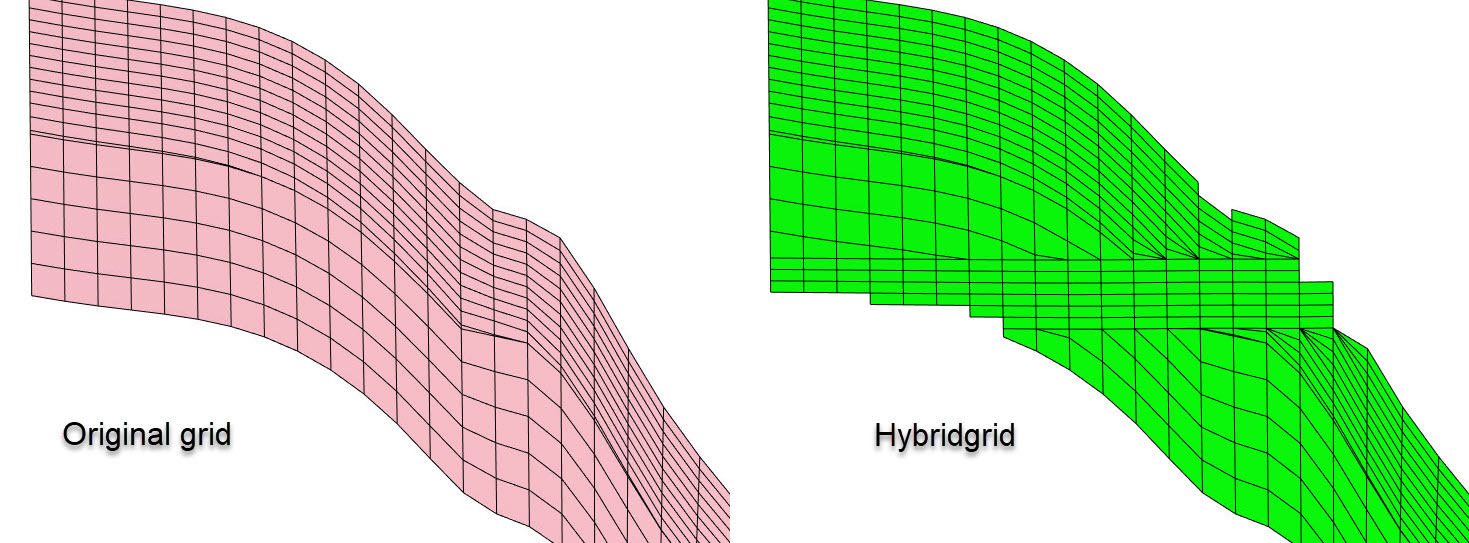
This function will convert the internal structure in the corner point grid, so that the cells between two levels
toplevelandbottomlevelbecome horizontal, which can be useful in flow simulators when e.g. liquid contact movements are dominating. See example on usage in the Troll field.Note that the resulting hybrid will have an increased number of layers. If the initial grid has N layers, and the number of horizontal layers is NHDIV, then the result grid will have N * 2 + NHDIV layers.
- Parameters:
nhdiv (
int) – Number of hybrid layers.toplevel (
float) – Top of hybrid grid.bottomlevel (
float) – Base of hybrid grid.region (
GridProperty|None) – Region property (if needed). Note that the region will only be applied in a lateral sense: i.e. if a column is in the region, then the full column will be converted to hybrid.region_number (
int|None) – Which region to apply hybrid grid in if region.
- Return type:
None
Example
Create a hybridgrid from file, based on a GRDECL file (no region):
import xtgeo
grd = xtgeo.grid_from_file("simgrid.grdecl", fformat="grdecl")
grd.convert_to_hybrid(nhdiv=12, toplevel=2200, bottomlevel=2250)
# save in binary GRDECL fmt:
grd.to_file("simgrid_hybrid.bgrdecl", fformat="bgrdecl")
See also
Make a hybrid grid example.
- convert_units(units)[source]
Convert the units of the grid. :type units:
Units:param units: The unit to convert to.- Raises:
ValueError – When the grid is unitless (no initial unit information available).
- Return type:
None
- copy()[source]
Copy from one existing Grid instance to a new unique instance.
Note that associated properties will also be copied.
Example:
>>> grd = create_box_grid((5,5,5))
>>> newgrd = grd.copy()
- Return type:
- crop(colcrop, rowcrop, laycrop, props=None)[source]
Reduce the grid size by cropping.
The new grid will get new dimensions.
If props is “all” then all properties assosiated (linked) to then grid are also cropped, and the instances are updated.
- Parameters:
colcrop (tuple) – A tuple on the form (i1, i2) where 1 represents start number, and 2 represent end. The range is inclusive for both ends, and the number start index is 1 based.
rowcrop (tuple) – A tuple on the form (j1, j2)
laycrop (tuple) – A tuple on the form (k1, k2)
props (list or str) – None is default, while properties can be listed. If “all”, then all GridProperty objects which are linked to the Grid instance are updated.
- Return type:
None- Returns:
The instance is updated (cropped)
Example:
>>> import xtgeo
>>> mygrid = xtgeo.grid_from_file(reek_dir + "/REEK.EGRID")
>>> mygrid.crop((3, 6), (4, 20), (1, 10))
>>> mygrid.to_file(outdir + "/gf_reduced.roff")
- describe(details=False, flush=True)[source]
Describe an instance by printing to stdout.
- Return type:
str|None
- property dimensions
The grid dimensions (read only).
- Type:
Dimensions NamedTuple
- property dualperm
Boolean flag for dual porosity scheme (read only).
- property dualporo
Boolean flag for dual porosity scheme (read only).
- estimate_design(nsub=None)[source]
Estimate design and simbox thickness of the grid or a subgrid.
If the grid consists of several subgrids, and nsub is not specified, then a failure should be raised.
- Parameters:
nsub (int or str) – Subgrid index to check, either as a number (starting with 1) or as subgrid name. If set to None, the whole grid will examined.
- Returns:
- where key “design” gives one letter in(P, T, B, X, M)
P=proportional, T=topconform, B=baseconform, X=underdetermined, M=Mixed conform. Key “dzsimbox” is simbox thickness estimate per cell. None if nsub is given, but subgrids are missing, or nsub (name or number) is out of range.
- Return type:
result (dict)
Example:
>>> import xtgeo
>>> grd = xtgeo.grid_from_file(emerald_dir + "/emerald_hetero_grid.roff")
>>> print(grd.subgrids)
dict([('subgrid_0', range(1, 17)), ('subgrid_1', range(17, 47))])
>>> res = grd.estimate_design(nsub="subgrid_0")
>>> print("Subgrid design is", res["design"])
Subgrid design is P
>>> print("Subgrid simbox thickness is", res["dzsimbox"])
Subgrid simbox thickness is 2.548...
- estimate_flip()[source]
Estimate flip (handedness) of grid returns as 1 or -1.
The flip numbers are 1 for left-handed and -1 for right-handed. :rtype:
Literal[1,-1]See also
- property filesrc
Source for grid (filepath or name in RMS).
- Type:
str
- generate_hash(hashmethod='md5')[source]
Return a unique hash ID for current instance (for persistance).
See
generic_hash()for documentation. :rtype:strAdded in version 2.14.
- get_actnum(name='ACTNUM', asmasked=False, dual=False)[source]
Return an ACTNUM GridProperty object.
- Parameters:
name (str) – name of property in the XTGeo GridProperty object.
asmasked (bool) – Actnum is returned with all cells shown as default. Use asmasked=True to make 0 entries masked.
dual (bool) – If True, and the grid is a dualporo/perm grid, an extended ACTNUM is applied (numbers 0..3)
- Return type:
Example:
>>> import xtgeo
>>> mygrid = xtgeo.create_box_grid((2,2,2))
>>> act = mygrid.get_actnum()
>>> print("{}% of cells are active".format(act.values.mean() * 100))
100.0% of cells are active
Changed in version 2.6: Added
dualkeyword
- get_actnum_indices(order='C', inverse=False)[source]
Returns the 1D ndarray which holds the indices for active cells.
- Parameters:
order (str) – “Either ‘C’ (default) or ‘F’ order).
inverse (bool) – Default is False, returns indices for inactive cells if True.
- Return type:
ndarray
Changed in version 2.18: Added inverse option
- get_adjacent_cells(prop, val1, val2, activeonly=True)[source]
Get a discrete property which reports val1 properties vs neighbouring val2.
The result will be a new gridproperty, which in general has value 0 but 1 if criteria is met, and 2 if criteria is met but cells are faulted.
- Parameters:
prop (xtgeo.GridProperty) – A discrete grid property, e.g region
val1 (int) – Primary value to evaluate
val2 (int) – Neighbourung value
activeonly (bool) – If True, do not look at inactive cells
- Return type:
Raises: Nothing
- get_boundary_polygons(alpha_factor=1.0, convex=False, simplify=True, filter_array=None)[source]
Extract boundary polygons from the grid cell centers.
A
filter_arraycan be applied to extract boundaries around specific parts of the grid e.g. a region or a zone.The concavity and precision of the boundaries are controlled by the
alpha_factor. A lowalpha_factormakes more precise boundaries, while a larger value makes more rough polygons.Note that the
alpha_factoris a multiplier (default value 1) on top of an auto estimated value, derived from the maximum xinc and yinc from the grid cells. Dependent on the regularity of the grid, tuning of the alpha_factor (up/down) is sometimes necessary to get satisfactory results.- Parameters:
alpha_factor (
float) – An alpha multiplier, which controls the precision of the boundaries. A higher number will produce smoother and less accurate polygons. Not applied if convex is set to True.convex (
bool) – The default is False, which means that a “concave hull” algorithm is used. If convex is True, the alpha factor is overridden to a large number, producing a ‘convex’ shape boundary instead.simplify (
bool|dict[str,Any]) – If True, a simplification is done in order to reduce the number of points in the polygons, where tolerance is 0.1. Another alternative to True is to input a Dict on the form{"tolerance": 2.0, "preserve_topology": True}, cf. thePolygons.simplify()method. For details on e.g. tolerance, see Shapely’s simplify() method.filter_array (
ndarray|None) – An numpy boolean array with equal shape as the grid dimension, used to filter the grid cells and define where to extract boundaries.
- Return type:
- Returns:
A XTGeo Polygons instance
Example:
grid = xtgeo.grid_from_roxar(project, "Simgrid")
# extract polygon for a specific region, here region 3
region = xtgeo.gridproperty_from_roxar(project, "Simgrid", "Regions")
filter_array = (region.values==3)
boundary = grid.get_boundary_polygons(filter_array=filter_array)
See also
The
Polygons.boundary_from_points()class method.
- get_bounding_box()[source]
Get the bounding box of the grid.
- Return type:
tuple[float,float,float,float,float,float]- Returns:
A tuple with the bounding box coordinates (xmin, ymin, zmin, xmax, ymax, zmax).
Example:
>>> import xtgeo
>>> grd = xtgeo.grid_from_file(reek_dir + "/REEK.EGRID", fformat="egrid")
>>> bb = grd.get_bounding_box()
_versionadded:: 4.9
- get_bulk_volume(name='bulkvol', asmasked=True, precision=2)[source]
Return the geometric cell volume for all cells as a GridProperty object.
This method is currently experimental.
A bulk volume of a cornerpoint cell is actually a non-trivial and a non-unique entity. The volume is approximated by dividing the cell (hexahedron) into 6 tetrehedrons; there is however a large number of ways to do this division.
As default (precision=2) an average of two different ways to divide the cell into tetrahedrons is averaged.
- Parameters:
name (str) – name of property, default to “bulkvol”
asmasked (bool) – are masked. Otherwise a numpy array will all bulk for all cells is returned
precision (int) – Not applied!
- Return type:
- Returns:
XTGeo GridProperty object
Added in version 2.13: (as experimental)
- get_cell_volume(ijk=(1, 1, 1), activeonly=True, zerobased=False, precision=2)[source]
Return the bulk volume for a given cell.
This method is currently experimental.
A bulk volume of a cornerpoint cell is actually a non-trivial and a non-unique entity. The volume is approximated by dividing the cell (hexahedron) into 6 tetrehedrons; there is however a large number of ways to do this division.
As default (precision=2) an average of two different ways to divide the cell into tetrahedrons is averaged.
- Parameters:
ijk (tuple) – A tuple of I J K (NB! cell counting starts from 1 unless zerobased is True).
activeonly (bool) – Skip undef cells if True; return None for inactive.
precision (int) – An even number indication precision level,where a higher number means increased precision but also increased computing time. Currently 1, 2, 4 are supported.
- Return type:
float- Returns:
Cell total bulk volume
Example:
>>> import xtgeo
>>> grid = xtgeo.grid_from_file(reek_dir + "/REEK.EGRID")
>>> print(grid.get_cell_volume(ijk=(10,13,2)))
107056...
Added in version 2.13: (as experimental)
- get_dataframe(activeonly=True, ijk=True, xyz=True, doubleformat=False)[source]
Returns a Pandas dataframe for the grid and any attached grid properties.
Note that this dataframe method is rather similar to GridProperties dataframe function, but have other defaults.
- Parameters:
activeonly (bool) – If True (default), return only active cells.
ijk (bool) – If True (default), show cell indices, IX JY KZ columns
xyz (bool) – If True (default), show cell center coordinates.
doubleformat (bool) – If True, floats are 64 bit, otherwise 32 bit. Note that coordinates (if xyz=True) is always 64 bit floats.
- Return type:
DataFrame- Returns:
A Pandas dataframe object
Example:
>>> import xtgeo
>>> grd = xtgeo.grid_from_file(reek_dir + "/REEK.EGRID", fformat="egrid")
>>> names = ["SOIL", "SWAT", "PRESSURE"]
>>> dates = [19991201]
>>> xpr = xtgeo.gridproperties_from_file(
...     reek_dir + "/REEK.UNRST",
...     fformat="unrst",
...     names=names,
...     dates=dates,
...     grid=grd,
... )
>>> grd.gridprops = xpr  # attach properties to grid

>>> df = grd.get_dataframe()

>>> # save as CSV file
>>> df.to_csv(outdir + "/mygrid.csv")
- get_dualactnum_indices(order='C', fracture=False)[source]
Returns the 1D ndarray which holds the indices for matrix/fracture cases.
- Parameters:
order (str) – “Either ‘C’ (default) or ‘F’ order).
fracture (bool) – If True use Fracture properties.
- Return type:
ndarray|None
- get_dx(name='dX', asmasked=True, metric='horizontal')[source]
Return the dX as GridProperty object.
Returns the average length of x direction edges for each cell as a GridProperty. The length is by default horizontal vector length (see the metric parameter).
- Parameters:
name (str) – names of properties
asmasked (bool) – are masked. Otherwise the inactive cells are included, but the numpy array is still a MaskedArray instance.
metric (str) – One of the following metrics: * “euclid”: sqrt(dx^2 + dy^2 + dz^2) * “horizontal”: sqrt(dx^2 + dy^2) * “east west vertical”: sqrt(dy^2 + dz^2) * “north south vertical”: sqrt(dx^2 + dz^2) * “x projection”: dx * “y projection”: dy * “z projection”: dz
- Return type:
- Returns:
XTGeo GridProperty objects containing dx.
- get_dy(name='dY', asmasked=True, metric='horizontal')[source]
Return the dY as GridProperty object.
Returns the average length of y direction edges for each cell as a GridProperty. The length is by default horizontal vector length (see the metric parameter).
- Parameters:
name (str) – names of properties
asmasked (bool) – are masked. Otherwise the inactive cells are included, but the numpy array is still a MaskedArray instance.
metric (str) – One of the following metrics: * “euclid”: sqrt(dx^2 + dy^2 + dz^2) * “horizontal”: sqrt(dx^2 + dy^2) * “east west vertical”: sqrt(dy^2 + dz^2) * “north south vertical”: sqrt(dx^2 + dz^2) * “x projection”: dx * “y projection”: dy * “z projection”: dz
- Return type:
- Returns:
Two XTGeo GridProperty objects (dx, dy).
- get_dz(name='dZ', flip=True, asmasked=True, metric='z projection')[source]
Return the dZ as GridProperty object.
Returns the average length of z direction edges for each cell as a GridProperty. The length is by default the z delta, ie. projected onto the z dimension (see the metric parameter).
- Parameters:
name (str) – name of property
flip (bool) – Use False for Petrel grids were Z is negative down (experimental)
asmasked (bool) – True if only for active cells, False for all cells. With False the inactive cells are included, but the numpy array is still a MaskedArray instance.
metric (str) – One of the following metrics: * “euclid”: sqrt(dx^2 + dy^2 + dz^2) * “horizontal”: sqrt(dx^2 + dy^2) * “east west vertical”: sqrt(dy^2 + dz^2) * “north south vertical”: sqrt(dx^2 + dz^2) * “x projection”: dx * “y projection”: dy * “z projection”: dz
- Return type:
- Returns:
A XTGeo GridProperty object dZ
- get_geometrics(allcells=False, cellcenter=True, return_dict=False, _ver=1)[source]
Get a list of grid geometrics such as origin, min, max, etc.
This returns a tuple: (xori, yori, zori, xmin, xmax, ymin, ymax, zmin, zmax, avg_rotation, avg_dx, avg_dy, avg_dz, grid_regularity_flag)
If a dictionary is returned, the keys are as in the list above.
- Parameters:
allcells (bool) – If True, return also for inactive cells
cellcenter (bool) – If True, use cell center, otherwise corner coords
return_dict (bool) – If True, return a dictionary instead of a list, which is usually more convinient.
_ver (int) – Private option; only for developer!
- Return type:
dict|tuple
Raises: Nothing
Example:
>>> mygrid = grid_from_file(reek_dir + "REEK.EGRID")
>>> gstuff = mygrid.get_geometrics(return_dict=True)
>>> print(f"X min/max is {gstuff['xmin']:.2f} {gstuff['xmax']:.2f}")
X min/max is 456620.79 467106.33
- get_gridquality_properties()[source]
Return a GridProperties() instance with grid quality measures.
These measures are currently: :rtype:
GridPropertiesminangle_topbase (degrees) - minimum angle of top and base
maxangle_topbase (degrees) - maximum angle of top and base
minangle_topbase_proj (degrees) min angle projected (bird view)
maxangle_topbase_proj (degrees) max angle projected (bird view)
minangle_sides (degress) minimum angle, all side surfaces
maxangle_sides (degress) maximum angle, all side surfaces
collapsed (int) Integer, 1 of one or more corners are collapsed in Z
faulted (int) Integer, 1 if cell is faulted (one or more neighbours offset)
negative_thickness (int) Integer, 1 if cell has negative thickness
concave_proj (int) 1 if cell is concave seen from projected bird view
Example:
# store grid quality measures in RMS
gprops = grd.gridquality()
for gprop in gprops:
    gprop.to_roxar(project, "MyGrid", gprop.name)
- get_heights_above_ffl(ffl, option='cell_center_above_ffl')[source]
Returns 3 properties: htop, hbot and hmid, primarely for use in Sw models.”
- Parameters:
ffl (
GridProperty) – Free fluid level e.g. FWL (or level whatever is required; a level from which cells above will be shown as delta heights (positive), while cells below will have 0.0 values.option (
str) – How to compute values, as either “cell_center_above_ffl”, “cell_corners_above_ffl” or “truncated_cell_corners_above_ffl”. The first one looks at cell Z centerlines, and compute the top, the bottom and the midpoint. The second will look at cell corners, using the uppermost corner for top, and the lowermost corner for bottom. The third will truncate all cell corners above ffl and compute cell Z centerlines. In all cases, values are modified if cell is intersected with the provided ffl.
- Return type:
tuple[GridProperty,GridProperty,GridProperty]- Returns:
(htop, hbot, hmid) delta heights, as xtgeo GridProperty objects
Added in version 3.9.
- get_ijk(names=('IX', 'JY', 'KZ'), asmasked=True, zerobased=False)[source]
Returns 3 xtgeo.grid3d.GridProperty objects: I counter, J counter, K counter.
- Parameters:
names (
tuple[str,str,str]) – a 3 x tuple of names per property (default IX, JY, KZ).asmasked (
bool) – If True, UNDEF cells are masked, default is Truezerobased (
bool) – If True, counter start from 0, otherwise 1 (default=1).
- Return type:
tuple[GridProperty,GridProperty,GridProperty]
- get_ijk_from_points(points, activeonly=True, zerobased=False, dataframe=True, includepoints=True, columnnames=('IX', 'JY', 'KZ'), fmt='int', undef=-1)[source]
Returns a list/dataframe of cell indices based on a Points() instance.
If a point is outside the grid, -1 values are returned
- Parameters:
points (Points) – A XTGeo Points instance
activeonly (bool) – If True, UNDEF cells are not included
zerobased (bool) – If True, counter start from 0, otherwise 1 (default=1).
dataframe (bool) – If True result is Pandas dataframe, otherwise a list of tuples
includepoints (bool) – If True, include the input points in result
columnnames (tuple) – Name of columns if dataframe is returned
fmt (str) – Format of IJK arrays (int/float). Default is “int”
undef (int or float) – Value to assign to undefined (outside) entries.
- Raises:
ValueError – If the Points object has no XYZ data available.
- Return type:
DataFrame|list
Added in version 2.6.
Changed in version 2.8: Added keywords columnnames, fmt, undef
- get_layer_slice(layer, top=True, activeonly=True)[source]
Get numpy arrays for cell coordinates e.g. for plotting.
In each cell there are 5 XY pairs, making a closed polygon as illustrated here:
XY3 < XY2 !~~~~~~~! ! ! ^ !~~~~~~~! XY0 -> XY1 XY4
Note that cell ordering is C ordering (row is fastest)
- Parameters:
layer (int) – K layer, starting with 1 as topmost
tip (bool) – If True use top of cell, otherwise use base
activeonly (bool) – If True, only return active cells
- Returns:
[[[X0, Y0], [X1, Y1]…[X4, Y4]], [[..][..]]…] icarray (np): On the form [ic1, ic2, …] where ic is cell count (C order)
- Return type:
layerarray (np)
Example
Return two arrays forr cell corner for bottom layer:
grd = xtgeo.grid_from_file(REEKFILE)

parr, ibarr = grd.get_layer_slice(grd.nlay, top=False)
Added in version 2.3.
- get_phase_volumes(water_contact, gas_contact, boundary=None, asmasked=True, precision=2)[source]
Return the geometric phase cell volume for all cells as three GridProperty objects, namely gas_bulkvol, oil_bulkvol and water_bulkvol.
The volume calculation is constrained to the area within the provided boundary polygon. In case of multiple polygons, only the first polygon will be used.
A bulk volume of a cornerpoint cell is a non-trivial and non-unique quantity. The volume is approximated by dividing the cell (hexahedron) into six tetrahedrons; there are multiple ways to perform this division.
By default (precision=2) an average of two different tetrahedral decompositions is used.
- Parameters:
water_contact (
float|GridProperty) – Water-oil contact, in most cases refers to free water level.gas_contact (
float|GridProperty) – Gas-oil contact, in most cases refers to free gas level.boundary (
Polygons|None) – Boundary area. If multiple polygons are present, only the first polygon is used.asmasked (
bool) – If True, make a numpy.ma array where inactive cells are masked. Otherwise a numpy array with bulk volumes for all cells is returned.precision (int) – An even number indicating precision level, where a higher number increases precision and computing time. Currently 1, 2 and 4 are supported.
- Returns:
gas, oil and water volumes.
- Return type:
Three XTGeo GridProperty objects
Example:
>>> grid = xtgeo.grid_from_file("myGrid.roff")
>>> gas, oil, water = grid.get_phase_volumes(
...     water_contact=1700.0, gas_contact=1650.0
... )
>>> print(f"Total gas volume: {gas.values.sum()}")
- get_prop_by_name(name)[source]
Gets a property object by name lookup, return None if not present.
- Return type:
GridProperty|None
- get_property_between_surfaces(top, base, value=1, name='between_surfaces')[source]
Returns a 3D GridProperty object with <value> between two surfaces.”
- Parameters:
top (
RegularSurface) – The bounding top surface (RegularSurface object)base (
RegularSurface) – The bounding base surface (RegularSurface object)value (
int) – An integer > 0 to assign to cells between surfaces, 1 as defaultname (
str) – Name of the property, default is “between_surfaces”
- Return type:
- Returns:
xtgeo GridProperty object with <value> if cell center is between surfaces, otherwise 0. Note that the property wil be discrete if input value is an integer, otherwise it will be continuous.
Added in version 4.5.
- get_randomline(fencespec, prop, zmin=None, zmax=None, zincrement=1.0, hincrement=None, atleast=5, nextend=2)[source]
Get a sampled randomline from a fence spesification.
This randomline will be a 2D numpy with depth on the vertical axis, and length along as horizontal axis. Undefined values will have the np.nan value.
The input fencespec is either a 2D numpy where each row is X, Y, Z, HLEN, where X, Y are UTM coordinates, Z is depth/time, and HLEN is a length along the fence, or a Polygons instance.
If input fencspec is a numpy 2D, it is important that the HLEN array has a constant increment and ideally a sampling that is less than the Grid resolution. If a Polygons() instance, this will be automated if hincrement is None.
- Parameters:
fencespec (
ndarrayorPolygons) – 2D numpy with X, Y, Z, HLEN as rows or a xtgeo Polygons() object.prop (GridProperty or str) – The grid property object, or name, which shall be plotted.
zmin (float) – Minimum Z (default is Grid Z minima/origin)
zmax (float) – Maximum Z (default is Grid Z maximum)
zincrement (float) – Sampling vertically, default is 1.0
hincrement (float) – Resampling horizontally. This applies only if the fencespec is a Polygons() instance. If None (default), the distance will be deduced automatically.
atleast (int) – Minimum number of horizontal samples This applies only if the fencespec is a Polygons() instance.
nextend (int) – Extend with nextend * hincrement in both ends. This applies only if the fencespec is a Polygons() instance.
- Returns:
(hmin, hmax, vmin, vmax, ndarray2d)
- Return type:
A tuple
- Raises:
ValueError – Input fence is not according to spec.
Example:
mygrid = xtgeo.grid_from_file("somegrid.roff")
poro = xtgeo.gridproperty_from_file("someporo.roff")
mywell = xtgeo.well_from_file("somewell.rmswell")
fence = mywell.get_fence_polyline(sampling=5, tvdmin=1750, asnumpy=True)
(hmin, hmax, vmin, vmax, arr) = mygrid.get_randomline(
     fence, poro, zmin=1750, zmax=1850, zincrement=0.5,
)
# matplotlib ...
plt.imshow(arr, cmap="rainbow", extent=(hmin1, hmax1, vmax1, vmin1))
Added in version 2.1.
See also
- Class
Polygons The method
get_fence()which can be used to pregenerate fencespec
- get_subgrids()[source]
Get the subgrids on a simplified ordered dictionary.
The simplified dictionary is on the form {“name1”: 3, “name2”: 5}
- Return type:
dict[str,int] |None
- get_transmissibilities(permx, permy, permz, ntg=1.0, min_dz_pinchout=0.0001, min_fault_throw=0.01, nnc_table=None, nnc_table_only=False)[source]
Compute TPFA transmissibilities between all cell pairs.
Uses the two-point flux approximation (TPFA) formula:
\[T = \frac{HT_1 \cdot HT_2}{HT_1 + HT_2}, \quad HT_i = \frac{k_i \cdot A}{d_i}\]where A is the shared face area (computed by the Sutherland–Hodgman polygon-clipping algorithm for faulted faces), d is the distance from the cell centre to the face, and k is the effective permeability (
perm * ntgin the horizontal directions;permzalone in the vertical direction).Three types of cell connections are considered:
I-direction: neighbouring cells in the column direction.
J-direction: neighbouring cells in the row direction.
K-direction: neighbouring cells in the layer direction.
Fault NNCs: I/J neighbours whose shared faces only partly overlap (faulted geometry), stored separately in the NNC DataFrame.
Pinch-out NNCs: K-pairs connected across one or more entirely collapsed (zero-thickness) layers.
When nnc_table is supplied the method additionally computes transmissibilities across the boundary of a nested hybrid grid. The table is produced by
fmu.tools.nestedhybridgrid.create_nested_hybrid_grid()and encodes every mother ↔ refined cell pair that should be connected.- Parameters:
permx (
GridProperty|float) – Permeability in the I-direction (grid cells), md, either as aGridPropertyor a scalar float.permy (
GridProperty|float) – Permeability in the J-direction (grid cells), md, either as aGridPropertyor a scalar float.permz (
GridProperty|float) – Permeability in the K-direction (grid cells), md, either as aGridPropertyor a scalar float.ntg (
GridProperty|float|None) – Net-to-gross ratio (0–1). Applied to horizontal transmissibility only. Either aGridPropertyor a scalar float. Defaults to1.0.min_dz_pinchout (
float) – Minimum layer thickness (in grid Z-units) below which a K-layer is treated as a pinch-out and bridged by a K-NNC. Default is1e-4.min_fault_throw (
float) – Minimum vertical displacement (in grid Z-units, same as the grid coordinate system) between the two cell centres of a Fault NNC. Fault NNCs whose throw is smaller than this value are discarded as numerical artefacts. Default is0.0(no filtering). A typical practical value is0.1metres.nnc_table (
DataFrame|None) – Optionalpandas.DataFramewith columnsI1, J1, K1(mother cell, 1-based),I2, J2, K2(refined cell, 1-based), andDIRECTION(face direction from the mother cell’s perspective:I+,I-,J+,J-,K+,K-). This is needed for special cases like so-called nested-hybrid grids, not for the ordinary TPFA calculations. When provided, nested-hybrid NNC transmissibilities are computed for each cell pair and returned in the last two elements of the result tuple.nnc_table_only (
bool) – IfTrue, skip the ordinary TPFA transmissibility calculations (I/J/K neighbour, fault and pinch-out NNCs) and only compute nested-hybrid NNC transmissibilities from nnc_table. In this modetranx,tranyandtranzare returned as zero-valuedGridPropertyobjects (masked where the input permeability is masked) and the regularnncDataFrame is empty. Requires nnc_table to be supplied. Defaults toFalse.
- Return type:
tuple[GridProperty,GridProperty,GridProperty,DataFrame,DataFrame|None,GridProperty|None]- Returns:
A 6-tuple
(tranx, trany, tranz, nnc, nnc_nested_hybrid, refined_boundary_prop):tranx:
GridPropertyof shape(ncol, nrow, nlay)— I-direction transmissibilities in m³·cP/(d·bar) (METRIC grids) or rb·cP/(d·psi) (FIELD grids). The last I-slice (tranx.values[-1, :, :]) is a dummy zero sentinel with no physical meaning. Entries are masked where either neighbour cell is inactive.trany:
GridPropertyof shape(ncol, nrow, nlay)— J-direction transmissibilities (same units). The last J-slice (trany.values[:, -1, :]) is a dummy zero sentinel.tranz:
GridPropertyof shape(ncol, nrow, nlay)— K-direction transmissibilities (same units). The last K-slice (tranz.values[:, :, -1]) is a dummy zero sentinel.nnc:
pandas.DataFramewith columnsI1, J1, K1, I2, J2, K2(1-based cell indices),T(transmissibility), andTYPE("Fault"or"Pinchout").nnc_nested_hybrid:
pandas.DataFramewith columnsI1, J1, K1(mother cell, 1-based),I2, J2, K2(refined cell, 1-based),T(transmissibility),TYPE("NestedHybrid"), andDIRECTION.Nonewhen nnc_table is not supplied.refined_boundary_prop:
GridProperty(discrete, codes{0: "none", 1: "refined_boundary"}) marking the refined cells that appear as cell 2 in at least one nested-hybrid NNC.Nonewhen nnc_table is not supplied.
Example:
>>> grid = xtgeo.grid_from_file("myGrid.roff")
>>> permx = xtgeo.gridproperty_from_file("permx.roff", grid=grid)
>>> permy = xtgeo.gridproperty_from_file("permy.roff", grid=grid)
>>> permz = xtgeo.gridproperty_from_file("permz.roff", grid=grid)
>>> ntg = xtgeo.gridproperty_from_file("ntg.roff", grid=grid)
>>> tranx, trany, tranz, nnc, _, _ = grid.get_transmissibilities(
...     permx, permy, permz, ntg=ntg
... )
>>> print(f"Max TRANX: {tranx.values.max():.4f}")
Nested hybrid example:
>>> from fmu.tools import create_nested_hybrid_grid
>>> merged, nnc_tbl = create_nested_hybrid_grid(
...     grid, region, target_region_id=2, refinement=(3, 3, 3)
... )
>>> tranx, trany, tranz, nnc, nnc_nh, rbnd = (
...     merged.get_transmissibilities(
...         permx, permy, permz, ntg=ntg, nnc_table=nnc_tbl
...     )
... )
>>> print(f"NNCs found: {len(nnc_nh)}")
- get_vtk_esg_geometry_data()[source]
Get grid geometry data suitable for use with VTK’s vtkExplicitStructuredGrid.
Builds and returns grid geometry data in a format tailored for use with VTK’s explicit structured grid (ESG). Essentially this entails building an unstructured grid representation where all the grid cells are represented as hexahedrons with explicit connectivities. The cell connectivity array refers into the accompanying vertex array.
In VTK, cell order increases in I fastest, then J, then K.
- Return type:
tuple[ndarray,ndarray,ndarray,ndarray]
- The returned tuple contains:
numpy array with dimensions in terms of points (not cells)
vertex array, numpy array with vertex coordinates
connectivity array for all the cells, numpy array with integer indices
inactive cell indices, numpy array with integer indices
This function also tries to remove/weld duplicate vertices, but this is still a work in progress.
Example usage with VTK:
dims, vert_arr, conn_arr, inact_arr = xtg_grid.get_vtk_esg_geometry_data()

vert_arr = vert_arr.reshape(-1, 3)
vtk_points = vtkPoints()
vtk_points.SetData(numpy_to_vtk(vert_arr, deep=1))

vtk_cell_array = vtkCellArray()
vtk_cell_array.SetData(8, numpy_to_vtkIdTypeArray(conn_arr, deep=1))

vtk_esgrid = vtkExplicitStructuredGrid()
vtk_esgrid.SetDimensions(dims)
vtk_esgrid.SetPoints(vtk_points)
vtk_esgrid.SetCells(vtk_cell_array)

vtk_esgrid.ComputeFacesConnectivityFlagsArray()

ghost_arr_vtk = vtk_esgrid.AllocateCellGhostArray()
ghost_arr_np = vtk_to_numpy(ghost_arr_vtk)
ghost_arr_np[inact_arr] = vtkDataSetAttributes.HIDDENCELL
Added in version 2.20.
- get_vtk_geometries()[source]
Get necessary arrays on correct layout for VTK ExplicitStructuredGrid usage.
Example:
import pyvista as pv
dim, crn, inactind = grd.get_vtk_geometries()
grid = pv.ExplicitStructuredGrid(dim, crn)
grid.flip_z(inplace=True)
grid.hide_cells(inactind, inplace=True)
grid.plot(show_edges=True)
- Return type:
tuple[ndarray,ndarray,ndarray]- Returns:
dims, corners, inactive_indices
Added in version 2.18.
- get_xyz(names=('X_UTME', 'Y_UTMN', 'Z_TVDSS'), asmasked=True)[source]
Returns 3 xtgeo.grid3d.GridProperty objects for x, y, z coordinates.
The values are mid cell values. Note that ACTNUM is ignored, so these is also extracted for UNDEF cells (which may have weird coordinates). However, the option asmasked=True will mask the numpies for undef cells.
- Parameters:
names (
tuple[str,str,str]) – a 3 x tuple of names per property (default is X_UTME,Y_UTMN
Z_TVDSS).
asmasked (
bool) – If True, then inactive cells is masked (numpy.ma).
- Return type:
tuple[GridProperty,GridProperty,GridProperty]
- get_xyz_cell_corners(ijk=(1, 1, 1), activeonly=True, zerobased=False)[source]
Return a 8 * 3 tuple x, y, z for each corner.
2       3
!~~~~~~~!
!  top  !
!~~~~~~~!    Listing corners with Python index (0 base)
0       1

6       7
!~~~~~~~!
!  base !
!~~~~~~~!
4       5
- Parameters:
ijk (tuple) – A tuple of I J K (NB! cell counting starts from 1 unless zerobased is True)
activeonly (bool) – Skip undef cells if set to True.
- Return type:
tuple[int,...]- Returns:
- A tuple with 24 elements (x1, y1, z1, … x8, y8, z8)
for 8 corners. None if cell is inactive and activeonly=True.
Example:
>>> grid = grid_from_file(reek_dir + "REEK.EGRID")
>>> print(grid.get_xyz_cell_corners(ijk=(10,13,2)))
(458704.10..., 1716.969970703125)
- Raises:
RuntimeWarning if spesification is invalid. –
- get_xyz_corners(names=('X_UTME', 'Y_UTMN', 'Z_TVDSS'))[source]
Returns 8*3 (24) xtgeo.grid3d.GridProperty objects, x, y, z for each corner.
The values are cell corner values. Note that ACTNUM is ignored, so these is also extracted for UNDEF cells (which may have weird coordinates).
2       3
!~~~~~~~!
!  top  !
!~~~~~~~!    Listing corners with Python index (0 base)
0       1

6       7
!~~~~~~~!
!  base !
!~~~~~~~!
4       5
- Parameters:
names (list) – Generic name of the properties, will have a number added, e.g. X0, X1, etc.
- Return type:
tuple[GridProperty,...]
Example:
>>> import xtgeo
>>> grid = xtgeo.create_box_grid((2,2,2))
>>> gps = grid.get_xyz_corners() # list of 24 grid properties
>>> len(gps)
24
>>> gps[0].values.tolist()
[[[0.0, 0.0], ... [[1.0, 1.0], [1.0, 1.0]]]
- Raises:
RunetimeError if corners has wrong spesification –
- get_zoneprop_from_subgrids()[source]
Create a discrete GridProperty encoding subgrid indices as zone values.
The returned GridProperty is automatically appended to the grid’s property list and has its geometry linked to the grid, ensuring proper handling of inactive cells.
- Return type:
GridProperty|None- Returns:
A GridProperty where each layer belonging to a subgrid is assigned a unique integer zone index (starting from 1). The property codes map these indices to subgrid names. Returns None if no subgrids are defined.
- property gridprops
Return or set a XTGeo GridProperties objects attached to the Grid.
- property ijk_handedness
IJK handedness for grids, “right” or “left”.
For a non-rotated grid with K increasing with depth, ‘left’ is corner in lower-left, while ‘right’ is origin in upper-left corner.
- Type:
str
- inactivate_by_dz(threshold)[source]
Inactivate cells thinner than a given threshold.
- Return type:
None
- inactivate_inside(poly, layer_range=None, inside=True, force_close=False)[source]
Inactivate grid inside a polygon.
The Polygons instance may consist of several polygons. If a polygon is open, then the flag force_close will close any that are not open when doing the operations in the grid.
- Parameters:
poly (Polygons) – A polygons object
layer_range (tuple) – A tuple of two ints, upper layer = 1, e.g. (1, 14). Note that base layer count is 1 (not zero)
inside (bool) – True if remove inside polygon
force_close (bool) – If True then force polygons to be closed.
- Raises:
RuntimeError – If a problems with one or more polygons.
ValueError – If Polygon is not a XTGeo object
- Return type:
None
- inactivate_outside(poly, layer_range=None, force_close=False)[source]
Inactivate grid outside a polygon.
- Return type:
None
- make_zconsistent(zsep=1e-05)[source]
Make the 3D grid consistent in Z, by a minimal gap (zsep).
- Parameters:
zsep (float) – Minimum gap
- Return type:
None
- property metadata
Return or set metadata instance of type MetaDataCPGeometry.
- Type:
obj
- property nactive
Returns the number of active cells (read only).
- Type:
int
- property name
Name attribute of grid.
- Type:
str
- property ncol
Returns the NCOL (NX or Ncolumns) number of cells.
- property nlay
Returns the NLAY (NZ or Nlayers) number of cells.
- property nrow
Returns the NROW (NY or Nrows) number of cells.
- property ntotal
Returns the total number of cells (read only).
- property propnames
Returns a list of property names that are hooked to a grid.
- property props
Return or set a list of XTGeo GridProperty objects.
When setting, the dimension of the property object is checked, and will raise an IndexError if it does not match the grid.
When setting props, the current property list is replaced.
See also
append_prop()method to add a property to the current list.
- reduce_to_one_layer()[source]
Reduce the grid to one single layer.
Example:
>>> import xtgeo
>>> grid = xtgeo.grid_from_file(reek_dir + "/REEK.EGRID")
>>> grid.nlay
14
>>> grid.reduce_to_one_layer()
>>> grid.nlay
1
- Return type:
None
- refine(refine_col, refine_row, refine_layer, zoneprop=None)[source]
Refine grid in all direction, proportionally.
The refine_layer can be a scalar or a dictionary.
If refine_layer is a dict and zoneprop is None, then the current subgrids array is used. If zoneprop is defined, the current subgrid index will be redefined for the case. A warning will be issued if subgrids are defined, but the give zone property is inconsistent with this.
Also, if a zoneprop is defined but no current subgrids in the grid, then subgrids will be added to the grid, if more than 1 subgrid.
- Parameters:
self (object) – A grid XTGeo object
refine_col (scalar or dict) – Refinement factor for each column.
refine_row (scalar or dict) – Refinement factor for each row.
refine_layer (scalar or dict) – Refinement factor for layer, if dict, then the dictionary must be consistent with self.subgrids if this is present.
zoneprop (GridProperty) – Zone property; must be defined if refine_layer is a dict
- Returns:
if.. RuntimeError: if mismatch in dimensions for refine_layer and zoneprop
- Return type:
ValueError
Note
Maximum refinement value for e.g.
refine_layeris 65535 per zone.
- refine_vertically(rfactor, zoneprop=None)[source]
Refine vertically, proportionally.
The rfactor can be a scalar or a dictionary.
If rfactor is a dict and zoneprop is None, then the current subgrids array is used. If zoneprop is defined, the current subgrid index will be redefined for the case. A warning will be issued if subgrids are defined, but the give zone property is inconsistent with this.
Also, if a zoneprop is defined but no current subgrids in the grid, then subgrids will be added to the grid, if more than 1 subgrid.
- Parameters:
self (object) – A grid XTGeo object
rfactor (scalar or dict) – Refinement factor, if dict, then the dictionary must be consistent with self.subgrids if this is present.
zoneprop (GridProperty) – Zone property; must be defined if rfactor is a dict
- Returns:
if.. RuntimeError: if mismatch in dimensions for rfactor and zoneprop
- Return type:
ValueError
Examples:
# refine vertically all by factor 3

grd.refine_vertically(3)

# refine by using a dictionary; note that subgrids must exist!
# and that subgrids that are not mentioned will have value 1
# in refinement (1 is meaning no refinement)

grd.refine_vertically({1: 3, 2: 4, 4: 1})

# refine by using a a dictionary and a zonelog. If subgrids exists
# but are inconsistent with the zonelog; the current subgrids will
# be redefined, and a warning will be issued! Note also that ranges
# in the dictionary rfactor and the zone property must be aligned.

grd.refine_vertically({1: 3, 2: 4, 4: 0}, zoneprop=myzone)
Note
Maximum value for
rfactoris 65535, per zone.
- rename_subgrids(names)[source]
Rename the names in the subgrids with the new names.
- Parameters:
names (list) – List of new names, length of list must be same as length of subgrids
- Return type:
None
Example:
>>> grd = create_box_grid((3, 3, 3))
>>> grd.subgrids = dict(
...     [("1", range(1,2)), ("2", range(2,3)), ("3", range(3,4))]
... )
>>> grd.rename_subgrids(["Inky", "Tinky", "Pinky"])
- Raises:
ValueError – Input names not a list or a tuple
ValueError – Lenght of names list not same as number of subgrids
Added in version 2.12.
- report_zone_mismatch(well=None, zonelogname='ZONELOG', zoneprop=None, zonelogrange=(0, 9999), zonelogshift=0, depthrange=None, perflogname=None, perflogrange=(1, 9999), filterlogname=None, filterlogrange=(1e-32, 9999.0), resultformat=1)[source]
Reports mismatch between wells and a zone.
- Approaches on matching:
Use the well zonelog as basis, and compare sampled zone with that interval. This means that zone cells outside well range will not be counted
Compare intervals with wellzonation in range or grid zonations in range. This gives a wider comparison, and will capture cases where grid zonations is outside well zonation
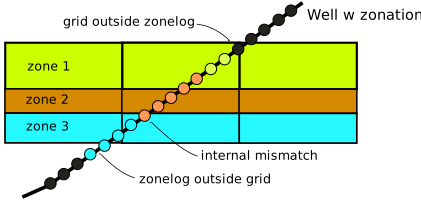
Note if zonelogname and/or filterlogname and/or perflogname is given, and such log(s) are not present, then this function will return
None.- Parameters:
well (Well) – a XTGeo well object
zonelogname (str) – Name of the zone logger
zoneprop (GridProperty) – Grid property instance to use for zonation
zonelogrange (tuple) – zone log range, from - to (inclusive)
zonelogshift (int) – Deviation (numerical shift) between grid and zonelog, e.g. if Zone property starts with 1 and this corresponds to a zonelog index of 3 in the well, the shift shall be -2.
depthrange (tuple) – Interval for search in TVD depth, to speed up
perflogname (str) – Name of perforation log to filter on (> 0 default).
perflogrange (tuple) – Range of values where perforations are present.
filterlogname (str) – General filter, work as perflog, filter on values > 0
filterlogrange (tuple) – Range of values where filter shall be present.
resultformat (int) – If 1, consider the zonelogrange in the well as basis for match ratio, return (percent, match count, total count). If 2 then a dictionary is returned with various result members
- Returns:
- report dependent on resultformat
- A tuple with 3 members:
(match_as_percent, number of matches, total count) approach 1
- A dictionary with keys:
MATCH1 - match as percent, approach 1
MCOUNT1 - number of match samples approach 1
TCOUNT1 - total number of samples approach 1
MATCH2 - match as percent, approach 2
MCOUNT2 - a.a for option 2
TCOUNT2 - a.a. for option 2
WELLINTV - a Well() instance for the actual interval
None, if perflogname or zonelogname of filtername is given, but the log does not exists for the well
- Return type:
res (tuple or dict)
Example:
g1 = xtgeo.grid_from_file("gullfaks2.roff")

z = xtgeo.gridproperty_from_file(gullfaks2_zone.roff", name="Zone")

w2 = xtgeo.well_from_file("34_10-1.w", zonelogname="Zonelog")

w3 = xtgeo.well_from_file("34_10-B-21_B.w", zonelogname="Zonelog"))

wells = [w2, w3]

for w in wells:
    response = g1.report_zone_mismatch(
        well=w, zonelogname="ZONELOG", zoneprop=z,
        zonelogrange=(0, 19), depthrange=(1700, 9999))

    print(response)
Changed in version 2.8: Added several new keys and better precision in result
Changed in version 2.11: Added
perflograngeandfilterlogrange
- reverse_column_axis(ijk_handedness=None)[source]
Reverse the column axis (I indices).
This means that IJK system will switched between a left vs right handed system. It is here (by using ijk_handedness key), possible to set a wanted handedness.
Note that properties that are assosiated with the grid (through the
gridpropsorpropsattribute) will also be reversed (which is desirable).- Parameters:
ijk_handedness (str) – If set to “right” or “left”, do only reverse columns if handedness is not already achieved.
- Return type:
None
Example:
grd = xtgeo.grid_from_file("somefile.roff")
prop1 = xtgeo.gridproperty_from_file("somepropfile1.roff")
prop2 = xtgeo.gridproperty_from_file("somepropfile2.roff")

grd.props = [prop1, prop2]

# secure that the grid geometry is IJK right-handed
grd.reverse_column_axis(ijk_handedness="right")
Added in version 4.14.
- reverse_row_axis(ijk_handedness=None)[source]
Reverse the row axis (J indices).
This means that IJK system will switched between a left vs right handed system. It is here (by using ijk_handedness key), possible to set a wanted handedness.
Note that properties that are assosiated with the grid (through the
gridpropsorpropsattribute) will also be reversed (which is desirable).- Parameters:
ijk_handedness (str) – If set to “right” or “left”, do only reverse rows if handedness is not already achieved.
- Return type:
None
Example:
grd = xtgeo.grid_from_file("somefile.roff")
prop1 = xtgeo.gridproperty_from_file("somepropfile1.roff")
prop2 = xtgeo.gridproperty_from_file("somepropfile2.roff")

grd.props = [prop1, prop2]

# secure that the grid geometry is IJK right-handed
grd.reverse_row_axis(ijk_handedness="right")
Added in version 2.5.
- property roxgrid
Get the Roxar native proj.grid_models[gname].get_grid() object.
- property roxindexer
The Roxar native proj.grid_models[gname].get_grid().grid_indexer object.
- set_actnum(actnum)[source]
Modify the existing active cell index, ACTNUM.
- Parameters:
actnum (GridProperty) – a gridproperty instance with 1 for active cells, 0 for inactive cells
- Return type:
None
- Example::
>>> mygrid = create_box_grid((5,5,5))
>>> act = mygrid.get_actnum()
>>> act.values[:, :, :] = 1
>>> act.values[:, :, 4] = 0
>>> mygrid.set_actnum(act)
- set_subgrids(sdict)[source]
Set the subgrid from a simplified ordered dictionary.
The simplified dictionary is on the form {“name1”: 3, “name2”: 5}
Note that the input must be an dict!
- Return type:
None
- property subgrids
A dict with subgrid name and an array as value.
I.e. a dict on the form
{"name1": [1, 2, 3, 4], "name2": [5, 6, 7],
"name3": [8, 9, 10]}
, here meaning 3 subgrids where upper is 4 cells vertically, then 3, then 3. The numbers must sum to NLAY.The numbering in the arrays are 1 based; meaning uppermost layer is 1 (not 0).
None will be returned if no subgrid indexing is present.
See also
set_subgrids()andget_subgrids()which have a similar function, but differs a bit.Note that this design is a bit different from the Roxar API, where repeated sections are allowed, and where indices start from 0, not one.
- Type:
listofint
- subgrids_from_zoneprop(zoneprop)[source]
Estimate subgrid index from a zone property.
The new will estimate which will replace the current if any.
- Parameters:
zoneprop (GridProperty) – a XTGeo GridProperty instance.
- Return type:
dict[str,int] |None- Returns:
- Will also return simplified dictionary is on the form
{“name1”: 3, “name2”: 5}
- to_file(gfile, fformat='roff', rle=False)[source]
Export grid geometry to file, various vendor formats.
- Parameters:
gfile (str) – Name of output file
fformat (str) – File format; roff/roff_binary/roff_ascii/ grdecl/bgrdecl/egrid.
rle (bool) – Use run-length encoding (only for grdecl file)
- Raises:
OSError – Directory does not exist
- Return type:
None
- Example::
>>> grid = create_box_grid((2,2,2))
>>> grid.to_file(outdir + "/myfile.roff")
- to_hdf(gfile, compression=None, chunks=False, subformat=844)[source]
Export grid geometry to HDF5 storage format (experimental!).
- Parameters:
gfile (
str|Path) – Name of output filecompression (
str|None) – Compression method, such as “blosc” or “lzf”chunks (
bool|None) – chunks settingssubformat (
int|None) – Format of output arrays in terms of bytes. E.g. 844 means 8 byte for COORD, 4 byte for ZCORNS, 4 byte for ACTNUM.
- Raises:
OSError – Directory does not exist
- Return type:
Union[str,Path,StringIO,BytesIO]- Returns:
Used file object, or None if memory stream
Example
>>> grid = create_box_grid((2,2,2))
>>> filename = grid.to_hdf(outdir + "/myfile_grid.h5")
- to_resinsight(instance_or_port, gname, find_last=True)[source]
Export this grid as a new corner-point grid in ResInsight.
The case named
gnamewill be created if it does not already exist, or an existing case with that name will be replaced.- Parameters:
instance_or_port (
int|Any|None) – Optionalrips.Instanceor gRPC port. UseNoneto auto-discover a running ResInsight instance.gname (
str) – Name of the ResInsight case to create or replace.find_last (
bool) – Controls which existing case to replace when multiple cases share the samegname. IfTrue(default), the last matching case is replaced; ifFalse, the first matching case is replaced.
- Return type:
None
- to_roxar(project, gname, realisation=0, method='cpg')[source]
Export (upload) a grid from XTGeo to RMS via Roxar API.
Note
When project is file path (direct access, outside RMS) then
to_roxar()will implicitly do a project save. Otherwise, the project will not be saved until the user do an explicit project save action.- Parameters:
project (
Union[str,Path,Any]) – Inside RMS use the magic ‘project’, else use path to RMS project, or a project referencegname (
str) – Name of grid in RMSrealisation (
int) – Realisation number, default 0method (
Literal['cpg','roff']) – Save approach, the default is ‘cpg’ which applies the internal RMS API, while ‘roff’ will do a save to a temporary area, and then load into RMS. For strange reasons, the ‘roff’ method is per RMS version 14.2 a faster method (strange since file i/o is way more costly than direct API access, in theory).
- Return type:
None
Note
When storing grids that needs manipulation of inactive cells, .e.g.
activate_all()method, using method=’roff’ is recommended. The reason is that saving cells using the ‘cpg’ method will force zero depth values in inactive cells.
- to_xtgf(gfile, subformat=844)[source]
Export grid geometry to xtgeo native binary file format (experimental!).
- Parameters:
gfile (
str|Path) – Name of output filesubformat (
int|None) – Format of output arryas in terms of bytes. E.g. 844 means 8 byte for COORD, 4 byte for ZCORNS, 4 byte for ACTNUM.
- Raises:
OSError – Directory does not exist
- Returns:
- Used pathlib.Path file object, or None if
memory stream
- Return type:
gfile (pathlib.Path)
- Example::
>>> grid = create_box_grid((2,2,2))
>>> filename = grid.to_xtgf(outdir + "/myfile.xtg")
- translate_coordinates(translate=(0.0, 0.0, 0.0), target_coordinates=None, flip=(1, 1, 1), add_rotation=0.0, rotation_point=None)[source]
Translate (move), flip and rotate the 3D grid geometry.
By ‘flip’ here, it means that the full coordinate arrays are inverted.
- Parameters:
translate (
tuple[float,float,float]) – Translation distance in X, Y, Z coordinates; these values will be added to the current coordinates.target_coordinates (
tuple[float,float,float] |None) – Position for the centerpoint of the active grid cells. Note that keytranslatecannot be used with this key; i.e. use eithertranslateortarget_coordinatesflip (
tuple[int,int,int]) – Flip array. The flip values must be 1 or -1, meaning 1 for keeping the current, and -1 for activating an axis flip.add_rotation (
float) – The grid geometry will get an additional rotation by this value, in degrees and counter clock wise.rotation_point (
tuple[float,float] |None) – Which (x, y) coordiate to be set as origin when adding rotation. Default is the corner of the first cell number.
- Return type:
Grid|None
Note
Grid properties attached to the grid will also be transformed
- Example::
import xtgeo grd = xtgeo.grid_from_roxar(project, “simpleb8”) poro = xtgeo.gridproperty_from_roxar(project, “simpleb8”, “PORO”) grd.props = [poro]
- grd.translate_coordinates(translate=(10,10, 20), flip=(1,1,-1),
add_rotation=30)
grd.to_roxar(project, “simpleb8_translated”) poro1 = grd.get_prop_by_name(“PORO”) poro1.to_roxar(project, “simpleb8_translated”, “PORO”)
- property vectordimensions
The storage grid array dimensions tuple of 3 integers (read only).
The tuple is (ncoord, nzcorn, nactnum).
- Type:
3-tuple
Grid property (single)
Functions
- xtgeo.gridproperty_from_file(pfile, fformat=None, **kwargs)[source]
Make a GridProperty instance directly from a file import.
Note that the the property may be linked to its geometrical grid through the
grid=option. Sometimes this is required, for instance for most Eclipse input.- Parameters:
pfile (
Union[str,Path,StringIO,BytesIO]) – Name of file to be imported.fformat (
str|None) – File format to be used (roff/init/unrst/grdecl). Defaults to None and tries to infer from file extension.name (str) – Name of property to import
date (int or str) – For restart files, date in YYYYMMDD format. Also the YYYY-MM-DD form is allowed (string), and for Eclipse, mnemonics like ‘first’, ‘last’ is also allowed.
grid (Grid, optional) – Grid object for checks. Optional for ROFF, required for Eclipse).
gridlink (bool) – If True, and grid is not None, a link from the grid instance to the property is made. If False, no such link is made. Avoiding gridlink is recommended when running statistics of multiple realisations of a property.
fracture (bool) – Only applicable for DUAL POROSITY systems. If True then the fracture property is read. If False then the matrix property is read. Names will be appended with “M” or “F”
ijrange (list-like) – A list of 4 numbers (i1, i2, j1, j2) for a subrange of cells to read. Only applicable for xtgcpprop format.
zerobased (bool) – Input if cells counts are zero- or one-based in ijrange. Only applicable for xtgcpprop format.
- Return type:
- Returns:
A GridProperty instance.
Examples:
import xtgeo
gprop = xtgeo.gridproperty_from_file("somefile.roff", fformat="roff")

# or

mygrid = xtgeo.grid_from_file("ECL.EGRID")
pressure_1 = xtgeo.gridproperty_from_file("ECL.UNRST", name="PRESSURE",
                                         date="first", grid=mygrid)
- xtgeo.gridproperty_from_roxar(project, gname, pname, realisation=0, faciescodes=False)[source]
Make a GridProperty instance directly inside RMS.
- Parameters:
project (
Any) – The Roxar project path or magical pre-defined variable in RMSgname (
str) – Name of the grid modelpname (
str) – Name of the grid propertyrealisation (
int) – Realisation number (default 0; first)faciescodes (
bool) – If a Roxar property is of the special body_facies type (e.g. result from a channel facies object modelling), the default is to get the body code values. If faciescodes is True, the facies code values will be read instead. For other roxar properties this key is not relevant.
- Return type:
- Returns:
A GridProperty instance.
Example:
import xtgeo
myporo = xtgeo.gridproperty_from_roxar(project, 'Geogrid', 'Poro')
- xtgeo.gridproperty_from_resinsight(instance_or_port, case_name, property_name, property_type='STATIC_NATIVE', time_step_index=0, find_last=True)[source]
Load a grid property from a ResInsight case into an XTGeo
GridProperty.- Parameters:
instance_or_port (
int|Any|None) – Optionalrips.Instanceor gRPC port. UseNoneto auto-discover a running ResInsight instance.case_name (
str) – Name of the ResInsight case.property_name (
str) – Name of the property (e.g."PORO","PRESSURE").property_type (
str|Any) – APropertyTypemember or a plain string such as"STATIC_NATIVE","DYNAMIC_NATIVE","GENERATED", or"INPUT_PROPERTY". Strings are validated and coerced to the enum internally.time_step_index (
int) – Time step index (default 0).find_last (
bool) – If multiple cases share the same name, select the last match.
- Return type:
- Returns:
A populated
xtgeo.GridProperty.- Raises:
RuntimeError – If rips is unavailable/too old, or if the case/property cannot be read.
ValueError – If property_type is not a valid
PropertyType.
Example:
import xtgeo

poro = xtgeo.gridproperty_from_resinsight(
    5000, "MY_CASE", "PORO",
    property_type="STATIC_NATIVE",
)
print(poro.values.mean())
Classes
- class xtgeo.GridProperty(gridlike=None, ncol=None, nrow=None, nlay=None, name='unknown', discrete=False, date=None, grid=None, linkgeometry=True, fracture=False, codes=None, dualporo=False, dualperm=False, roxar_dtype=None, values=None, roxorigin=False, filesrc=None)[source]
Bases:
_Grid3DClass for a single 3D grid property, e.g porosity or facies.
An GridProperty instance may or may not ‘belong’ to a grid (geometry) object. E.g. for ROFF input, ncol, nrow, nlay are given in the import file and the grid geometry file is not needed. For many Eclipse files, the grid geometry is needed as this holds the active number indices (ACTNUM).
Normally the instance is created when importing a grid property from file, but it can also be created directly, as e.g.:
poro = GridProperty(ncol=233, nrow=122, nlay=32)
The grid property values
someinstance.valuesby themselves is a 3D masked numpy usually as either float64 (double) or int32 (if discrete), and undefined cells are displayed as masked. The internal array order is now C_CONTIGUOUS. (i.e. not in Eclipse manner). A 1D view (C order) is achieved by the values1d property, e.g.:poronumpy = poro.values1d
Changed in version 2.6: Possible to make GridProperty instance directly from Grid
Changed in version 2.8: Possible to base it on existing GridProperty instance
Instantiating.
- Parameters:
gridlike (
Grid|GridProperty|None) – Grid or GridProperty instance, or leave blank.ncol (
int|None) – Number of columns (nx). Defaults to 4.nrow (
int|None) – Number of rows (ny). Defaults to 3.nlay (
int|None) – Number of layers (nz). Defaults to 5.name (
str) – Name of property. Defaults to “unknown”.discrete (
bool) – True or False. Defaults to False.date (
str|None) – Date on YYYYMMDD form.grid (
Grid|None) – Attached Grid object.linkgeometry (
bool) – If True, establish a link between GridProperty and Grid. Defaults to True.fracture (
bool) – True if fracture option (relevant for flow simulator data). Defaults to False.codes (
dict[int,str] |None) – Codes in case a discrete property e.g. {1: “Sand”, 4: “Shale”}.dualporo (
bool) – True if dual porosity system. Defaults to False.dualperm (
bool) – True if dual porosity and dual permeability system. Defaults to False.roxar_dtype (
Union[type[uint8],type[uint16],type[float32],None]) – Specify Roxar datatype e.g. np.uint8.values (
ndarray|float|int|None) – Values to apply.roxorigin (
bool) – True if the object comes from Roxar API. Defaults to False.filesrc (
str|None) – Where the file came from.
- Raises:
RuntimeError – If something goes wrong (e.g. file not found).
Examples:
import xtgeo
myprop = xtgeo.gridproperty_from_file("emerald.roff", name="PORO")

# or

values = np.ma.ones((12, 17, 10), dtype=np.float64),
myprop = GridProperty(ncol=12, nrow=17, nlay=10,
                      values=values, discrete=False,
                      name="MyValue")

# or create properties from a Grid() instance

mygrid = xtgeo.grid_from_file("grid.roff")
myprop1 = xtgeo.GridProperty(mygrid, name="PORO")
myprop2 = xtgeo.GridProperty(mygrid, name="FACIES", discrete=True, values=1,
                       linkgeometry=True)  # alternative 1
myprop2.geometry = mygrid  # alternative 2 to link grid geometry to property

# from Grid instance:
grd = xtgeo.grid_from_file("somefile_grid_file")
myprop = GridProperty(grd, values=99, discrete=True)  # based on grd

# or from existing GridProperty instance:
myprop2 = GridProperty(myprop, values=99, discrete=False)  # based on myprop
Public Data Attributes:
metadataGet or set metadata object instance of type MetaDataCPProperty.
nameGet or set the property name.
dimensionsGet the grid dimensions as a NamedTuple of 3 integers.
nactiveGet the number of active cells.
geometryGet or set the linked geometry, i.e. the Grid instance.
actnum_indicesGet the 1D ndarray which holds the indices for active cells given in 1D, C order.
isdiscreteGet or set whether this property is discrete.
dtypeGet or set the
valuesnumpy dtype.filesrcGet or set the GridProperty file src (if any).
roxar_dtypeGet or set the roxar dtype (if any).
dateGet or set the property date as string in YYYYMMDD format.
codesGet or set the property codes as a dictionary.
ncodesGet number of codes if discrete grid property.
valuesGet or set the grid property as a masked 3D numpy array.
ntotalGet total number of cells (ncol * nrow * nlay).
roxoriginGet boolean value of True if the property comes from ROXAPI.
values1dGet a masked 1D array view of values.
undefGet the actual undef value for floats or ints in numpy arrays.
undef_limitGet the undef limit number, which is slightly less than the undef value.
Inherited from
_Grid3DncolReturns the NCOL (NX or Ncolumns) number of cells.
nrowReturns the NROW (NY or Nrows) number of cells.
nlayReturns the NLAY (NZ or Nlayers) number of cells.
Public Methods:
generate_hash()Generates a sha256 hash id representing a GridProperty.
methods()A list of methods in the class as a string.
ensure_correct_values(ncol, nrow, nlay, invalues)Ensures that values is a 3D masked numpy (ncol, nrol, nlay).
to_file(pfile[, fformat, name, append, ...])Export the grid property to file.
to_roxar(projectname, gridname, propertyname)Store a grid model property into a RMS project.
to_resinsight(instance_or_port, case_name[, ...])Export this grid property to a ResInsight case.
describe([flush])Describe a GridProperty instance by printing its properties to stdout
get_npvalues3d([fill_value])Get a pure numpy copy (not masked) of the values in 3D shape.
get_actnum([name, asmasked])Return an ACTNUM GridProperty object.
get_active_npvalues1d()Get the active cells as a 1D numpy masked array.
get_npvalues1d([activeonly, fill_value, order])Return the grid property as a 1D numpy array (copy) for active or all cells, but inactive have a fill value.
copy([newname])Copy a GridProperty object to another instance.
mask_undef()Make UNDEF values masked.
crop(spec)Crop a property between grid coordinates.
get_xy_value_lists([grid, activeonly])Get lists of xy coords and values for Webportal format.
get_values_by_ijk(iarr, jarr, karr[, base])Get a 1D ndarray of values by I J K arrays.
discrete_to_continuous()Convert from discrete to continuous values.
continuous_to_discrete()Convert from continuous to discrete values.
operation_polygons(poly, value[, opname, inside])A generic function for doing 3D grid property operations restricted to inside or outside polygon(s).
add_inside(poly, value)Add a value (scalar) inside polygons.
add_outside(poly, value)Add a value (scalar) outside polygons.
sub_inside(poly, value)Subtract a value (scalar) inside polygons.
sub_outside(poly, value)Subtract a value (scalar) outside polygons.
mul_inside(poly, value)Multiply a value (scalar) inside polygons.
mul_outside(poly, value)Multiply a value (scalar) outside polygons.
div_inside(poly, value)Divide a value (scalar) inside polygons.
div_outside(poly, value)Divide a value (scalar) outside polygons.
set_inside(poly, value)Set a value (scalar) inside polygons.
set_outside(poly, value)Set a value (scalar) outside polygons.
- __init__(gridlike=None, ncol=None, nrow=None, nlay=None, name='unknown', discrete=False, date=None, grid=None, linkgeometry=True, fracture=False, codes=None, dualporo=False, dualperm=False, roxar_dtype=None, values=None, roxorigin=False, filesrc=None)[source]
Instantiating.
- Parameters:
gridlike (
Grid|GridProperty|None) – Grid or GridProperty instance, or leave blank.ncol (
int|None) – Number of columns (nx). Defaults to 4.nrow (
int|None) – Number of rows (ny). Defaults to 3.nlay (
int|None) – Number of layers (nz). Defaults to 5.name (
str) – Name of property. Defaults to “unknown”.discrete (
bool) – True or False. Defaults to False.date (
str|None) – Date on YYYYMMDD form.grid (
Grid|None) – Attached Grid object.linkgeometry (
bool) – If True, establish a link between GridProperty and Grid. Defaults to True.fracture (
bool) – True if fracture option (relevant for flow simulator data). Defaults to False.codes (
dict[int,str] |None) – Codes in case a discrete property e.g. {1: “Sand”, 4: “Shale”}.dualporo (
bool) – True if dual porosity system. Defaults to False.dualperm (
bool) – True if dual porosity and dual permeability system. Defaults to False.roxar_dtype (
Union[type[uint8],type[uint16],type[float32],None]) – Specify Roxar datatype e.g. np.uint8.values (
ndarray|float|int|None) – Values to apply.roxorigin (
bool) – True if the object comes from Roxar API. Defaults to False.filesrc (
str|None) – Where the file came from.
- Raises:
RuntimeError – If something goes wrong (e.g. file not found).
Examples:
import xtgeo
myprop = xtgeo.gridproperty_from_file("emerald.roff", name="PORO")

# or

values = np.ma.ones((12, 17, 10), dtype=np.float64),
myprop = GridProperty(ncol=12, nrow=17, nlay=10,
                      values=values, discrete=False,
                      name="MyValue")

# or create properties from a Grid() instance

mygrid = xtgeo.grid_from_file("grid.roff")
myprop1 = xtgeo.GridProperty(mygrid, name="PORO")
myprop2 = xtgeo.GridProperty(mygrid, name="FACIES", discrete=True, values=1,
                       linkgeometry=True)  # alternative 1
myprop2.geometry = mygrid  # alternative 2 to link grid geometry to property

# from Grid instance:
grd = xtgeo.grid_from_file("somefile_grid_file")
myprop = GridProperty(grd, values=99, discrete=True)  # based on grd

# or from existing GridProperty instance:
myprop2 = GridProperty(myprop, values=99, discrete=False)  # based on myprop
- property actnum_indices
Get the 1D ndarray which holds the indices for active cells given in 1D, C order.
- property codes
Get or set the property codes as a dictionary.
- copy(newname=None)[source]
Copy a GridProperty object to another instance.
- Parameters:
newname (
str|None) – Give the copied instance a new name.- Return type:
- Returns:
A copy of the GridProperty instance.
>>> import xtgeo
>>> myporo = xtgeo.gridproperty_from_file(
...    reek_dir + '/reek_sim_poro.roff',
...    name="PORO"
... )
>>> mycopy = myporo.copy(newname='XPROP')
>>> print(mycopy.name)
XPROP
- crop(spec)[source]
Crop a property between grid coordinates.
- Parameters:
spec (
tuple[tuple[int,int],tuple[int,int],tuple[int,int]]) – Provide a tuple of i, j, k lower and upper bounds to crop between, e.g. ((1, 3), (2, 4), (1, 5)) would crop a grid property such that only values from 1:3 in the i plane, 2:4 in the j plane, and 1:5 in the k plane would be present.- Return type:
None
- property date
Get or set the property date as string in YYYYMMDD format.
- describe(flush=True)[source]
Describe a GridProperty instance by printing its properties to stdout
- Parameters:
flush (
bool) – Print to stdout. True by default.- Return type:
str- Returns:
A string description of the grid property instance.
- property dimensions
Get the grid dimensions as a NamedTuple of 3 integers.
- property dtype
Get or set the
valuesnumpy dtype.When setting, note that the the dtype must correspond to the isdiscrete property. Hence dtype cannot alter isdiscrete status
Example:
if myprop.isdiscrete:
    myprop.dtype = np.uint16
- ensure_correct_values(ncol, nrow, nlay, invalues)[source]
Ensures that values is a 3D masked numpy (ncol, nrol, nlay).
- Parameters:
ncol (
int) – Number of columns.nrow (
int) – Number of rows.nlay (
int) – Number of layers.invalues (
Union[_Buffer,_SupportsArray[dtype[Any]],_NestedSequence[_SupportsArray[dtype[Any]]],complex,bytes,str,_NestedSequence[complex|bytes|str]]) – Values to process.
- Return type:
MaskedArray- Returns:
The values as a masked numpy array.
- property filesrc
Get or set the GridProperty file src (if any).
- generate_hash()[source]
Generates a sha256 hash id representing a GridProperty.
- Return type:
str- Returns:
A unique hash id string.
Added in version 2.10.
- property geometry
Get or set the linked geometry, i.e. the Grid instance.
- get_active_npvalues1d()[source]
Get the active cells as a 1D numpy masked array.
- Return type:
ndarray- Returns:
The grid property as a 1D numpy masked array, active cells only.
- get_actnum(name='ACTNUM', asmasked=False)[source]
Return an ACTNUM GridProperty object.
Note that this method is similar to, but not identical to, the job with same name in Grid(). Here, the maskedarray of the values is applied to deduce the ACTNUM array.
- Parameters:
name (
str) – Name of property in the XTGeo GridProperty object. Default is “ACTNUM”.asmasked (
bool) – Default is False, so that actnum is returned with all cells shown. Use asmasked=True to make 0 entries masked.
- Return type:
- Returns:
The ACTNUM GridProperty object.
Example:
act = mygrid.get_actnum()
print('{}% cells are active'.format(act.values.mean() * 100))
- get_npvalues1d(activeonly=False, fill_value=nan, order='C')[source]
Return the grid property as a 1D numpy array (copy) for active or all cells, but inactive have a fill value.
- Parameters:
activeonly (
bool) – If True, then only return active cells. Default is False.fill_value (
float|int|str|bytes|complex|generic|None) – Fill value for inactive cells. Default is np.nan.order (
Literal['C','F']) – Array internal order. Default is “C”, alternative is “F”.
- Return type:
ndarray- Returns:
The grid property as a 1D numpy masked array.
Added in version 2.3.
Changed in version 2.8: Added fill_value and order
- get_npvalues3d(fill_value=None)[source]
Get a pure numpy copy (not masked) of the values in 3D shape.
Note that Numpy dtype will be reset; int32 if discrete or float64 if continuous. The reason for this is to avoid inconsistensies regarding UNDEF values.
If fill_value is not None, than the returning dtype is always np.float64.
- Parameters:
fill_value (
Union[_Buffer,_SupportsArray[dtype[Any]],_NestedSequence[_SupportsArray[dtype[Any]]],complex,bytes,str,_NestedSequence[complex|bytes|str],None]) – Value of masked entries. Default is None which means the XTGeo UNDEF value (a high number). This UNDEF value is different for a continuous or discrete property.- Return type:
ndarray- Returns:
Non-masked array copy of 3D-shaped values
- get_values_by_ijk(iarr, jarr, karr, base=1)[source]
Get a 1D ndarray of values by I J K arrays.
This could for instance be a well path where I J K exists as well logs.
Note that the input arrays have 1 as base as default
- Parameters:
iarr (
ndarray) – Numpy array of Ijarr (
ndarray) – Numpy array of Jkarr (
ndarray) – Numpy array of Kbase (
int) – Should be 1 or 0, dependent on what number base the input arrays has.
- Return type:
ndarray[tuple[Any,...],dtype[TypeVar(_ScalarT, bound=generic)]] |None- Returns:
A 1D numpy array of property values, with NaN if undefined. Returns None on IndexErrors.
- get_xy_value_lists(grid=None, activeonly=True)[source]
Get lists of xy coords and values for Webportal format.
The coordinates are on the form (two cells):
[[[(x1,y1), (x2,y2), (x3,y3), (x4,y4)],
[(x5,y5), (x6,y6), (x7,y7), (x8,y8)]]]
- Parameters:
grid (
Grid|None) – The XTGeo Grid object for the property. Defaults to None.activeonly (
bool) – If True (default), active cells only, otherwise cell geometries will be listed and property will have value -999 in undefined cells.
- Return type:
Tuple[List[List[List[Tuple[Union[float,int],Union[float,int]]]]],List[List[Union[float,int]]]]- Returns:
A tuple of two lists, one being the xr coords, the other the values at those coords.
Example:
import xtgeo
grid = xtgeo.grid_from_file("../xtgeo-testdata/3dgrids/bri/b_grid.roff")
prop = xtgeogridproperty_from_file(
    "../xtgeo-testdata/3dgrids/bri/b_poro.roff", grid=grid, name="PORO"
)

clist, valuelist = prop.get_xy_value_lists(
    grid=grid, activeonly=False
)
- property isdiscrete
Get or set whether this property is discrete.
This can also be used to convert from continuous to discrete or from discrete to continuous:
myprop.isdiscrete = False
- property metadata
Get or set metadata object instance of type MetaDataCPProperty.
- classmethod methods()[source]
A list of methods in the class as a string.
- Return type:
str- Returns:
The names of the methods in the class.
- Example::
>>> print(GridProperty.methods())
METHODS for GridProperty():
======================
__init__
_reset
_set_initial_dimensions
_check_dimensions_match
...
- property nactive
Get the number of active cells.
- property name
Get or set the property name.
- property ncodes
Get number of codes if discrete grid property.
- property ncol
Returns the NCOL (NX or Ncolumns) number of cells.
- property nlay
Returns the NLAY (NZ or Nlayers) number of cells.
- property nrow
Returns the NROW (NY or Nrows) number of cells.
- property ntotal
Get total number of cells (ncol * nrow * nlay).
- operation_polygons(poly, value, opname='add', inside=True)[source]
A generic function for doing 3D grid property operations restricted to inside or outside polygon(s).
This method requires that the property geometry is known (prop.geometry is set to a grid instance).
- Parameters:
poly (
Polygons) – A XTGeo Polygons instance.value (
float|int) – Value to add, subtract etc.opname (
Literal['add','sub','mul','div','set']) – Name of operation… “add”, “sub”, etc. Defaults to “add”.inside (
bool) – If True do operation inside polygons; else outside. Defaults to True.
- Return type:
None
- property roxar_dtype
Get or set the roxar dtype (if any).
- property roxorigin
Get boolean value of True if the property comes from ROXAPI.
- to_file(pfile, fformat='roff', name=None, append=False, dtype=None, fmt=None, rle=False)[source]
Export the grid property to file.
- Parameters:
pfile (
Union[str,Path,StringIO,BytesIO]) – File name or pathlib.Path to export to.fformat (
Literal['roff','roffasc','grdecl','bgrdecl','xtgcpprop']) – The file format to be used. Default is roff binary, else roff_ascii/grdecl/bgrdecl.name (
str|None) – If provided, will explicitly give property name; else the existing name of the instance will used.append (
bool) – Append to existing file, only for (b)grdecl formats.dtype (
type[float32] |type[float64] |type[int32] |None) – The values data type. This is valid only for grdecl or bgrdecl formats, where the default is None which means ‘float32’ for floating point numbers and ‘int32’ for discrete properties. Other choices are ‘float64’ which are ‘DOUB’ entries in Eclipse formats.fmt (
str|None) – Format for ascii grdecl format. Default is None. If specified, the user is responsible for a valid format specifier, e.g. “%8.4f”.rle (
bool) – Use run length encoding, only for grdecl format.
- Return type:
None
Example:
# This example demonstrates that file formats can be mixed
import xtgeo
rgrid = xtgeo.grid_from_file("reek.roff")
poro = GridProperty("reek_poro.grdecl", grid=rgrid, name='PORO')

poro.values += 0.05

poro.to_file("reek_export_poro.bgrdecl", format="bgrdecl")
Added in version 2.13: Key fmt was added and default format for float output to grdecl is now “%e” if fmt=None
- to_resinsight(instance_or_port, case_name, property_type='GENERATED', property_name=None, time_step_index=0, find_last=True)[source]
Export this grid property to a ResInsight case.
- Parameters:
instance_or_port (
int|Any|None) – Optionalrips.Instanceor gRPC port. UseNoneto auto-discover a running ResInsight instance.case_name (
str) – Name of the target ResInsight case.property_type (
str|Any) – APropertyTypemember or a plain string such as"GENERATED". Strings are validated and coerced to the enum internally.property_name (
str|None) – Name to give the property in ResInsight. IfNone, the currentnameis used.time_step_index (
int) – Time step index (default 0).find_last (
bool) – Controls which case to target when multiple cases share the same name. IfTrue(default), the last matching case is used; ifFalse, the first.
- Raises:
RuntimeError – If rips is unavailable/too old, or if the case/property cannot be written.
ValueError – If property_type is not a valid
PropertyType.
Example:: :rtype:
Noneimport xtgeo
poro = xtgeo.gridproperty_from_file(“poro.roff”, name=”PORO”) poro.to_resinsight(5000, “MY_CASE”, property_name=”PORO_MODIFIED”)
- to_roxar(projectname, gridname, propertyname, realisation=0, casting='unsafe')[source]
Store a grid model property into a RMS project.
Note
When project is file path (direct access, outside RMS) then
to_roxar()will implicitly do a project save. Otherwise, the project will not be saved until the user do an explicit project save action.Note
Beware values casting, see
castingkey. Default is “unsafe” which may create issues if your property has values that is outside the valid range. I.e. for float values XTGeo normally use float64 (8 byte) while roxar use float32 (4 byte). With extreme values, e.g. 10e40, such values will be truncated if “unsafe” casting. More common is casting issues with discrete as Roxar (RMS) often use uint8 which only allow values in range 1..256.- Parameters:
projectname (
str) – Inside RMS use the magic ‘project’ string. Otherwise use a path to an RMS project, or a project reference.gridname (
str) – Name of grid model.propertyname (
str) – Name of grid property.realisation (
int) – Realisation number. Default is 0 (the first).casting (
Optional[Literal['no','equiv','safe','same_kind','same_value','unsafe']]) – This refers to numpy astype(… casting=…) settings.
- Return type:
None
Changed in version 2.10: Key saveproject has been removed and will have no effect
Added in version 2.12: Key casting was added
- property undef
Get the actual undef value for floats or ints in numpy arrays.
- property undef_limit
Get the undef limit number, which is slightly less than the undef value.
Hence for numerical precision, one can force undef values to a given number, e.g.:
x[x<x.undef_limit] = 999
Undef limit values cannot be changed (read only).
- property values
Get or set the grid property as a masked 3D numpy array.
- property values1d
Get a masked 1D array view of values.
Grid properties (multiple)
Classes
- class xtgeo.GridProperties(props=None)[source]
Bases:
_Grid3DClass for a collection of 3D grid props, belonging to the same grid topology.
It is a thin wrapper on a list that 1) checks that the GridProperties belong to the same Grid (loosely). 2) Contains operations that can be called on lists of GridProperty objects for easy discoverability.
- Examples::
>>> import xtgeo
>>> # Create an
>>> grid_properties = xtgeo.GridProperties(props=[])
>>> # Get the dataframe via the gridproperties object
>>> grid_properties.get_dataframe()
Empty DataFrame...
>>> # Convert the gridproperties to a list
>>> grid_properties_list = list(grid_properties)
>>> # Get the dataframe of the list:
>>> gridproperties_dataframe(grid_properties_list)
Empty DataFrame...
- Parameters:
props (
list[GridProperty] |None) – The list of GridProperty objects.
See also
The
GridPropertyclass.Public Data Attributes:
namesReturns a list of property names.
propsReturns a list of XTGeo GridProperty objects, None if empty.
datesReturns a list of valid (found) dates after import.
Inherited from
_Grid3DncolReturns the NCOL (NX or Ncolumns) number of cells.
nrowReturns the NROW (NY or Nrows) number of cells.
nlayReturns the NLAY (NZ or Nlayers) number of cells.
Public Methods:
copy()Copy a GridProperties instance to a new unique instance.
describe([flush])Describe an instance by printing to stdout.
generate_hash()str: Return a unique hash ID for current gridproperties instance.
get_prop_by_name(name[, raiseserror])Find and return a property object (GridProperty) by name.
append_props(proplist)Add a list of GridProperty objects to current GridProperties instance.
get_ijk([names, zerobased, asmasked])Returns 3 xtgeo.grid3d.GridProperty objects: I counter, J counter, K counter.
get_actnum([name, asmasked])Return an ACTNUM GridProperty object.
get_dataframe([activeonly, ijk, xyz, ...])Returns a Pandas dataframe table for the properties.
scan_dates(pfile[, fformat, maxdates, ...])Quick scan dates in a simulation restart file.
- append_props(proplist)[source]
Add a list of GridProperty objects to current GridProperties instance.
- Return type:
None
- copy()[source]
Copy a GridProperties instance to a new unique instance.
Note that the GridProperty instances will also be unique.
- Return type:
- property dates
Returns a list of valid (found) dates after import.
Returns None if no dates present
Note
See also
GridProperties.scan_dates()for scanning available dates in advanceExample:
>>> import xtgeo
>>> grid = xtgeo.grid_from_file(reek_dir + "/REEK.EGRID")
>>> props = xtgeo.gridproperties_from_file(
...     reek_dir + "/REEK.INIT",
...     fformat="init",
...     names=["PERMX"],
...     grid=grid,
... )

>>> datelist = props.dates
>>> for date in datelist:
...     print ('Date applied is {}'.format(date))
Date applied is 19991201
Changed in version 2.16: dates is no longer an alias (undocumented behavior), and simply return the dates of the underlying list of GridProperty.
- generate_hash()[source]
str: Return a unique hash ID for current gridproperties instance. :rtype:
strAdded in version 2.10.
- get_actnum(name='ACTNUM', asmasked=False)[source]
Return an ACTNUM GridProperty object.
- Parameters:
name (str) – name of property in the XTGeo GridProperty object.
asmasked (bool) – ACTNUM is returned with all cells as default. Use asmasked=True to make 0 entries masked.
Example:
>>> import xtgeo
>>> grid = xtgeo.grid_from_file(reek_dir + "/REEK.EGRID")
>>> myprops = xtgeo.gridproperties_from_file(
...     reek_dir + "/REEK.INIT",
...     fformat="init",
...     names=["PERMX"],
...     grid=grid,
... )
>>> act = myprops.get_actnum()
>>> print('{}% of cells are active'.format(act.values.mean() * 100))
99.99...% of cells are active
- Return type:
GridProperty|None- Returns:
A GridProperty instance of ACTNUM, or None if no props present.
- get_dataframe(activeonly=False, ijk=False, xyz=False, doubleformat=False, grid=None)[source]
Returns a Pandas dataframe table for the properties.
See also
xtgeo.gridproperties_dataframe()- Parameters:
activeonly (bool) – If True, return only active cells, NB! If True, will require a grid instance (see grid key)
ijk (bool) – If True, show cell indices, IX JY KZ columns
xyz (bool) – If True, show cell center coordinates (needs grid).
doubleformat (bool) – If True, floats are 64 bit, otherwise 32 bit. Note that coordinates (if xyz=True) is always 64 bit floats.
grid (Grid) – The grid geometry object. This is required for the xyz option.
- Return type:
DataFrame- Returns:
Pandas dataframe object
Examples:
>>> import xtgeo
>>> grid = xtgeo.grid_from_file(reek_dir + "/REEK.EGRID")
>>> pps = xtgeo.gridproperties_from_file(
...     reek_dir + "/REEK.UNRST",
...     fformat="unrst",
...     names=['SOIL', 'SWAT', 'PRESSURE'],
...     dates=[19991201],
...     grid=grid,
... )
>>> df = pps.get_dataframe(activeonly=False, ijk=True, xyz=True, grid=grid)
>>> print(df)
       ACTNUM  IX  JY  ...  SOIL_19991201  SWAT_19991201  PRESSURE_19991201
0           1   1   1  ...            0.0            1.0         341.694183
1           1   1   1  ...            0.0            1.0         342.097107
2           1   1   1  ...            0.0            1.0         342.500061
3           1   1   1  ...            0.0            1.0         342.902954
4           1   1   1  ...            0.0            1.0         343.305908
...
- get_ijk(names=('IX', 'JY', 'KZ'), zerobased=False, asmasked=False)[source]
Returns 3 xtgeo.grid3d.GridProperty objects: I counter, J counter, K counter.
- Parameters:
names (
tuple[str,str,str]) – a 3 x tuple of names per property (default IX, JY, KZ).asmasked (
bool) – If True, then active cells only.zerobased (
bool) – If True, counter start from 0, otherwise 1 (default=1).
- Return type:
tuple[GridProperty,GridProperty,GridProperty]
- get_prop_by_name(name, raiseserror=True)[source]
Find and return a property object (GridProperty) by name.
- Parameters:
name (str) – Name of property to look for
raiseserror (bool) – If True, raises a ValueError if not found, otherwise return None
- Return type:
GridProperty|None
- property names
Returns a list of property names.
Example:
>>> import xtgeo
>>> grid = xtgeo.grid_from_file(reek_dir + "/REEK.EGRID")
>>> props = xtgeo.gridproperties_from_file(
...     reek_dir + "/REEK.INIT",
...     fformat="init",
...     names=["PERMX"],
...     grid=grid,
... )

>>> namelist = props.names
>>> for name in namelist:
...     print ('Property name is {}'.format(name))
Property name is PERMX
- property ncol
Returns the NCOL (NX or Ncolumns) number of cells.
- property nlay
Returns the NLAY (NZ or Nlayers) number of cells.
- property nrow
Returns the NROW (NY or Nrows) number of cells.
- property props
Returns a list of XTGeo GridProperty objects, None if empty.
Example:
>>> import xtgeo
>>> grid = xtgeo.grid_from_file(reek_dir + "/REEK.EGRID")
>>> myprops = xtgeo.gridproperties_from_file(
...     reek_dir + "/REEK.INIT",
...     fformat="init",
...     names=["PERMX"],
...     grid=grid,
... )

>>> proplist = myprops.props
>>> for prop in proplist:
...     print ('Property object name is {}'.format(prop.name))
Property object name is PERMX

>>> # adding a property, e.g. get ACTNUM as a property from the grid
>>> actn = grid.get_actnum()  # this will get actn as a GridProperty
>>> myprops.append_props([actn])
- static scan_dates(pfile, fformat='unrst', maxdates=1000, dataframe=False, datesonly=False)[source]
Quick scan dates in a simulation restart file.
- Parameters:
pfile (str) – Name of file or file handle with properties
fformat (str) – unrst (so far)
maxdates (int) – Maximum number of dates to collect
dataframe (bool) – If True, return a Pandas dataframe instead
datesonly (bool) – If True, SEQNUM is skipped,
- Return type:
list|DataFrame- Returns:
A list of tuples or a dataframe with (seqno, date), date is on YYYYMMDD form. If datesonly is True and dataframe is False, the returning list will be a simple list of dates.
- Example::
>>> dlist = GridProperties.scan_dates(reek_dir + "/REEK.UNRST")
>>> #or getting all dates a simple list:
>>> dlist = GridProperties.scan_dates(
... reek_dir + "/REEK.UNRST",
... datesonly=True)
Changed in version 2.13: Added datesonly keyword