Points and Polygons
Points
Functions
- xtgeo.points_from_file(pfile, fformat='guess')[source]
Make an instance of a Points object directly from file import.
Supported formats are:
‘xyz’ or ‘poi’ or ‘pol’: Simple XYZ format
‘csv’: Comma separated values, with at least three columns X, Y, Z
‘parquet’: Parquet format with mandatory columns X, Y, Z
‘zmap’: ZMAP line format as exported from RMS (e.g. fault lines)
‘rms_attr’: RMS points formats with attributes (extra columns)
‘guess’: Try to choose file format based on extension
- Parameters:
pfile (
str|Path) – Name of file or pathlib object.fformat (
str|None) – File format, xyz/pol/… Default is guess where file extension or file signature is parsed to guess the correct format.
- Return type:
Example:
import xtgeo
mypoints = xtgeo.points_from_file('somefile.xyz')
- xtgeo.points_from_roxar(project, name, category, stype='horizons', realisation=0, attributes=False)[source]
Load a Points instance from Roxar RMS project.
The import from the RMS project can be done either within the project or outside the project.
Note also that horizon/zone/faults name and category must exists in advance, otherwise an Exception will be raised.
- Parameters:
project (
Any) – Name of project (as folder) if outside RMS, or just use the magic project word if within RMS.name (str) – Name of points item, or name of well pick set if well picks.
category (
str) – For horizons/zones/faults: for example ‘DL_depth’ or use a folder notation on clipboard/general2d_data. For well picks it is the well pick type: ‘horizon’ or ‘fault’.stype (
str) – RMS folder type, ‘horizons’ (default), ‘zones’, ‘clipboard’, ‘general2d_data’, ‘faults’ or ‘well_picks’realisation (
int) – Realisation number, default is 0attributes (bool) – Bool or list with attribute names to collect. If True, all attributes are collected.
- Return type:
Example:
# inside RMS:
import xtgeo
mypoints = xtgeo.points_from_roxar(project, 'TopEtive', 'DP_seismic')
Added in version 2.19: general2d_data support is added
- xtgeo.points_from_surface(regular_surface, zname='Z_TVDSS')[source]
This makes an instance of a Points directly from a RegularSurface object.
Each surface node will be stored as a X Y Z point.
- Parameters:
regular_surface (
RegularSurface) – XTGeo RegularSurface() instancezname (
str) – Name of third column
- Return type:
Added in version 2.16: Replaces the from_surface() method.
- xtgeo.points_from_wells(wells, tops=True, incl_limit=None, top_prefix='Top', zonelist=None, use_undef=False)[source]
Get tops or zone points data from a list of wells.
- Parameters:
wells (
list[Well]) – List of XTGeo well objects. If a list of well files, the routine will try to load well based on file signature and/or extension, but only default settings are applied. Hence this is less flexible and more fragile.tops (
bool) – Get the tops if True (default), otherwise zone.incl_limit (
float|None) – Inclination limit for zones (thickness points)top_prefix (
str) – Prefix used for Tops.zonelist (
list[Any] |None) – Which zone numbers to apply, None means all.use_undef (
bool) – If True, then transition from UNDEF is also used.
- Return type:
- Returns:
None if empty data, otherwise a Points() instance.
Example:
wells = [xtgeo.well_from_file("w1.w"), xtgeo.well_from_file("w2.w")]
points = xtgeo.points_from_wells(wells)
- xtgeo.points_from_wells_dfrac(wells, dlogname, dcodes, incl_limit=90, count_limit=3, zonelist=None, zonelogname=None)[source]
Get fraction of discrete code(s) e.g. facies per zone.
- Parameters:
wells (
list[Well]) – List of XTGeo well objects. If a list of file names, the routine will try to load well based on file signature and/or extension, but only default settings are applied. Hence this is less flexible and more fragile.dlogname (
str) – Name of discrete log (e.g. Facies)dcodes (
list[int]) – Code(s) to get fraction for, e.g. [3]incl_limit (
float) – Inclination limit for zones (thickness points)count_limit (
int) – Min. no of counts per segment for valid resultzonelist (
list[Any] |None) – Which zone numbers to apply, default None means all.zonelogname (
str|None) – If None, the zonelogname property in the well object will be applied. This option is particualr useful if one uses wells directly from files.
- Return type:
- Returns:
None if empty data, otherwise a Points() instance.
Example:
wells = [xtgeo.well_from_file("w1.w"), xtgeo.well_from_file("w2.w")]
points = xtgeo.points_from_wells_dfrac(
        wells, dlogname="Facies", dcodes=[4], zonelogname="ZONELOG"
    )
Classes
- class xtgeo.Points(values=None, xname='X_UTME', yname='Y_UTMN', zname='Z_TVDSS', attributes=None, filesrc=None)[source]
Bases:
XYZClass for Points data in XTGeo.
The Points class is a subclass of the
XYZabstract class, and the point set itself is a pandas dataframe object.For points, 3 float columns (X Y Z) are mandatory. In addition it is possible to have addiotional points attribute columns, and such attributes may be integer, strings or floats.
The instance can be made either from file (then as classmethod), from another object or by a spesification, e.g. from file or a surface:
xp1 = xtgeo.points_from_file('somefilename', fformat='xyz')
# or
regsurf = xtgeo.surface_from_file("somefile.gri")
xp2 = xtgeo.points_from_surface(regsurf)
You can also initialise points from list of tuples/lists in Python, where each tuple is a (X, Y, Z) coordinate:
plist = [(234, 556, 12), (235, 559, 14), (255, 577, 12)]
mypoints = Points(values=plist)
The tuples can also contain point attributes which needs spesification via an attributes dictionary:
plist = [
    (234, 556, 12, "Well1", 22),
    (235, 559, 14, "Well2", 44),
    (255, 577, 12, "Well3", 55)]
attrs = {"WellName": "str", "ID": "int"}
mypoints = Points(values=plist, attributes=attrs)
And points can be initialised from a 2D numpy array or an existing dataframe:
>>> mypoints1 = Points(values=[(1,1,1), (2,2,2), (3,3,3)])
>>> mypoints2 = Points(
...     values=pd.DataFrame(
...          [[1, 2, 3], [1, 2, 3], [1, 2, 3]],
...          columns=["X_UTME", "Y_UTMN", "Z_TVDSS"]
...     )
... )
Similar as for lists, attributes are alse possible for numpy and dataframes.
Default column names in the dataframe:
X_UTME: UTM X coordinate as self._xname
Y_UTMN: UTM Y coordinate as self._yname
Z_TVDSS: Z coordinate, often depth below TVD SS, but may also be something else! Use zname attribute to change name.
Note
Attributes may have undefined entries. Pandas version 0.21 (which is applied for RMS version up to 12.0.x) do not support NaN values for Integers. The solution is store undefined values as large numbers, xtgeo.UNDEF_INT (2000000000) for integers and xtgeo.UNDEF (10e32) for float values. This will change from xtgeo version 3.x where Pandas version 1 and above will be required, which in turn support will pandas.NA entries.
- Parameters:
values (
list[Any] |ndarray|DataFrame|None) – Provide input values on various forms (list-like or dataframe).xname (
str) – Name of first (X) mandatory columnyname (
str) – Name of second (Y) mandatory columnzname (
str) – Name of third (Z) mandatory columnattributes (
dict[str,str] |None) – A dictionary for attribute columns as ‘name: type’, e.g. {“WellName”: “str”, “IX”: “int”}. This is applied when values are input and is to name and type the extra attribute columns in a point set.
Initialisation of Points().
Public Data Attributes:
dataframeReturns or set the Pandas dataframe object.
Inherited from
XYZxyztypeRead only, returns the type of XYZ data (POINTS, POLYGONS, ...)
xnameReturns or set the name of the X column.
ynameReturns or set the name of the Y column.
znameReturns or set the name of the Z column.
dataframeReturn or set the Pandas dataframe object.
nrowReturns the Pandas dataframe object number of rows.
Public Methods:
get_dataframe([copy])Returns the Pandas dataframe object.
set_dataframe(df)Set the Pandas dataframe object.
to_file(pfile[, fformat, attributes, ...])Export Points to file.
to_roxar(project, name, category[, stype, ...])Export (store) a Points item to a Roxar RMS project.
copy()Returns a deep copy of an instance.
snap_surface(surf[, activeonly])Snap (transfer) the points Z values to a RegularSurface
get_boundary()Get the square XYZ window (boundaries) of the instance.
get_xyz_arrays()Get the X, Y, Z arrays from the dataframe as a numpy (n, 3) vector.
merge_close_points(min_distance[, method])Merge close points based on a minimum distance.
Inherited from
XYZcopy()Returns a deep copy of an instance
describe([flush])Describe an instance by printing to stdout
get_dataframe([copy])Return the Pandas dataframe object.
set_dataframe(dataframe)Set the Pandas dataframe object.
get_xyz_arrays()Get the X, Y, Z arrays from the dataframe as a numpy (n, 3) vector.
protected_columns()- rtype:
list[str]
geometry_columns()- rtype:
list[str|None]
delete_columns(clist[, strict])Delete one or more columns by name.
get_nwells([well_name_column])Get number of unique wells in the instance.
get_boundary()Get the square XYZ window (boundaries) of the instance.
mark_in_polygons(poly[, name, inside_value, ...])Add a column that assign values if points are inside or outside polygons.
operation_polygons(poly, value[, opname, ...])A generic function for operations restricted to inside or outside polygon(s).
add_inside(poly, value)Add a value (scalar) to points inside polygons (old behaviour).
add_inside_polygons(poly, value)Add a value (scalar) to points inside polygons (new behaviour).
add_outside(poly, value)Add a value (scalar) to points outside polygons (old behaviour).
add_outside_polygons(poly, value)Add a value (scalar) to points outside polygons (new behaviour).
sub_inside(poly, value)Subtract a value (scalar) to points inside polygons.
sub_inside_polygons(poly, value)Subtract a value (scalar) for points inside polygons (new behaviour).
sub_outside(poly, value)Subtract a value (scalar) to points outside polygons.
sub_outside_polygons(poly, value)Subtract a value (scalar) for points outside polygons (new behaviour).
mul_inside(poly, value)Multiply a value (scalar) to points inside polygons.
mul_inside_polygons(poly, value)Multiply a value (scalar) for points inside polygons (new behaviour).
mul_outside(poly, value)Multiply a value (scalar) to points outside polygons.
mul_outside_polygons(poly, value)Multiply a value (scalar) for points outside polygons (new behaviour).
div_inside(poly, value)Divide a value (scalar) to points inside polygons.
div_inside_polygons(poly, value)Divide a value (scalar) for points inside polygons (new behaviour).
div_outside(poly, value)Divide a value (scalar) outside polygons (value 0.0 will give result 0).
div_outside_polygons(poly, value)Divide a value (scalar) for points outside polygons (new behaviour).
set_inside(poly, value)Set a value (scalar) to points inside polygons.
set_inside_polygons(poly, value)Set a value (scalar) for points inside polygons (new behaviour).
set_outside(poly, value)Set a value (scalar) to points outside polygons.
set_outside_polygons(poly, value)Set a value (scalar) for points outside polygons (new behaviour).
eli_inside(poly)Eliminate current points inside polygons (old implentation).
eli_inside_polygons(poly)Remove points inside polygons.
eli_outside(poly)Eliminate current points outside polygons (old implentation).
eli_outside_polygons(poly)Remove points outside polygons.
- __init__(values=None, xname='X_UTME', yname='Y_UTMN', zname='Z_TVDSS', attributes=None, filesrc=None)[source]
Initialisation of Points().
- add_inside(poly, value)
Add a value (scalar) to points inside polygons (old behaviour).
- Parameters:
- Return type:
None
See notes under
operation_polygons()and consider insteadadd_inside polygons().
- add_inside_polygons(poly, value)
Add a value (scalar) to points inside polygons (new behaviour).
This is an improved implementation than
add_inside(), and is now the recommended method, as it is both faster and works similar for all single and overlapping sub-polygons within one or more Polygons instances.- Parameters:
- Return type:
None
Added in version 3.2.
- add_outside(poly, value)
Add a value (scalar) to points outside polygons (old behaviour).
- Parameters:
- Return type:
None
See notes under
operation_polygons()and consider insteadadd_outside polygons().
- add_outside_polygons(poly, value)
Add a value (scalar) to points outside polygons (new behaviour).
This is an improved implementation than
add_outside(), and is now the recommended method, as it is both faster and works similar for all single and overlapping sub-polygons within one or more Polygons instances.- Parameters:
- Return type:
None
Added in version 3.2.
- property dataframe
Returns or set the Pandas dataframe object.
- delete_columns(clist, strict=False)
Delete one or more columns by name.
Note that the columns returned by
protected_columns(self)()(for instance, the coordinate columns) will not be deleted.- Parameters:
self (obj) – Points or Polygons
clist (list) – Name of columns
strict (bool) – If False, will not trigger exception if a column is not found. Otherwise a ValueError will be raised.
- Raises:
ValueError – If strict is True and columnname not present
- Return type:
None
- Example::
mypoly.delete_columns([“WELL_ID”, mypoly.hname, mypoly.dhname])
Added in version 2.1.
- describe(flush=True)
Describe an instance by printing to stdout
- Return type:
str|None
- div_inside(poly, value)
Divide a value (scalar) to points inside polygons.
- Parameters:
- Return type:
None
See notes under
operation_polygons()and consider insteaddiv_inside polygons().
- div_inside_polygons(poly, value)
Divide a value (scalar) for points inside polygons (new behaviour).
This is an improved implementation than
div_inside(), and is now the recommended method, as it is both faster and works similar for all single and overlapping sub-polygons within one or more Polygons instances.- Parameters:
- Return type:
None
Added in version 3.2.
- div_outside(poly, value)
Divide a value (scalar) outside polygons (value 0.0 will give result 0).
- Parameters:
- Return type:
None
See notes under
operation_polygons()and consider insteaddiv_outside polygons().
- div_outside_polygons(poly, value)
Divide a value (scalar) for points outside polygons (new behaviour).
Note if input value is 0.0 (division on zero), the result will be 0.0.
This is an improved implementation than
div_outside(), and is now the recommended method, as it is both faster and works similar for all single and overlapping sub-polygons within one or more Polygons instances.- Parameters:
- Return type:
None
Added in version 3.2.
- eli_inside(poly)
Eliminate current points inside polygons (old implentation).
See notes under
operation_polygons()and consider insteadeli_inside polygons().
- eli_inside_polygons(poly)
Remove points inside polygons.
This is an improved implementation than
eli_inside(), and is now the recommended method, as it is both faster and works similar for all single and overlapping sub-polygons within one or more Polygons instances.- Parameters:
poly (
Polygons|list[Polygons]) – A xtgeo Polygons instance, or a list of xtgeo Polygons instances- Return type:
None
Added in version 3.2.
- eli_outside(poly)
Eliminate current points outside polygons (old implentation).
See notes under
operation_polygons()and consider insteadeli_outside polygons().
- eli_outside_polygons(poly)
Remove points outside polygons.
This is an improved implementation than
eli_outside(), and is now the recommended method, as it is both faster and works similar for all single and overlapping sub-polygons within one or more Polygons instances.- Parameters:
poly (
Polygons|list[Polygons]) – A xtgeo Polygons instance, or a list of xtgeo Polygons instances- Return type:
None
Added in version 3.2.
- geometry_columns()
- Return type:
list[str|None]- Returns:
Columns can be deleted silently by
delete_columns()
- get_boundary()[source]
Get the square XYZ window (boundaries) of the instance.
- Return type:
tuple[float,float,float,float,float,float]- Returns:
(xmin, xmax, ymin, ymax, zmin, zmax)
See also
The class method
Polygons.boundary_from_points()
- get_dataframe(copy=True)[source]
Returns the Pandas dataframe object.
- Parameters:
copy (
bool) – If True (default) the a deep copy is returned; otherwise a view which may be faster in some cases)- Return type:
DataFrame
Changed in version 3.7: Add keyword copy, defaulted to True
- get_nwells(well_name_column='WellName')
Get number of unique wells in the instance.
- Parameters:
well_name_column (
str) – Name of column with well names- Return type:
int- Returns:
Number of unique wells, 0 if no well or column not present.
- get_xyz_arrays()[source]
Get the X, Y, Z arrays from the dataframe as a numpy (n, 3) vector.
- Return type:
ndarray|None- Returns:
A numpy array with shape (n, 3) with the X, Y, Z values.
_versionadded:: 4.9
- mark_in_polygons(poly, name='pstatus', inside_value=1, outside_value=0)
Add a column that assign values if points are inside or outside polygons.
This is a generic function that adds a column in the points dataframe with a flag for values being inside or outside polygons in a Polygons instance.
- Parameters:
- Return type:
None
..versionadded:: 3.2
- merge_close_points(min_distance, method='average')[source]
Merge close points based on a minimum distance.
- Parameters:
min_distance (float) – Minimum distance to consider points as close.
method (str) – Merge method, one of ‘average’, ‘median’, ‘first’, ‘min_z’, ‘max_z’.
- Return type:
None
Note
Any points attributes will be removed when merging points, as it is not possible to know how to merge such values. E.g. an attribute can be categorical strings which cannot be averaged.
- mul_inside(poly, value)
Multiply a value (scalar) to points inside polygons.
- Parameters:
- Return type:
None
See notes under
operation_polygons()and consider insteadmul_inside polygons().
- mul_inside_polygons(poly, value)
Multiply a value (scalar) for points inside polygons (new behaviour).
This is an improved implementation than
mul_inside(), and is now the recommended method, as it is both faster and works similar for all single and overlapping sub-polygons within one or more Polygons instances.- Parameters:
- Return type:
None
Added in version 3.2.
- mul_outside(poly, value)
Multiply a value (scalar) to points outside polygons.
- Parameters:
- Return type:
None
See notes under
operation_polygons()and consider insteadmul_outside polygons().
- mul_outside_polygons(poly, value)
Multiply a value (scalar) for points outside polygons (new behaviour).
This is an improved implementation than
mul_outside(), and is now the recommended method, as it is both faster and works similar for all single and overlapping sub-polygons within one or more Polygons instances.- Parameters:
- Return type:
None
Added in version 3.2.
- property nrow
Returns the Pandas dataframe object number of rows.
- operation_polygons(poly, value, opname='add', inside=True, version=1)
A generic function for operations restricted to inside or outside polygon(s).
The operations are performed on the Z values, while the ‘inside’ or ‘outside’ of polygons are purely based on X and Y values (typically X is East and Y in North coordinates).
The operations are XYZ generic i.e. done on the points that defines the Polygon or the point in Points, depending on the calling instance.
Possible
opnamestrings:add: add the valuesub: substract the valuemul: multiply the valuediv: divide the valueset: replace current values with valueeli: eliminate; here value is not applied
- Parameters:
poly (
Polygons|list[Polygons]) – A single Polygons instance or a list of Polygons instances. The list option is only allowed when version = 2value (
float) – Value to add, subtract etcopname (
str) – Name of operation… ‘add’, ‘sub’, etcinside (
bool) – If True do operation inside polygons; else outside. Note that boundary is treated as ‘inside’version (
int) – The algorithm version, see notes below. Although version 1 is default, version 2 is recommended as it is much faster and works intuitively when have multiple polygons and/or using the is_inside=False (i.e. outside)
- Return type:
None
Note
version=1: This function works only intuitively when using one single polygon in thepolyinstance. When having several polygons the operation is done sequentially per polygon which may lead to surprising results. For instance, using “add inside” into two overlapping polygons, the addition will be doubled in the overlapping part. Similarly, using e.g. “eli, outside” will completely remove all points of two non-overlapping polygons are given as input.version=2: This is a new and recommended implementation. It works much faster and intuitively for both inside and outside, overlapping and multiple polygons within a Polygons instance.Changed in version 3.2: Add
versionoption which defaults to 1. Also allow thatpolyoption can be a list of Polygons when version is 2.
- protected_columns()
- Return type:
list[str]- Returns:
Columns not deleted by
delete_columns(), for instance the coordinate columns.
- set_inside(poly, value)
Set a value (scalar) to points inside polygons.
- Parameters:
- Return type:
None
See notes under
operation_polygons()and consider insteadset_inside polygons().
- set_inside_polygons(poly, value)
Set a value (scalar) for points inside polygons (new behaviour).
This is an improved implementation than
set_inside(), and is now the recommended method, as it is both faster and works similar for all single and overlapping sub-polygons within one or more Polygons instances.- Parameters:
- Return type:
None
Added in version 3.2.
- set_outside(poly, value)
Set a value (scalar) to points outside polygons.
- Parameters:
- Return type:
None
See notes under
operation_polygons()and consider insteadset_outside polygons().
- set_outside_polygons(poly, value)
Set a value (scalar) for points outside polygons (new behaviour).
This is an improved implementation than
set_outside(), and is now the recommended method, as it is both faster and works similar for all single and overlapping sub-polygons within one or more Polygons instances.- Parameters:
- Return type:
None
Added in version 3.2.
- snap_surface(surf, activeonly=True)[source]
Snap (transfer) the points Z values to a RegularSurface
- Parameters:
surf (RegularSurface) – Surface to snap to.
activeonly (bool) – If True (default), the points outside the defined surface will be removed. If False, these points will keep the original values.
- Return type:
None- Returns:
None (instance is updated inplace)
- Raises:
ValueError – Input object of wrong data type, must be RegularSurface
RuntimeError – Error code from C routine surf_get_zv_from_xyv is …
Added in version 2.1.
- sub_inside(poly, value)
Subtract a value (scalar) to points inside polygons.
- Parameters:
- Return type:
None
See notes under
operation_polygons()and consider insteadsub_inside polygons().
- sub_inside_polygons(poly, value)
Subtract a value (scalar) for points inside polygons (new behaviour).
This is an improved implementation than
sub_inside(), and is now the recommended method, as it is both faster and works similar for all single and overlapping sub-polygons within one or more Polygons instances.- Parameters:
- Return type:
None
Added in version 3.2.
- sub_outside(poly, value)
Subtract a value (scalar) to points outside polygons.
- Parameters:
- Return type:
None
See notes under
operation_polygons()and consider insteadsub_outside polygons().
- sub_outside_polygons(poly, value)
Subtract a value (scalar) for points outside polygons (new behaviour).
This is an improved implementation than
sub_outside(), and is now the recommended method, as it is both faster and works similar for all single and overlapping sub-polygons within one or more Polygons instances.- Parameters:
- Return type:
None
Added in version 3.2.
- to_file(pfile, fformat='xyz', attributes=True, pfilter=None, wcolumn='', hcolumn='', mdcolumn='M_MDEPTH', **kwargs)[source]
Export Points to file.
- Parameters:
pfile (str) – Name of file
fformat (str) – File format xyz/poi/pol/csv/parquet/rms_attr
attributes (bool or list) – List of extra columns to export (some formats) or True for all attributes present
pfilter (dict) – Filter on e.g. top name(s) with keys TopName or ZoneName as {‘TopName’: [‘Top1’, ‘Top2’]}.
wcolumn (str) – Name of well column (rms_wellpicks format only)
hcolumn (str) – Name of horizons column (rms_wellpicks format only)
mdcolumn (str) – Name of MD column (rms_wellpicks format only)
- Return type:
int- Returns:
Number of points exported
Note that the rms_wellpicks will try to output to:
HorizonName, WellName, MD if a MD (mdcolumn) is present,
HorizonName, WellName, X, Y, Z otherwise
Note
For backward compatibility, the key
filtercan be applied instead ofpfilter.- Raises:
KeyError if pfilter is set and key(s) are invalid –
- to_roxar(project, name, category, stype='horizons', pfilter=None, realisation=0, attributes=False)[source]
Export (store) a Points item to a Roxar RMS project.
The export to the RMS project can be done either within the project or outside the project.
Note also that horizon/zone name and category must exists in advance, otherwise an Exception will be raised.
Note
When project is file path (direct access, outside RMS) then
to_roxar()will implicitly do a project save. Otherwise, the project will not be saved until the user do an explicit project save action.- Parameters:
project (str or special) – Name of project (as folder) if outside RMS, og just use the magic project word if within RMS.
name (str) – Name of points item, or name of well pick set if well picks.
category (str) – For horizons/zones/faults: for example ‘DL_depth’ or use a folder notation on clipboard/general2d_data. For well picks it is the well pick type: “horizon” or “fault”.
pfilter (dict) – Filter on e.g. top name(s) with keys TopName or ZoneName as {‘TopName’: [‘Top1’, ‘Top2’]}
stype (
str) – RMS folder type, ‘horizons’ (default), ‘zones’, ‘clipboard’, ‘general2d_data’, ‘faults’ or ‘well_picks’realisation (int) – Realisation number, default is 0
attributes (bool) – If True, attributes will be preserved (from RMS 11)
- Raises:
ValueError – Various types of invalid inputs.
NotImplementedError – Not supported in this ROXAPI version
- Return type:
None
Added in version 2.19: general2d_data support is added
- property xname
Returns or set the name of the X column.
- property xyztype
Read only, returns the type of XYZ data (POINTS, POLYGONS, …)
- property yname
Returns or set the name of the Y column.
- property zname
Returns or set the name of the Z column.
Polygons
Functions
- xtgeo.polygons_from_file(pfile, fformat='guess')[source]
Make an instance of a Polygons object directly from file import.
Supported formats are:
‘xyz’ or ‘pol’: Simple XYZ format
‘csv’: CSV format with mandatory columns X, Y, Z and POLY_ID
‘parquet’: Parquet format with mandatory columns X, Y, Z and POLY_ID
‘zmap’: ZMAP line format as exported from RMS (e.g. fault lines)
‘guess’: Try to choose file format based on extension
- Parameters:
pfile (str) – Name of file
fformat (str) – See
Polygons.from_file()
- Return type:
Example:
import xtgeo
mypoly = xtgeo.polygons_from_file('somefile.xyz')
- xtgeo.polygons_from_roxar(project, name, category, stype='horizons', realisation=0, attributes=False)[source]
Load a Polygons instance from Roxar RMS project.
Note also that horizon/zone/faults name and category must exists in advance, otherwise an Exception will be raised.
- Parameters:
project (
str|Any) – Name of project (as folder) if outside RMS, or just use the magic project word if within RMS.name (
str) – Name of polygons itemcategory (
str) – For horizons/zones/faults: for example ‘DL_depth’ or use a folder notation on clipboard/general2d_data.stype (
str|None) – RMS folder type, ‘horizons’ (default), ‘zones’, ‘clipboard’, ‘faults’, ‘general2d_data’realisation (
int|None) – Realisation number, default is 0attributes (
bool|list[str]) – Polygons can store an attrubute (e.g. a fault name) per polygon, i.e. per “POLY_ID”)
- Return type:
Example:
import xtgeo
mysurf = xtgeo.polygons_from_roxar(project, 'TopAare', 'DepthPolys')
Added in version 2.19: general2d_data support is added
Added in version 3.x: support for polygon attributes (other than POLY_ID)
- xtgeo.polygons_from_wells(wells, zone=1, resample=1)[source]
Get polygons from wells and a single zone number.
- Parameters:
wells (
list[Well]) – List of XTGeo well objects, a single XTGeo well or a list of well files. If a list of well files, the routine will try to load well based on file signature and/or extension, but only default settings are applied. Hence this is less flexible and more fragile.zone (
int|None) – The zone number to extract the linepiece fromresample (
int|None) – If given, resample every N’th sample to make polylines smaller in terms of bits and bytes. 1 = No resampling, which means just use well sampling (which can be rather dense; typically 15 cm).
- Return type:
- Returns:
None if empty data, otherwise a Polygons() instance.
Example:
wells = ["w1.w", "w2.w"]
points = xtgeo.polygons_from_wells(wells, zone=2)
Classes
- class xtgeo.Polygons(values=None, xname='X_UTME', yname='Y_UTMN', zname='Z_TVDSS', pname='POLY_ID', hname='R_HLEN', dhname='H_DELTALEN', tname='T_CUMLEN', dtname='T_DELTALEN', name='poly', attributes=None, fformat='guess', filesrc=None)[source]
Bases:
XYZClass for a Polygons object (connected points) in the XTGeo framework.
The term Polygons is here used in a wider context, as it includes polylines that do not connect into closed polygons. A Polygons instance may contain several pieces of polylines/polygons, which are identified by POLY_ID.
The polygons are stored in Python as a Pandas dataframe, which allow for flexible manipulation and fast execution.
A Polygons instance will have 4 mandatory columns; here by default names:
X_UTME - for X UTM coordinate (Easting)
Y_UTMN - For Y UTM coordinate (Northing)
Z_TVDSS - For depth or property from mean SeaLevel; Depth positive down
POLY_ID - for polygon ID as there may be several polylines segments
Each Polygons instance can also a name (through the name attribute). Default is ‘poly’. E.g. if a well fence, it is logical to name the instance to be the same as the well name.
- Parameters:
values (
list|ndarray|DataFrame|None) – Provide input values on various forms (list-like or dataframe).xname (
str) – Name of first (X) mandatory column.yname (
str) – Name of second (Y) mandatory column.zname (
str) – Name of third (Z) mandatory column.pname (
str) – Name of forth (P) mandatory enumerating column.hname (
str) – Name of cumulative horizontal length, defaults to “H_CUMLEN” if in dataframe otherwise None.dhname (
str) – Name of delta horizontal length, defaults to “H_DELTALEN” if in dataframe otherwise None.tname (
str) – Name of cumulative total length, defaults to “T_CUMLEN” if in dataframe otherwise None.dtname (
str) – Name of delta total length, defaults to “T_DELTALEN” if in dataframe otherwise None.attributes (
dict|None) – A dictionary for attribute columns as ‘name: type’, e.g. {“WellName”: “str”, “IX”: “int”}. This is applied when values are input and is to name and type the extra attribute columns in a polygons set.
Note
Most export/import file formats do not support additional attributes; only the three first columns (X, Y, Z) are fully supported.
Concrete initialisation for base class _XYZ.
Public Data Attributes:
nameReturns or sets the name of the instance.
pnamehnameReturns or set the name of the cumulative horizontal length.
dhnameReturns or set the name of the delta horizontal length column if it exists.
tnameReturns or set the name of the cumulative total length column if it exists.
dtnameReturns or set the name of the delta total length column if it exists.
dataframeReturns or set the Pandas dataframe object.
Inherited from
XYZxyztypeRead only, returns the type of XYZ data (POINTS, POLYGONS, ...)
xnameReturns or set the name of the X column.
ynameReturns or set the name of the Y column.
znameReturns or set the name of the Z column.
dataframeReturn or set the Pandas dataframe object.
nrowReturns the Pandas dataframe object number of rows.
Public Methods:
get_dataframe([copy])Returns the Pandas dataframe object.
set_dataframe(df)Set the Pandas dataframe object.
boundary_from_points(points[, alpha_factor, ...])Instantiate polygons from detecting the boundary around points.
protected_columns()- rtype:
list[str]
to_file(pfile[, fformat, attributes])Export Polygons to file.
to_roxar(project, name, category[, stype, ...])Export (store) a Polygons item to a Roxar RMS project.
copy()Returns a deep copy of this instance
get_xyz_dataframe()Get a dataframe copy from the Polygons points with no ID column.
get_shapely_objects()Returns a list of Shapely LineString objects, one per POLY_ID.
get_boundary()Get the square XYZ window (boundaries) of the instance.
get_xyz_arrays()Get the X, Y, Z arrays from the dataframe as a numpy (n, 3) vector.
simplify([tolerance, preserve_topology])Simply a polygon, i.e. remove unneccesary points.
filter_byid([polyid])Remove all line segments not in polyid.
tlen([tname, dtname, atindex])Compute and add or replace columns for cum.
hlen([hname, dhname, atindex])Compute and add/replace columns for cum.
extend(distance[, nsamples, mode2d])Extend polyline by distance at both ends, nsmaples times.
rescale(distance[, addlen, kind, mode2d])Rescale (resample) by using a new increment.
get_fence([distance, atleast, nextend, ...])Extracts a fence with constant horizontal sampling.
quickplot([filename, others, title, ...])Simple plotting of polygons using matplotlib.
Inherited from
XYZcopy()Returns a deep copy of an instance
describe([flush])Describe an instance by printing to stdout
get_dataframe([copy])Return the Pandas dataframe object.
set_dataframe(dataframe)Set the Pandas dataframe object.
get_xyz_arrays()Get the X, Y, Z arrays from the dataframe as a numpy (n, 3) vector.
protected_columns()- rtype:
list[str]
geometry_columns()- rtype:
list[str|None]
delete_columns(clist[, strict])Delete one or more columns by name.
get_nwells([well_name_column])Get number of unique wells in the instance.
get_boundary()Get the square XYZ window (boundaries) of the instance.
mark_in_polygons(poly[, name, inside_value, ...])Add a column that assign values if points are inside or outside polygons.
operation_polygons(poly, value[, opname, ...])A generic function for operations restricted to inside or outside polygon(s).
add_inside(poly, value)Add a value (scalar) to points inside polygons (old behaviour).
add_inside_polygons(poly, value)Add a value (scalar) to points inside polygons (new behaviour).
add_outside(poly, value)Add a value (scalar) to points outside polygons (old behaviour).
add_outside_polygons(poly, value)Add a value (scalar) to points outside polygons (new behaviour).
sub_inside(poly, value)Subtract a value (scalar) to points inside polygons.
sub_inside_polygons(poly, value)Subtract a value (scalar) for points inside polygons (new behaviour).
sub_outside(poly, value)Subtract a value (scalar) to points outside polygons.
sub_outside_polygons(poly, value)Subtract a value (scalar) for points outside polygons (new behaviour).
mul_inside(poly, value)Multiply a value (scalar) to points inside polygons.
mul_inside_polygons(poly, value)Multiply a value (scalar) for points inside polygons (new behaviour).
mul_outside(poly, value)Multiply a value (scalar) to points outside polygons.
mul_outside_polygons(poly, value)Multiply a value (scalar) for points outside polygons (new behaviour).
div_inside(poly, value)Divide a value (scalar) to points inside polygons.
div_inside_polygons(poly, value)Divide a value (scalar) for points inside polygons (new behaviour).
div_outside(poly, value)Divide a value (scalar) outside polygons (value 0.0 will give result 0).
div_outside_polygons(poly, value)Divide a value (scalar) for points outside polygons (new behaviour).
set_inside(poly, value)Set a value (scalar) to points inside polygons.
set_inside_polygons(poly, value)Set a value (scalar) for points inside polygons (new behaviour).
set_outside(poly, value)Set a value (scalar) to points outside polygons.
set_outside_polygons(poly, value)Set a value (scalar) for points outside polygons (new behaviour).
eli_inside(poly)Eliminate current points inside polygons (old implentation).
eli_inside_polygons(poly)Remove points inside polygons.
eli_outside(poly)Eliminate current points outside polygons (old implentation).
eli_outside_polygons(poly)Remove points outside polygons.
- __init__(values=None, xname='X_UTME', yname='Y_UTMN', zname='Z_TVDSS', pname='POLY_ID', hname='R_HLEN', dhname='H_DELTALEN', tname='T_CUMLEN', dtname='T_DELTALEN', name='poly', attributes=None, fformat='guess', filesrc=None)[source]
Concrete initialisation for base class _XYZ.
- add_inside(poly, value)
Add a value (scalar) to points inside polygons (old behaviour).
- Parameters:
- Return type:
None
See notes under
operation_polygons()and consider insteadadd_inside polygons().
- add_inside_polygons(poly, value)
Add a value (scalar) to points inside polygons (new behaviour).
This is an improved implementation than
add_inside(), and is now the recommended method, as it is both faster and works similar for all single and overlapping sub-polygons within one or more Polygons instances.- Parameters:
- Return type:
None
Added in version 3.2.
- add_outside(poly, value)
Add a value (scalar) to points outside polygons (old behaviour).
- Parameters:
- Return type:
None
See notes under
operation_polygons()and consider insteadadd_outside polygons().
- add_outside_polygons(poly, value)
Add a value (scalar) to points outside polygons (new behaviour).
This is an improved implementation than
add_outside(), and is now the recommended method, as it is both faster and works similar for all single and overlapping sub-polygons within one or more Polygons instances.- Parameters:
- Return type:
None
Added in version 3.2.
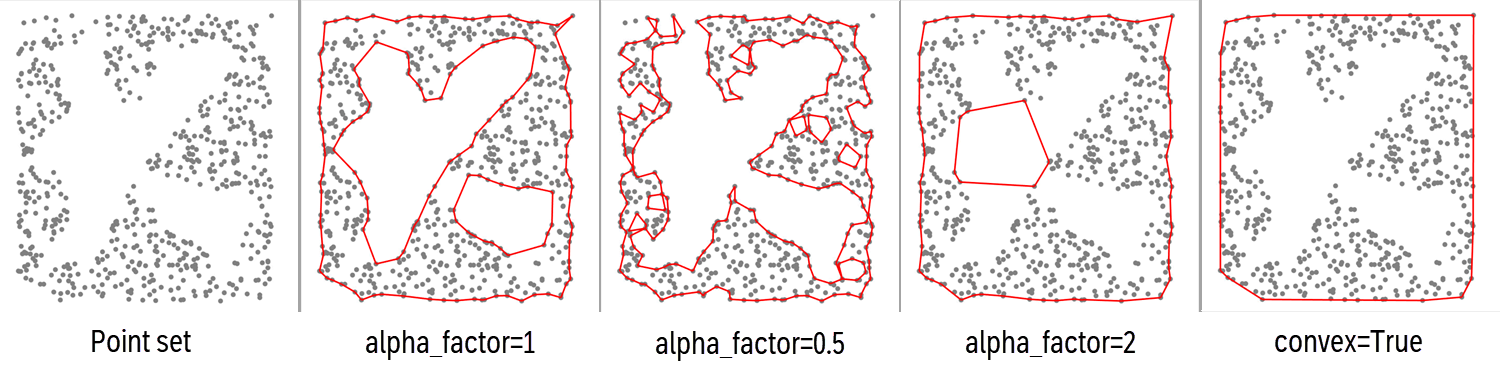
- classmethod boundary_from_points(points, alpha_factor=1.0, alpha=None, convex=False)[source]
Instantiate polygons from detecting the boundary around points.
- Parameters:
points (
Points) – The XTGeo Points instance to estimate boundary/boundaries around.alpha_factor (
float|None) – The alpha factor is a multiplier to alpha. Normally it will be around 1, but can be increased to get a looser boundary. Dependent on the points topology, it can also be decreased to some extent.alpha (
float|None) – The alpha factor for determine the ‘precision’ in how to delineate the polygon. A large value will produce a smoother polygon. The default is to detect the value from the data, but note that this default may be far from optimal for you needs. Usually use thealpha_factorto tune the best value. The actual alpha applied in the concave hull algorithm is alpha_factor multiplied with alpha.convex (
bool) – If True, then compute a maximum boundary (convex), and note that alpha_factor and alpha are not applied in ths case. Default is False.
- Return type:
Self- Returns:
A Polygons instance.
- property dataframe
Returns or set the Pandas dataframe object.
- delete_columns(clist, strict=False)
Delete one or more columns by name.
Note that the columns returned by
protected_columns(self)()(for instance, the coordinate columns) will not be deleted.- Parameters:
self (obj) – Points or Polygons
clist (list) – Name of columns
strict (bool) – If False, will not trigger exception if a column is not found. Otherwise a ValueError will be raised.
- Raises:
ValueError – If strict is True and columnname not present
- Return type:
None
- Example::
mypoly.delete_columns([“WELL_ID”, mypoly.hname, mypoly.dhname])
Added in version 2.1.
- describe(flush=True)
Describe an instance by printing to stdout
- Return type:
str|None
- property dhname
Returns or set the name of the delta horizontal length column if it exists.
If the column does not exist, None is returned. Default name is H_DELTALEN.
Added in version 2.1.
- div_inside(poly, value)
Divide a value (scalar) to points inside polygons.
- Parameters:
- Return type:
None
See notes under
operation_polygons()and consider insteaddiv_inside polygons().
- div_inside_polygons(poly, value)
Divide a value (scalar) for points inside polygons (new behaviour).
This is an improved implementation than
div_inside(), and is now the recommended method, as it is both faster and works similar for all single and overlapping sub-polygons within one or more Polygons instances.- Parameters:
- Return type:
None
Added in version 3.2.
- div_outside(poly, value)
Divide a value (scalar) outside polygons (value 0.0 will give result 0).
- Parameters:
- Return type:
None
See notes under
operation_polygons()and consider insteaddiv_outside polygons().
- div_outside_polygons(poly, value)
Divide a value (scalar) for points outside polygons (new behaviour).
Note if input value is 0.0 (division on zero), the result will be 0.0.
This is an improved implementation than
div_outside(), and is now the recommended method, as it is both faster and works similar for all single and overlapping sub-polygons within one or more Polygons instances.- Parameters:
- Return type:
None
Added in version 3.2.
- property dtname
Returns or set the name of the delta total length column if it exists.
Added in version 2.1.
- eli_inside(poly)
Eliminate current points inside polygons (old implentation).
See notes under
operation_polygons()and consider insteadeli_inside polygons().
- eli_inside_polygons(poly)
Remove points inside polygons.
This is an improved implementation than
eli_inside(), and is now the recommended method, as it is both faster and works similar for all single and overlapping sub-polygons within one or more Polygons instances.- Parameters:
poly (
Polygons|list[Polygons]) – A xtgeo Polygons instance, or a list of xtgeo Polygons instances- Return type:
None
Added in version 3.2.
- eli_outside(poly)
Eliminate current points outside polygons (old implentation).
See notes under
operation_polygons()and consider insteadeli_outside polygons().
- eli_outside_polygons(poly)
Remove points outside polygons.
This is an improved implementation than
eli_outside(), and is now the recommended method, as it is both faster and works similar for all single and overlapping sub-polygons within one or more Polygons instances.- Parameters:
poly (
Polygons|list[Polygons]) – A xtgeo Polygons instance, or a list of xtgeo Polygons instances- Return type:
None
Added in version 3.2.
- extend(distance, nsamples=1, mode2d=True)[source]
Extend polyline by distance at both ends, nsmaples times.
The instance is updated in-place.
- Parameters:
distance (float) – The horizontal distance (sampling) to extend
nsamples (int) – Number of samples to extend.
mode2d (bool) – XY extension (only True is supported)
- Return type:
None
Added in version 2.1.
- filter_byid(polyid=None)[source]
Remove all line segments not in polyid.
The instance is updated in-place.
- Parameters:
polyid (int or list of int) – Which ID(s) to keep, None means use first.
- Return type:
None
Example:
mypoly.filter_byid(polyid=[2, 4]) # keep POLY_ID 2 and 4
Added in version 2.1.
- geometry_columns()
- Return type:
list[str|None]- Returns:
Columns can be deleted silently by
delete_columns()
- get_boundary()[source]
Get the square XYZ window (boundaries) of the instance.
- Return type:
tuple[float,float,float,float,float,float]- Returns:
(xmin, xmax, ymin, ymax, zmin, zmax)
See also
The class method
Polygons.boundary_from_points()
- get_dataframe(copy=True)[source]
Returns the Pandas dataframe object.
- Parameters:
copy (
bool) – If True, return a deep copy of the dataframe- Return type:
DataFrame
- get_fence(distance=20.0, atleast=5, nextend=2, name='', asnumpy=True, polyid=None)[source]
Extracts a fence with constant horizontal sampling.
Additonal H_CUMLEN and H_DELTALEN vectors will be added, suitable for X sections.
- Parameters:
distance (float) – New horizontal distance between points
atleast (int) – Minimum number of points. If the true length/atleast is less than distance, than distance will be be reset to length/atleast. Values below 3 are not permitted
nextend (int) – Number of samples to extend at each end. Note that in case of internal resetting of distance (due to ‘atleast’), then nextend internally will be modified in order to fulfill the initial intention. Hence keep distance*nextend as target.
name (str) – Name of polygon (if asnumpy=False)
asnumpy (bool) – Return a [:, 5] numpy array with columns X.., Y.., Z.., HLEN, dH
polyid (int) – Which POLY_ID to use. Default (if None) is to use the first found.
- Return type:
ndarray|bool|Polygons- Returns:
A numpy array (if asnumpy=True) or a new Polygons() object
Added in version 2.1.
- get_nwells(well_name_column='WellName')
Get number of unique wells in the instance.
- Parameters:
well_name_column (
str) – Name of column with well names- Return type:
int- Returns:
Number of unique wells, 0 if no well or column not present.
- get_shapely_objects()[source]
Returns a list of Shapely LineString objects, one per POLY_ID. :rtype:
list[LineString]Added in version 2.1.
- get_xyz_arrays()[source]
Get the X, Y, Z arrays from the dataframe as a numpy (n, 3) vector.
- Return type:
ndarray|None- Returns:
A numpy array with shape (n, 3) with the X, Y, Z values.
_versionadded:: 4.9
- get_xyz_dataframe()[source]
Get a dataframe copy from the Polygons points with no ID column.
Convert from POLY_ID based to XYZ, where a new polygon is marked with a 999 value as flag.
- Return type:
DataFrame
- hlen(hname='H_CUMLEN', dhname='H_DELTALEN', atindex=0)[source]
Compute and add/replace columns for cum. horizontal length and delta length.
The instance is updated in-place.
- Parameters:
hname (str) – Name of cumulative horizontal length. Default is H_CUMLEN.
dhname (str) – Name of delta length column. Default is H_DELTALEN.
atindex (int) – Which index which shall be 0.0 for cumulative length.
- Return type:
None
Added in version 2.1.
- property hname
Returns or set the name of the cumulative horizontal length.
If the column does not exist, None is returned. Default name is H_CUMLEN.
Added in version 2.1.
- mark_in_polygons(poly, name='pstatus', inside_value=1, outside_value=0)
Add a column that assign values if points are inside or outside polygons.
This is a generic function that adds a column in the points dataframe with a flag for values being inside or outside polygons in a Polygons instance.
- Parameters:
- Return type:
None
..versionadded:: 3.2
- mul_inside(poly, value)
Multiply a value (scalar) to points inside polygons.
- Parameters:
- Return type:
None
See notes under
operation_polygons()and consider insteadmul_inside polygons().
- mul_inside_polygons(poly, value)
Multiply a value (scalar) for points inside polygons (new behaviour).
This is an improved implementation than
mul_inside(), and is now the recommended method, as it is both faster and works similar for all single and overlapping sub-polygons within one or more Polygons instances.- Parameters:
- Return type:
None
Added in version 3.2.
- mul_outside(poly, value)
Multiply a value (scalar) to points outside polygons.
- Parameters:
- Return type:
None
See notes under
operation_polygons()and consider insteadmul_outside polygons().
- mul_outside_polygons(poly, value)
Multiply a value (scalar) for points outside polygons (new behaviour).
This is an improved implementation than
mul_outside(), and is now the recommended method, as it is both faster and works similar for all single and overlapping sub-polygons within one or more Polygons instances.- Parameters:
- Return type:
None
Added in version 3.2.
- property name
Returns or sets the name of the instance.
- property nrow
Returns the Pandas dataframe object number of rows.
- operation_polygons(poly, value, opname='add', inside=True, version=1)
A generic function for operations restricted to inside or outside polygon(s).
The operations are performed on the Z values, while the ‘inside’ or ‘outside’ of polygons are purely based on X and Y values (typically X is East and Y in North coordinates).
The operations are XYZ generic i.e. done on the points that defines the Polygon or the point in Points, depending on the calling instance.
Possible
opnamestrings:add: add the valuesub: substract the valuemul: multiply the valuediv: divide the valueset: replace current values with valueeli: eliminate; here value is not applied
- Parameters:
poly (
Polygons|list[Polygons]) – A single Polygons instance or a list of Polygons instances. The list option is only allowed when version = 2value (
float) – Value to add, subtract etcopname (
str) – Name of operation… ‘add’, ‘sub’, etcinside (
bool) – If True do operation inside polygons; else outside. Note that boundary is treated as ‘inside’version (
int) – The algorithm version, see notes below. Although version 1 is default, version 2 is recommended as it is much faster and works intuitively when have multiple polygons and/or using the is_inside=False (i.e. outside)
- Return type:
None
Note
version=1: This function works only intuitively when using one single polygon in thepolyinstance. When having several polygons the operation is done sequentially per polygon which may lead to surprising results. For instance, using “add inside” into two overlapping polygons, the addition will be doubled in the overlapping part. Similarly, using e.g. “eli, outside” will completely remove all points of two non-overlapping polygons are given as input.version=2: This is a new and recommended implementation. It works much faster and intuitively for both inside and outside, overlapping and multiple polygons within a Polygons instance.Changed in version 3.2: Add
versionoption which defaults to 1. Also allow thatpolyoption can be a list of Polygons when version is 2.
- property pname
- protected_columns()[source]
- Return type:
list[str]- Returns:
Columns not deleted by
delete_columns(), for instance the coordinate columns.
- quickplot(filename=None, others=None, title='QuickPlot for Polygons', subtitle=None, infotext=None, linewidth=1.0, color='r')[source]
Simple plotting of polygons using matplotlib.
- Parameters:
filename (str) – Name of plot file; None will plot to screen.
others (list of Polygons) – List of other polygon instances to plot
title (str) – Title of plot
subtitle (str) – Subtitle of plot
infotext (str) – Additonal info on plot.
linewidth (float) – Width of line.
color (str) – Name of color (may use matplotib shortcuts, e.g. ‘r’ for ‘red’)
- Return type:
None
- rescale(distance, addlen=False, kind='simple', mode2d=True)[source]
Rescale (resample) by using a new increment.
The increment (distance) may be a horizontal or a True 3D distance dependent on mode2d.
The instance is updated in-place.
If the distance is larger than the total input poly-line length, nothing is done. Note that the result distance may differ from the requested distance caused to rounding to fit original length.
Hence actual distance is input distance +- 50%.
- Parameters:
distance (float) – New distance between points
addlen (str) – If True, total and horizontal cum. and delta length columns will be added.
kind (str) – What kind of rescaling: slinear/cubic/simple
mode2d (bool) – The distance may be a 2D (XY) ora 3D (XYZ) mode.
- Return type:
None
Changed in version 2.1: a new algorithm
- set_inside(poly, value)
Set a value (scalar) to points inside polygons.
- Parameters:
- Return type:
None
See notes under
operation_polygons()and consider insteadset_inside polygons().
- set_inside_polygons(poly, value)
Set a value (scalar) for points inside polygons (new behaviour).
This is an improved implementation than
set_inside(), and is now the recommended method, as it is both faster and works similar for all single and overlapping sub-polygons within one or more Polygons instances.- Parameters:
- Return type:
None
Added in version 3.2.
- set_outside(poly, value)
Set a value (scalar) to points outside polygons.
- Parameters:
- Return type:
None
See notes under
operation_polygons()and consider insteadset_outside polygons().
- set_outside_polygons(poly, value)
Set a value (scalar) for points outside polygons (new behaviour).
This is an improved implementation than
set_outside(), and is now the recommended method, as it is both faster and works similar for all single and overlapping sub-polygons within one or more Polygons instances.- Parameters:
- Return type:
None
Added in version 3.2.
- simplify(tolerance=0.1, preserve_topology=True)[source]
Simply a polygon, i.e. remove unneccesary points.
This is based on Shapely’s simplify() method
- Parameters:
tolerance (
float) – Cf. Shapely’s documentationpreserve_topology (
bool) – Default is True, if False a faster algorithm is applied
- Return type:
bool- Returns:
True if simplification is achieved. The polygons instance is updated in-place.
- sub_inside(poly, value)
Subtract a value (scalar) to points inside polygons.
- Parameters:
- Return type:
None
See notes under
operation_polygons()and consider insteadsub_inside polygons().
- sub_inside_polygons(poly, value)
Subtract a value (scalar) for points inside polygons (new behaviour).
This is an improved implementation than
sub_inside(), and is now the recommended method, as it is both faster and works similar for all single and overlapping sub-polygons within one or more Polygons instances.- Parameters:
- Return type:
None
Added in version 3.2.
- sub_outside(poly, value)
Subtract a value (scalar) to points outside polygons.
- Parameters:
- Return type:
None
See notes under
operation_polygons()and consider insteadsub_outside polygons().
- sub_outside_polygons(poly, value)
Subtract a value (scalar) for points outside polygons (new behaviour).
This is an improved implementation than
sub_outside(), and is now the recommended method, as it is both faster and works similar for all single and overlapping sub-polygons within one or more Polygons instances.- Parameters:
- Return type:
None
Added in version 3.2.
- tlen(tname='T_CUMLEN', dtname='T_DELTALEN', atindex=0)[source]
Compute and add or replace columns for cum. total 3D length and delta length.
The instance is updated in-place.
- Parameters:
tname (str) – Name of cumulative total length. Default is T_CUMLEN.
dtname (str) – Name of delta length column. Default is T_DELTALEN.
atindex (int) – Which index which shall be 0.0 for cumulative length.
- Return type:
None
Added in version 2.1.
- property tname
Returns or set the name of the cumulative total length column if it exists.
Added in version 2.1.
- to_file(pfile, fformat='xyz', attributes=False)[source]
Export Polygons to file.
- Parameters:
pfile (str) – Name of file
fformat (str) – File format xyz/pol/csv/parquet
attributes (
bool|list[str]) – If True or a list, attributes (additional columns) will be preserved if supported by the file format (currently only supported by CSV and PARQUET format). The default is False.
- Return type:
int- Returns:
Number of polygon points exported
- to_roxar(project, name, category, stype='horizons', realisation=0, attributes=False)[source]
Export (store) a Polygons item to a Roxar RMS project.
The export to the RMS project can be done either within the project or outside the project.
Note also that horizon/zone name and category must exists in advance, otherwise an Exception will be raised.
Note
When project is file path (direct access, outside RMS) then
to_roxar()will implicitly do a project save. Otherwise, the project will not be saved until the user do an explicit project save action.- Parameters:
project (str or special) – Name of project (as folder) if outside RMS, og just use the magic project word if within RMS.
name (str) – Name of polygons item
category (str) – For horizons/zones/faults: for example ‘DL_depth’ and use a folder notation for clipboard/general2d_data
stype (str) – RMS folder type, ‘horizons’ (default), ‘zones’ or ‘faults’ or ‘clipboard’ (in prep: well picks)
realisation (int) – Realisation number, default is 0
attributes (bool) – If True, attributes will be preserved (from RMS 13)
- Raises:
ValueError – Various types of invalid inputs.
NotImplementedError – Not supported in this ROXAPI version
- Return type:
None
Note
Setting (storing) polygons with attributes is not supported in RMSAPI.
Added in version 2.19: general2d_data support is added
Added in version 4.X: Added attributes
- property xname
Returns or set the name of the X column.
- property xyztype
Read only, returns the type of XYZ data (POINTS, POLYGONS, …)
- property yname
Returns or set the name of the Y column.
- property zname
Returns or set the name of the Z column.