Surfaces (maps)
RegularSurface
Functions
- xtgeo.surface_from_file(mfile, fformat=None, template=None, values=True, engine=None, dtype=<class 'numpy.float64'>)[source]
Make an instance of a RegularSurface directly from file import.
- Parameters:
mfile (str) – Name of file
fformat – File format, None/guess/irap_binary/irap_ascii/ijxyz/petromod/ zmap_ascii/xtg/hdf is currently supported. If None or guess, the file ‘signature’ is used to guess format first, then file extension.
template – Only valid if
ijxyzformat, where an existing Cube or RegularSurface instance is applied to get correct topology.values (bool) – If True (default), surface values will be read (Irap binary only)
engine (str) – Key indended for developers initially, now deprecated and have no effect. To be removed in future versions.
dtype (
Union[Type[float64],Type[float32]]) – Requsted numpy dtype of values; default is float64, alternatively float32
Example:
>>> import xtgeo
>>> mysurf = xtgeo.surface_from_file(surface_dir + '/topreek_rota.gri')
Changed in version 2.1: Key “values” for Irap binary maps added
Changed in version 2.13: Key “engine” added
- xtgeo.surface_from_cube(cube, value)[source]
Make RegularSurface directly from a cube instance with a constant value.
The surface geometry will be exactly the same as for the Cube.
- Parameters:
cube (xtgeo.cube.Cube) – A Cube instance
value (float) – A constant value for the surface
Example:
>>> import xtgeo
>>> mycube = xtgeo.cube_from_file(cube_dir + "/ib_test_cube2.segy")
>>> mymap = xtgeo.surface_from_cube(mycube, 2700)
- xtgeo.surface_from_grid3d(grid, template=None, where='top', property='depth', rfactor=1.0, index_position='center', **kwargs)[source]
This makes an instance of a RegularSurface directly from a Grid() instance.
- Parameters:
grid (
Grid) – XTGeo 3D Grid instance, describing the corner point grid geometrytemplate (
RegularSurface|str|None) – Optional, to use an existing surface as template for map geometry, or by using “native” which returns a surface that approximate the 3D grid layout (same number of rows and columns, and same rotation). If None (default) a non-rotated surface will be made based on a refined estimation from the current grid resolution (seerfactor).where (
str|int) – Cell layer number, or if property is “depth”, use “top” or “base” to get a surface sampled from the very top or very base of the grid (including inactive cells!). Otherwise use the syntax “2_top” where 2 is layer no. 2 and _top indicates top of cell, while “_base” indicates base of cell. Cell layer numbering starts from 1. Default position in a cell layer is “top” if layer is given as pure number and “depth” is the property. If a grid property is given, the position is always found the center depth within in a cell.property (
str|GridProperty) – Which property to return. Choices are “depth”, “i” (columns) or “j” (rows) or, more generic, a GridProperty instance which belongs to the given grid geometry. Alle these returns a RegularSurface. A special variant is “raw” which returns a list of 2D numpy arrays. See details in the Note section.rfactor (
float) – Note this setting will only apply iftemplateis None. Determines how fine the extracted map is; higher values for finer map (but computing time will increase slightly). The default is 1.0, which in effect will make a surface approximentaly twice as fine as the average resolution estimated from the 3D grid.index_position (
Literal['center','top','base']) – Default is “center” which means that the index is taken from the Z center of the cell. If “top” is given, the index is taken from the top of the cell, and if “base” is given, the index is taken from the base of the cell. This is only valid for index properties “i” and “j”.
- Return type:
Union[RegularSurface,List[ndarray]]
- Note::
The keyword
modeis deprecated and will be removed in XTGeo version 5, use keywordpropertyinstead. If both are given,propertywill be used.- Note::
For
property“depth”, “i” and “j”, all cells in a layer will be used (including inactive 3D cells), while for a GridProperty, only active cells will be used. Hence the extent of the resulting surfaces may differ.- Note::
For
property“raw”, the return is a list of 2D arrays, where the first array is the i-index (int), the second is the j-index (int), the third is the top depth (float64), the fourth is the bottom depth (float64), and the fifth is a mask (boolean) for inactive cells. For the index arrays, -1 indicates that the cell is outside any grid cell (projected from above; i.e. could also be within a fault). For the depth arrays, the value is NaN for inactive cells. The inactive mask is True for inactive cells. The index arrays and mask is derived from the Z midpoints of the 3D cells. The “raw” option is useful for further processing in Python, e.g. when a combination of properties is needed.
Added in version 2.1.
Changed in version 4.2: Changed
modetopropertyto add support for a GridProperty. Thewherearg. can now be an integer. Added optionactiveonly.Changed in version 4.3: Added option
rawto get data for further processing. and addindex_positionfor “i” and “j” properties.
- xtgeo.surface_from_roxar(project, name, category, stype='horizons', realisation=0, dtype=<class 'numpy.float64'>)[source]
This makes an instance of a RegularSurface directly from roxar (i.e. RMS) input.
Deprecated since version The: surface_from_roxar function is deprecated and will be removed in a future version. Use surface_from_rms instead.
For parameters and usage details, see
surface_from_rms().
- xtgeo.create_synthetic_surface(ncol, nrow, xinc, yinc, xori=0.0, yori=0.0, rotation=0.0, rx=0.0, ry=0.0, rz=0.0, top_depth=0.0, dipping=0.0, azimuth=0.0, centroid=(0.5, 0.5))[source]
Create a synthetic regular surface with optional curvature and tilt.
- Parameters:
ncol (int) – Number of columns in the surface grid.
nrow (int) – Number of rows in the surface grid.
xinc (float) – X-axis increment (spacing between columns).
yinc (float) – Y-axis increment (spacing between rows).
xori (float, optional) – X-axis origin. Default is 0.0.
yori (float, optional) – Y-axis origin. Default is 0.0.
rotation (float, optional) – Rotation angle of the surface in degrees. Default is 0.0.
rx (float, optional) – Radius of curvature in X direction. Default is 0.0. If 0, return a planar surface with optional tilt.
ry (float, optional) – Radius of curvature in Y direction. Default is 0.0. If 0, return a planar surface with optional tilt.
rz (float, optional) – Radius of curvature in Z direction. Default is 0.0. If 0, return a planar surface with optional tilt.
top_depth (float, optional) – Top depth (Z value) of the surface after normalization. Default is 0.0.
dipping (float, optional) – Dip angle of the surface in degrees. Default is 0.0.
azimuth (float, optional) – Azimuth direction of dip in degrees, clockwise from global North (+Y). This is independent of the surface
rotation. Default is 0.0.centroid (tuple[float, float], optional) – Centroid position as (x_fraction, y_fraction) relative to grid dimensions. Default is (0.5, 0.5).
- Returns:
The created synthetic regular surface.
- Return type:
Example:
surf = xtgeo.create_synthetic_surface(
    ncol=100, nrow=100, xinc=25.0, yinc=25.0, rotation=0.0,
    rx=1000.0, ry=1000.0, rz=500.0, dipping=5.0, top_depth=1000.0,
    centroid=(0.5, 0.5), azimuth=45.0
)
- Note::
If rx, ry, and rz are all non-zero, the surface will have ellipsoidal curvature. Otherwise, the surface will be a tilted plane (slab). The dip direction is controlled by azimuth, measured in the global coordinate system, where 0 = North (+Y) and 90 = East (+X), independent of
rotation. The Z values are normalized so that the minimum value equals top_depth.
Classes
- class xtgeo.RegularSurface(ncol, nrow, xinc, yinc, xori=0.0, yori=0.0, yflip=1, rotation=0.0, values=None, ilines=None, xlines=None, masked=True, name='unknown', filesrc=None, fformat=None, undef=1e+33, dtype=<class 'numpy.float64'>)[source]
Bases:
objectClass for a regular surface in the XTGeo framework.
The values can as default be accessed by the user as a 2D masked numpy (ncol, nrow) float64 array, but also other representations or views are possible (e.g. as 1D ordinary numpy).
Instantiating a RegularSurface:
vals = np.zeros(30 * 50)
surf = xtgeo.RegularSurface(
    ncol=30, nrow=50, xori=1234.5, yori=4321.0, xinc=30.0, yinc=50.0,
    rotation=30.0, values=vals, yflip=1,
)
- Parameters:
ncol (
int) – Integer for number of X direction columns.nrow (
int) – Integer for number of Y direction rows.xori (
Optional[float]) – X (East) origon coordinate.yori (
Optional[float]) – Y (North) origin coordinate.xinc (
float) – X increment.yinc (
float) – Y increment.yflip (
Optional[int]) – If 1, the map grid is left-handed (assuming depth downwards), otherwise -1 means that Y axis is flipped (right-handed).rotation (
Optional[float]) – rotation in degrees, anticlock from X axis between 0, 360.values (
Union[List[float],float,None]) – A scalar (for constant values) or a “array-like” input that has ncol * nrow elements. As result, a 2D (masked) numpy array of shape (ncol, nrow), C order will be made.masked (
Optional[bool]) – Indicating if numpy array shall be masked or not. Default is True.name (
Optional[str]) – A given name for the surface, default is file name root or ‘unknown’ if constructed from scratch.
Examples
The instance can be made by specification:
>>> surface = RegularSurface(
... ncol=20,
... nrow=10,
... xori=2000.0,
... yori=2000.0,
... rotation=0.0,
... xinc=25.0,
... yinc=25.0,
... values=np.zeros((20,10))
... )
Public Data Attributes:
metadataReturn metadata object instance of type MetaDataRegularSurface.
ncolThe NCOL (NX or N-Idir) number, as property (read only).
nrowThe NROW (NY or N-Jdir) number, as property (read only).
dimensionsThe surface dimensions as a tuple of 2 integers (read only).
nactiveNumber of active map nodes (read only).
rotationThe rotation, anticlock from X axis, in degrees [0..360>.
xincThe X increment (or I dir increment).
yincThe Y increment (or I dir increment).
yflipThe Y flip (handedness) indicator 1, or -1 (read only).
xoriThe X coordinate origin of the map.
yoriThe Y coordinate origin of the map.
ilinesThe inlines numbering vector (read only).
xlinesThe xlines numbering vector (read only).
xminThe minimim X coordinate (read only).
xmaxThe maximum X coordinate (read only).
yminThe minimim Y coordinate (read only).
ymaxThe maximum Y xoordinate (read only).
dtypeGetting the dtype of the values (np.array); float64 or float32
valuesThe map values, as 2D masked numpy (float64/32), shape (ncol, nrow).
values1d(Read only) Map values, as 1D numpy masked, normally a numpy view(?).
npvalues1d(Read only) Map values, as 1D numpy (not masked), undef as np.nan.
nameA free form name for the surface, to be used in display etc.
undefReturns the undef map value (read only).
undef_limitReturns the undef_limit map value (read only).
filesrcGives the name of the file source (if any).
Public Methods:
methods()Returns the names of the methods in the class.
generate_hash([hashmethod])Return a unique hash ID for current instance.
describe([flush])Describe an instance by printing to stdout.
load_values()Import surface values in cases where metadata only is loaded.
to_file(mfile[, fformat, pmd_dataunits, ...])Export a surface (map) to file.
to_hdf(mfile[, compression])Export a surface (map) with metadata to a HDF5 file.
to_rms(project, name, category[, stype, ...])Store (export/save) a regular surface to a Roxar RMS project via the RMSAPI.
to_roxar(project, name, category[, stype, ...])Deprecated: Use to_rms() instead.
copy()Deep copy of a RegularSurface object to another instance.
get_values1d([order, asmasked, fill_value, ...])Get a 1D numpy or masked array of the map values.
set_values1d(val[, order])Update the values attribute based on a 1D input, multiple options.
get_rotation()Returns the surface roation, in degrees, from X, anti-clock.
get_nx()Same as ncol (nx) (for backward compatibility).
get_ny()Same as nrow (ny) (for backward compatibility).
get_xori()Same as property xori (for backward compatibility).
get_yori()Same as property yori (for backward compatibility).
get_xinc()Same as property xinc (for backward compatibility).
get_yinc()Same as property yinc (for backward compatibility).
similarity_index(other)Report the degree of similarity between two maps, by comparing mean.
compare_topology(other[, strict])Check that two object has the same topology, i.e. map definitions.
swapaxes()Swap (flip) the axes columns vs rows, keep origin but reverse yflip.
make_lefthanded()Makes the surface lefthanded in case yflip is -1.
make_righthanded()Makes the surface righthanded in case yflip is 1.
get_map_xycorners()Get the X and Y coordinates of the map corners.
get_value_from_xy([point, sampling])Return the map value given a X Y point.
get_xy_value_from_ij(iloc, jloc[, zvalues])Returns x, y, z(value) from a single i j location.
get_ij_values([zero_based, asmasked, order])Return I J numpy 2D arrays, optionally as masked arrays.
get_ij_values1d([zero_based, activeonly, order])Return I J numpy as 1D arrays.
get_xy_values([order, asmasked])Return coordinates for X and Y as numpy (masked) 2D arrays.
get_xy_values1d([order, activeonly])Return coordinates for X and Y as numpy 1D arrays.
get_xyz_values()Return coordinates for X Y and Z (values) as numpy (masked) 2D arrays.
get_xyz_values1d([order, activeonly, fill_value])Return coordinates for X Y and Z (values) as numpy 1D arrays.
get_dataframe([ijcolumns, ij, order, ...])Return a Pandas dataframe object, with columns X_UTME, Y_UTMN, VALUES.
dataframe(**kwargs)Deprecated; see method get_dataframe().
get_xy_value_lists([lformat, xyfmt, valuefmt])Returns two lists for coordinates (x, y) and values.
autocrop()Automatic cropping of the surface to minimize undefined areas.
fill([fill_value, method])Infilling of undefined values.
smooth([method, iterations, width])Various smoothing methods for surfaces.
operation(opname, value)Do operation on map values.
operation_polygons(poly, value[, opname, inside])A generic function for map operations inside or outside polygon(s).
add_inside(poly, value)Add a value (scalar or other map) inside polygons.
add_outside(poly, value)Add a value (scalar or other map) outside polygons.
sub_inside(poly, value)Subtract a value (scalar or other map) inside polygons.
sub_outside(poly, value)Subtract a value (scalar or other map) outside polygons.
mul_inside(poly, value)Multiply a value (scalar or other map) inside polygons.
mul_outside(poly, value)Multiply a value (scalar or other map) outside polygons.
div_inside(poly, value)Divide a value (scalar or other map) inside polygons.
div_outside(poly, value)Divide a value (scalar or other map) outside polygons.
set_inside(poly, value)Set a value (scalar or other map) inside polygons.
set_outside(poly, value)Set a value (scalar or other map) outside polygons.
eli_inside(poly)Eliminate current map values inside polygons.
eli_outside(poly)Eliminate current map values outside polygons.
add(other)Add another map to current map.
subtract(other)Subtract another map from current map.
multiply(other)Multiply another map and current map.
divide(other)Divide current map with another map.
gridding(input_data[, method, coarsen, ...])Grid a surface from points, polygons, or another surface.
resample(other[, mask, sampling])Resample an instance surface values from another surface instance.
unrotate([factor])Unrotete a map instance, and this will also change nrow, ncol, xinc, etc.
refine(factor)Refine a surface with a factor.
coarsen(factor)Coarsen a surface with a factor.
slice_grid3d(grid, prop[, zsurf, sbuffer])Slice the grid property and update the instance surface to sampled values.
slice_cube(cube[, zsurf, sampling, mask, ...])Slice the cube and update the instance surface to sampled cube values.
slice_cube_window(cube[, zsurf, other, ...])Slice the cube within a vertical window and get the statistical attrubutes.
get_boundary_polygons([alpha_factor, ...])Extract boundary polygons from the surface.
get_fence(xyfence[, sampling])Sample the surface along X and Y positions (numpy arrays) and get Z.
get_randomline(fencespec[, hincrement, ...])Extract a line along a fencespec.
hc_thickness_from_3dprops([xprop, yprop, ...])Make a thickness weighted HC thickness map.
avg_from_3dprop([xprop, yprop, mprop, ...])Average map (DZ weighted) based on numpy arrays of properties from a 3D grid.
quickplot([filename, title, subtitle, ...])Fast surface plot of maps using matplotlib.
distance_from_point([point, azimuth])Make map values as horizontal distance from a point with azimuth direction.
translate_coordinates([translate])Translate a map in X Y VALUE space.
- __init__(ncol, nrow, xinc, yinc, xori=0.0, yori=0.0, yflip=1, rotation=0.0, values=None, ilines=None, xlines=None, masked=True, name='unknown', filesrc=None, fformat=None, undef=1e+33, dtype=<class 'numpy.float64'>)[source]
Instantiating a RegularSurface:
vals = np.zeros(30 * 50)
surf = xtgeo.RegularSurface(
    ncol=30, nrow=50, xori=1234.5, yori=4321.0, xinc=30.0, yinc=50.0,
    rotation=30.0, values=vals, yflip=1,
)
- Parameters:
ncol (
int) – Integer for number of X direction columns.nrow (
int) – Integer for number of Y direction rows.xori (
Optional[float]) – X (East) origon coordinate.yori (
Optional[float]) – Y (North) origin coordinate.xinc (
float) – X increment.yinc (
float) – Y increment.yflip (
Optional[int]) – If 1, the map grid is left-handed (assuming depth downwards), otherwise -1 means that Y axis is flipped (right-handed).rotation (
Optional[float]) – rotation in degrees, anticlock from X axis between 0, 360.values (
Union[List[float],float,None]) – A scalar (for constant values) or a “array-like” input that has ncol * nrow elements. As result, a 2D (masked) numpy array of shape (ncol, nrow), C order will be made.masked (
Optional[bool]) – Indicating if numpy array shall be masked or not. Default is True.name (
Optional[str]) – A given name for the surface, default is file name root or ‘unknown’ if constructed from scratch.
Examples
The instance can be made by specification:
>>> surface = RegularSurface(
... ncol=20,
... nrow=10,
... xori=2000.0,
... yori=2000.0,
... rotation=0.0,
... xinc=25.0,
... yinc=25.0,
... values=np.zeros((20,10))
... )
- autocrop()[source]
Automatic cropping of the surface to minimize undefined areas.
This method is simply removing undefined “white areas”. The instance will be updated with new values for xori, yori, ncol, etc. Rotation will never change
- Returns:
RegularSurface instance is updated in-place
Added in version 2.12.
- avg_from_3dprop(xprop=None, yprop=None, mprop=None, dzprop=None, truncate_le=None, zoneprop=None, zone_minmax=None, coarsen=1, zone_avg=False)[source]
Average map (DZ weighted) based on numpy arrays of properties from a 3D grid.
The 3D arrays mush be ordinary numpies of size (nx,ny,nz). Undef entries must be given weights 0 by using DZ=0
- Parameters:
xprop – 3D numpy of all X coordinates (also inactive cells)
yprop – 3D numpy of all Y coordinates (also inactive cells)
mprop – 3D numpy of requested property (e.g. porosity) all
dzprop – 3D numpy of dz values (for weighting) NB zero for undef cells
truncate_le (float) – Optional. Truncate value (mask) if value is less
zoneprop – 3D numpy to a zone property
zone_minmax – a tuple with from-to zones to combine (e.g. (1,3))
- Returns:
Nothing explicit, but updates the surface object.
- coarsen(factor)[source]
Coarsen a surface with a factor.
Range for coarsening is 2 to 10, where e.g. 2 meaning half the number of columns and rows.
Note that there may be some ‘loss’ of nodes at the edges of the updated map, as only the ‘inside’ nodes in the updated map versus the input map are applied.
- Parameters:
factor (int) – Coarsen factor (2 .. 10)
- Raises:
ValueError – Coarsen is too large, giving too few nodes in result
- compare_topology(other, strict=True)[source]
Check that two object has the same topology, i.e. map definitions.
Map definitions such as origin, dimensions, number of defined cells…
- Parameters:
other (
RegularSurface) – The other surface to compare withstrict (bool) – If false, the masks are not compared
- Return type:
bool- Returns:
True of same topology, False if not
- copy()[source]
Deep copy of a RegularSurface object to another instance.
Example:
>>> mymap = xtgeo.surface_from_file(surface_dir + '/topreek_rota.gri')
>>> mymapcopy = mymap.copy()
- property dimensions
The surface dimensions as a tuple of 2 integers (read only).
- Type:
2-tuple
- distance_from_point(point=(0, 0), azimuth=0.0)[source]
Make map values as horizontal distance from a point with azimuth direction.
- Parameters:
point (tuple) – Point to measure from
azimuth (float) – Angle from North (clockwise) in degrees
- property dtype
Getting the dtype of the values (np.array); float64 or float32
- property filesrc
Gives the name of the file source (if any).
- fill(fill_value=None, method='nearest')[source]
Infilling of undefined values.
Note that minimum and maximum values will not change with “linear” or “cubic”.
Algorithm when fill_value is not set explicitly, is based on a nearest node extrapolation.
- Parameters:
fill_value – If numeric, fill with this constant value
method (
Literal['nearest','linear','cubic','radial_basis']) –Extrapolation method if fill_value is None:
’nearest’: Use nearest valid cell (fast, blocky)
’linear’: Linear interpolation/extrapolation (smooth)
’cubic’: Cubic interpolation/extrapolation (very smooth)
’radial_basis’: RBF (radial basis function) defaulted with thin plate spline (smooth, best quality). See also scipy.interpolate.RBFInterpolator: https://docs.scipy.org/doc/scipy/reference/generated/scipy. interpolate.RBFInterpolator.html
- Return type:
None- Returns:
RegularSurface instance is updated in-place
Added in version 2.1.
Changed in version 2.6: Added option key fill_value
Changed in version 4.15: Added method ‘radial_basis’
- generate_hash(hashmethod='md5')[source]
Return a unique hash ID for current instance.
See
generic_hash()for documentation.Added in version 2.14.
- get_boundary_polygons(alpha_factor=1.0, convex=False, simplify=True)[source]
Extract boundary polygons from the surface.
A regular surface may often contain areas of undefined (masked) entries which makes the surface appear ‘ragged’ and/or ‘patchy’.
This method extracts boundaries around the surface patches, and the precision depends on the keyword settings. As default, the
alpha_factorof 1 makes a precise boundary, while a larger alpha_factor makes more rough polygons.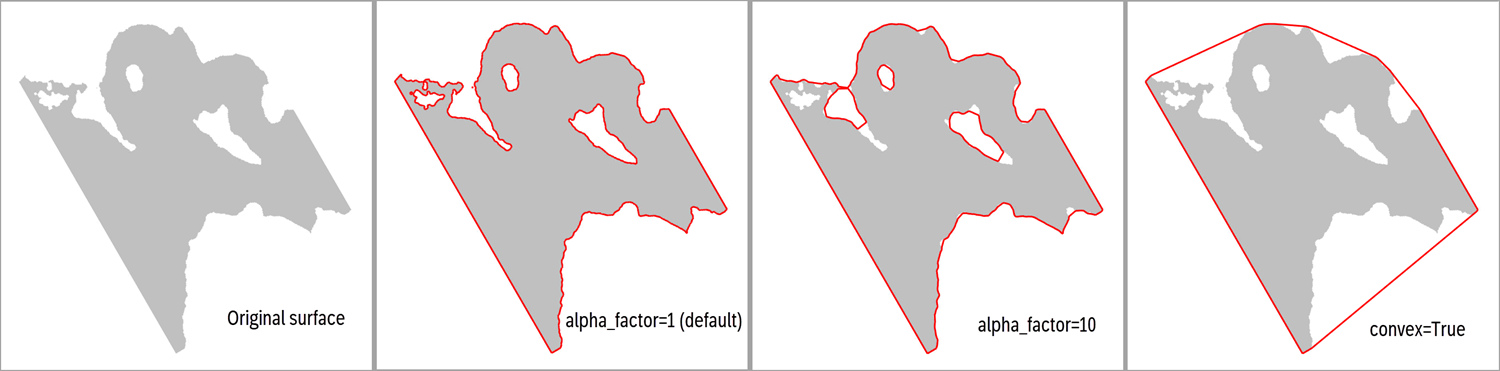
- Parameters:
alpha_factor (
Optional[float]) – An alpha multiplier, where lowest allowed value is 1.0. A higher number will produce smoother and less accurate polygons. Not applied if convex is set to True.convex (
Optional[bool]) – The default is False, which means that a “concave hull” algorithm is used. If convex is True, the alpha factor is overridden to a large number, producing a ‘convex’ shape boundary instead.simplify (
Optional[bool]) – If True, a simplification is done in order to reduce the number of points in the polygons, where tolerance is 0.1. Another alternative to True is to input a Dict on the form{"tolerance": 2.0, "preserve_topology": True}, cf. thePolygons.simplify()method. For details on e.g. tolerance, see Shapely’s simplify() method.
- Returns:
A XTGeo Polygons instance
Example:
surf = xtgeo.surface_from_file("mytop.gri")
# eliminate all values below a depth, e.g. a fluid contact
surf.values = np.ma.masked_greater(surf.values, 2100.0)
boundary = surf.get_boundary_polygons()
# the boundary may contain several smaller polygons; keep only the
# largest (first) polygon which is number 0:
boundary.filter_byid([0])  # polygon is updated in-place
See also
The
Polygons.boundary_from_points()class method.Added in version 3.1.
- get_dataframe(ijcolumns=False, ij=False, order='C', activeonly=True, fill_value=nan)[source]
Return a Pandas dataframe object, with columns X_UTME, Y_UTMN, VALUES.
- Parameters:
ijcolumns (bool) – If True, and IX and JY indices will be added as dataframe columns. Redundant, use “ij” instead.
ij (bool) – Same as ijcolumns. If True, and IX and JY indices will be added as dataframe columns. Preferred syntax
order (str) – ‘C’ (default) for C order (row fastest), or ‘F’ for Fortran order (column fastest)
activeonly (bool) – If True, only active nodes are listed. If False, the values will have fill_value default None = NaN as values
fill_value (float) – Value of inactive nodes if activeonly is False
Example:
>>> import xtgeo
>>> surf = xtgeo.surface_from_file(surface_dir + '/topreek_rota.gri')
>>> dfr = surf.get_dataframe()
>>> dfr.to_csv('somecsv.csv')
- Returns:
A Pandas dataframe object.
- get_fence(xyfence, sampling='bilinear')[source]
Sample the surface along X and Y positions (numpy arrays) and get Z.
Changed in version 2.14: Added keyword option sampling
Returns a masked numpy 2D array similar as input, but with updated Z values, which are masked if undefined.
- Parameters:
xyfence (
ndarray) – A 2D numpy array with shape (N, 3) where columns are (X, Y, Z). The Z will be updated to the map.sampling (
Optional[str]) – Use “bilinear” (default) for interpolation or “nearest” for snapping to nearest node.
- Return type:
MaskedArray
- get_ij_values(zero_based=False, asmasked=False, order='C')[source]
Return I J numpy 2D arrays, optionally as masked arrays.
- Parameters:
zero_based (bool) – If False, first number is 1, not 0
asmasked (bool) – If True, UNDEF map nodes are skipped
order (str) – ‘C’ (default) or ‘F’ order (row vs column major)
- get_ij_values1d(zero_based=False, activeonly=True, order='C')[source]
Return I J numpy as 1D arrays.
- Parameters:
zero_based (bool) – If False, first number is 1, not 0
activeonly (bool) – If True, UNDEF map nodes are skipped
order (str) – ‘C’ (default) or ‘F’ order (row vs column major)
- get_map_xycorners()[source]
Get the X and Y coordinates of the map corners.
Returns a tuple on the form ((x0, y0), (x1, y1), (x2, y2), (x3, y3)) where (if unrotated and normal flip) 0 is the lower left corner, 1 is the right, 2 is the upper left, 3 is the upper right.
- get_randomline(fencespec, hincrement=None, atleast=5, nextend=2, sampling='bilinear')[source]
Extract a line along a fencespec.
Added in version 2.1.
Changed in version 2.14: Added keyword option sampling
Here, horizontal axis is “length” and vertical axis is sampled depth, and this is used for fence plots.
The input fencespec is either a 2D numpy where each row is X, Y, Z, HLEN, where X, Y are UTM coordinates, Z is depth/time, and HLEN is a length along the fence, or a Polygons instance.
If input fencspec is a numpy 2D, it is important that the HLEN array has a constant increment and ideally a sampling that is less than the map resolution. If a Polygons() instance, this is automated if hincrement is None, and ignored if hincrement is False.
Returns a ndarray with shape (:, 2).
- Parameters:
fencespec (
Union[ndarray,object]) – 2D numpy with X, Y, Z, HLEN as rows or a xtgeo Polygons() object.hincrement (
Union[bool,float,None]) – Resampling horizontally. This applies only if the fencespec is a Polygons() instance. If None (default), the distance will be deduced automatically. If False, then it assumes the Polygons can be used as-is.atleast (
Optional[int]) – Minimum number of horizontal samples (only if fencespec is a Polygons instance and hincrement != False)nextend (
Optional[int]) – Extend with nextend * hincrement in both ends (only if fencespec is a Polygons instance and hincrement != False)sampling (
Optional[str]) – Use “bilinear” (default) for interpolation or “nearest” for snapping to nearest node.
- Return type:
ndarray
Example:
fence = xtgeo.polygons_from_file("somefile.pol")
fspec = fence.get_fence(distance=20, nextend=5, asnumpy=True)
surf = xtgeo.surface_from_file("somefile.gri")

arr = surf.get_randomline(fspec)

distance = arr[:, 0]
zval = arr[:, 1]
# matplotlib...
plt.plot(distance, zval)
See also
- Class
Polygons The method
get_fence()which can be used to pregenerate fencespec
- get_value_from_xy(point=(0.0, 0.0), sampling='bilinear')[source]
Return the map value given a X Y point.
- Parameters:
point (float tuple) – Position of X and Y coordinate
sampling (str) – Sampling method, either “bilinear” for bilinear interpolation, or “nearest” for nearest node sampling (e.g. facies maps)
- Returns:
The map value (interpolated). None if XY is outside defined map
- Example::
mvalue = map.get_value_from_xy(point=(539291.12, 6788228.2))
Changed in version 2.14: Added keyword option sampling
- get_values1d(order='C', asmasked=False, fill_value=1e+33, activeonly=False)[source]
Get a 1D numpy or masked array of the map values.
- Parameters:
order (str) – Flatteting is in C (default) or F order
asmasked (bool) – If true, return as MaskedArray, other as standard numpy ndarray with undef as np.nan or fill_value
fill_value (str) – Relevent only if asmasked is False, this will be the value of undef entries
activeonly (bool) – If True, only active cells. Keys ‘asmasked’ and ‘fill_value’ are not revelant.
- Returns:
A numpy 1D array or MaskedArray
- get_xy_value_from_ij(iloc, jloc, zvalues=None)[source]
Returns x, y, z(value) from a single i j location.
- Parameters:
iloc (int) – I (col) location (base is 1)
jloc (int) – J (row) location (base is 1)
zvalues (ndarray) – to precompute the numpy surface once in the caller, and submit the numpy array (use surf.get_values1d()).
- Returns:
The x, y, z values at location iloc, jloc
- get_xy_value_lists(lformat='webportal', xyfmt=None, valuefmt=None)[source]
Returns two lists for coordinates (x, y) and values.
For lformat = ‘webportal’ (default):
The lists are returned as xylist and valuelist, where xylist is on the format:
[(x1, y1), (x2, y2) …] (a list of x, y tuples)
and valuelist is one the format
[v1, v2, …]
Inactive cells will be ignored.
- Parameters:
lformat (string) – List return format (‘webportal’ is default, other options later)
xyfmt (string) – The formatter for xy numbers, e.g. ‘12.2f’ (default None). Note no checks on valid input.
valuefmt (string) – The formatter for values e.g. ‘8.4f’ (default None). Note no checks on valid input.
- Returns:
xylist, valuelist
Example
>>> import xtgeo
>>> surf = xtgeo.surface_from_file(surface_dir + '/topreek_rota.gri')
>>> xylist, valuelist = surf.get_xy_value_lists(valuefmt='6.2f')
- get_xy_values(order='C', asmasked=True)[source]
Return coordinates for X and Y as numpy (masked) 2D arrays.
- Parameters:
order (str) – ‘C’ (default) or ‘F’ order (row major vs column major)
asmasked (bool) – If True , inactive nodes are masked.
- get_xy_values1d(order='C', activeonly=True)[source]
Return coordinates for X and Y as numpy 1D arrays.
- Parameters:
order (str) – ‘C’ (default) or ‘F’ order (row major vs column major)
activeonly (bool) – Only active cells are returned.
- get_xyz_values1d(order='C', activeonly=True, fill_value=nan)[source]
Return coordinates for X Y and Z (values) as numpy 1D arrays.
- Parameters:
order (str) – ‘C’ (default) or ‘F’ order (row major vs column major)
activeonly (bool) – Only active cells are returned.
fill_value (float) – If activeonly is False, value of inactive nodes
- gridding(input_data, method='linear', coarsen=1, method_options=None)[source]
Grid a surface from points, polygons, or another surface.
A variety of gridding methods are available, suitable for different point distributions and desired output quality. The instance will be updated in-place.
- Parameters:
input_data (Points | Polygons | ‘RegularSurface) – Input data - can be XTGeo Points, Polygons, or RegularSurface instance.
method (Literal[‘linear’, ‘cubic’, ‘nearest’, ‘inverse_distance’, ‘radial_basis’, ‘moving_average’, ‘kriging’]) –
Gridding method. Options:
’linear’: Linear interpolation (fast, simple)
’cubic’: Cubic interpolation (many points, smooth result) recommended for dense data
’nearest’: Nearest neighbor (preserves exact values)
’inverse_distance’: Inverse distance weighting (IDW) (local control)
’radial_basis’: Radial basis function (RBF) (sparse data, very smooth) recommended for sparse data. But may also work well for dense data, in particular when using ‘function’ = linear.
’moving_average’: Moving average gridding (smooth)
’kriging’: Use ordinary or simple kriging, requires gstools installed.
coarsen (int) – Coarsen factor to speed up gridding (use every Nth point)
method_options (dict | None) –
Dictionary with method-specific parameters:
- For methods ‘linear’, ‘cubic’, ‘nearest’:
extrapolate (bool): to fill map outide point ‘convex-hull’ area, default is False.
extrapolation_method (str): What fill method to apply, default is ‘nearest’, alternatives are ‘linear’, ‘cubic’, ‘radial_basis’. See also
fill().
- For method=’inverse_distance’:
power (float): IDW power parameter, default 2.0
radius (float): Search radius, default None (use all points)
min_points (int): Minimum points required, default 1
- For method=’radial_basis’:
function (str): Kernel type, default ‘thin_plate_spline’ Options: ‘thin_plate_spline’, ‘cubic’, ‘quintic’, ‘multiquadric’, ‘inverse_multiquadric’, ‘inverse_quadratic’, ‘gaussian’, ‘linear’ See also: scipy.interpolate.RBFInterpolator https://docs.scipy.org/doc/scipy/reference/generated/scipy. interpolate.RBFInterpolator.html
smoothing (float): Smoothing parameter, default 0.0 (interpolating)
epsilon (float): Shape parameter (certain kernels), default None
- For method=’moving_average’:
radius (float): Search radius, default is None (auto-computed)
min_points (int): Minimum points required, default 3
- For method=’kriging’:
variogram_model (str): Model type, default ‘gaussian’ Options: ‘gaussian’, ‘exponential’, ‘spherical’, ‘matern’, ‘stable’, ‘linear’. Note that ‘stable’ is the same as ‘general_exponential’ seen in some vendor tools.
variogram_parameters (dict): Dictionary with variogram model parameters (all optional, auto-estimated if not provided). Options: ‘len_scale’ (float or tuple), ‘range_value’ (float or tuple), ‘angle’ (float), ‘nugget’ (float), ‘variance’ (float), ‘nu’ (float for Matern), ‘alpha’ (float for Stable). Use tuple (len_x, len_y) for anisotropic len_scale or range_value. Angle is rotation in degrees (counter-clockwise from East/X-axis). If both len_scale and range_value provided, len_scale takes precedence. Default None (auto-estimated).
krige_type (str): Type of kriging, ‘ordinary’ (default) or ‘simple’.
mean (float): Mean value for simple kriging, default None (auto-estimated).
max_points (int): Max points per block for kriging, default 500. When dataset has more points, uses hybrid block-based kriging for speed/accuracy balance.
radius (float): Search radius for kriging, default None (auto-calculated as 2 * len_scale).
exact (bool): If True, enforces exact data values at point locations using bilinear interpolation adjustment, default False.
Examples:
# Many points that cover mapping area - use cubic (fast, good quality)
surf.gridding(points, method='cubic')

# Many points with extrapolation outside convex hull
surf.gridding(points, method='radial_basis',
              method_options={'function': 'linear'})

# Sparse points or trends - use RBF for smooth result
surf.gridding(points, method='radial_basis')

# Sparse points with custom RBF (Radial Basis Function)
surf.gridding(points, method='radial_basis',
              method_options={'function': 'thin_plate', 'smooth': 0.1})

# IDW for local control
surf.gridding(points, method='inverse_distance',
              method_options={'power': 2.0, 'radius': 1000.0})

# Kriging with custom variogram
surf.gridding(points, method='kriging',
              method_options={
                  'variogram_model': 'exponential',
                  'variogram_parameters': {
                      'range_value': (500.0, 1000.0),
                      'nugget': 0.1,
                      'angle': 45.0
                  },
                  'krige_type': 'ordinary'
              })

# Preprocessing: merge close points before gridding
points.merge_close_points(min_distance=5.0, method='average')
surf.gridding(points, method='linear')

# Postprocessing: fill undefined areas after gridding
surf.gridding(points, method='linear')
surf.fill(method='nearest')
- Returns:
RegularSurface instance is updated in-place.
Note
While the linear method is default for historical reasons, the recommended method for general use is ‘radial_basis’ which works well both for sparse data (e.g. isochore gridding) and dense data with appropriate tuning of method parameters.
For preprocessing (e.g., merging close points), use methods on the Points instance before calling gridding(). For postprocessing (e.g., filling undefined areas), use the
fill()method after gridding.- Raises:
ValueError – If method is invalid or required method_options are missing
RuntimeError – If gridding fails
Changed in version 4.15: Added many more options and methods
Changed in version 4.15: Accepts Points, Polygons, or RegularSurface as input
- hc_thickness_from_3dprops(xprop=None, yprop=None, hcpfzprop=None, zoneprop=None, zone_minmax=None, dzprop=None, zone_avg=False, coarsen=1, mask_outside=False)[source]
Make a thickness weighted HC thickness map.
Make a HC thickness map based on numpy arrays of properties from a 3D grid. The numpy arrays here shall be ndarray, not masked numpies (MaskedArray).
Note that the input hcpfzprop is hydrocarbon fraction multiplied with thickness, which can be achieved by e.g.: cpfz = dz*poro*ntg*shc or by hcpfz = dz*hcpv/vbulk
- Parameters:
xprop (ndarray) – 3D numpy array of X coordinates
yprop (ndarray) – 3D numpy array of Y coordinates
hcpfzprop (ndarray) – 3D numpy array of HC fraction multiplied with DZ per cell.
zoneprop (ndarray) – 3D numpy array indicating zonation property, where 1 is the lowest (0 values can be used to exclude parts of the grid)
dzprop (ndarray) – 3D numpy array holding DZ thickness. Will be applied in weighting if zone_avg is active.
zone_minmax (tuple) – (optional) 2 element list indicating start and stop zonation (both start and end spec are included)
zone_avg (bool) – A zone averaging is done prior to map gridding. This may speed up the process a lot, but result will be less precise. Default is False.
coarsen (int) – Select every N’th X Y point in the gridding. Will speed up process, but less precise result. Default=1
mask_outside (bool) – Will mask the result map undef where sum of DZ is zero. Default is False as it costs some extra CPU.
- Returns:
True if operation went OK (but check result!), False if not
- property ilines
The inlines numbering vector (read only).
- load_values()[source]
Import surface values in cases where metadata only is loaded.
Currently, only Irap binary format is supported.
Example:
surfs = []
for i in range(1000):
    surfs.append(xtgeo.surface_from_file(f"myfile{i}.gri", values=False))

# load values in number 88:
surfs[88].load_values()
Added in version 2.1.
- make_lefthanded()[source]
Makes the surface lefthanded in case yflip is -1. This will change origin.
Lefthanded regular maps are common in subsurface data, where I is to east, J is to north and Z axis is positive down for depth and time data.
The instance is changed in-place. The method is a no-op if yflip already is 1. :rtype:
NoneAdded in version 4.2.
- make_righthanded()[source]
Makes the surface righthanded in case yflip is 1. This will change origin.
Righthanded regular maps are less common in subsurface data, where I is to east, J is to north and Z axis is positive down for depth and time data. This method is mainly for consistency since make_lefthanded() is present.
The instance is changed in-place. The method is a no-op if yflip already is -1. :rtype:
NoneAdded in version 4.5.
- property metadata
Return metadata object instance of type MetaDataRegularSurface.
- classmethod methods()[source]
Returns the names of the methods in the class.
>>> print(RegularSurface.methods())
METHODS for RegularSurface():
======================
__init__
__repr__
...
- property nactive
Number of active map nodes (read only).
- property name
A free form name for the surface, to be used in display etc.
- property ncol
The NCOL (NX or N-Idir) number, as property (read only).
- property npvalues1d
(Read only) Map values, as 1D numpy (not masked), undef as np.nan.
In most cases this will be a copy of the values.
Example:
>>> import xtgeo
>>> map = xtgeo.surface_from_file(surface_dir + '/topreek_rota.gri')
>>> values = map.npvalues1d
>>> mean = np.nanmean(values)
>>> values[values <= 0] = np.nan
>>> print(values)
[nan nan ... nan]
- property nrow
The NROW (NY or N-Jdir) number, as property (read only).
- operation(opname, value)[source]
Do operation on map values.
Do operations on the current map values. Valid operations are:
‘elilt’ or ‘eliminatelessthan’: Eliminate less than <value>
‘elile’ or ‘eliminatelessequal’: Eliminate less or equal than <value>
- Parameters:
opname (str) – Name of operation. See list above.
value – A scalar number (float) or a tuple of two floats, dependent on operation opname.
Examples:
surf.operation('elilt', 200) # set all values < 200 as undef
- operation_polygons(poly, value, opname='add', inside=True)[source]
A generic function for map operations inside or outside polygon(s).
- Parameters:
poly (Polygons) – A XTGeo Polygons instance
value (float or RegularSurface) – Value to add, subtract etc
opname (str) – Name of operation… ‘add’, ‘sub’, etc
inside (bool) – If True do operation inside polygons; else outside.
_version (int) – Algorithm version, 2 will be much faster when many points on polygons (this key will be removed in later versions and shall not be applied)
- quickplot(filename=None, title='QuickPlot for Surfaces', subtitle=None, infotext=None, minmax=(None, None), xlabelrotation=None, colormap='rainbow', faults=None, logarithmic=False)[source]
Fast surface plot of maps using matplotlib.
- Parameters:
filename (str) – Name of plot file; None will plot to screen.
title (str) – Title of plot
subtitle (str) – Subtitle of plot
infotext (str) – Additonal info on plot.
minmax (tuple) – Tuple of min and max values to be plotted. Note that values outside range will be set equal to range limits
xlabelrotation (float) – Rotation in degrees of X labels.
colormap (str) – Name of matplotlib or RMS file or XTGeo colormap. Default is matplotlib’s ‘rainbow’
faults (dict) – If fault plot is wanted, a dictionary on the form => {‘faults’: XTGeo Polygons object, ‘color’: ‘k’}
logarithmic (bool) – If True, a logarithmic contouring color scale will be used.
- refine(factor)[source]
Refine a surface with a factor.
Range for factor is 2 to 10.
Note that there may be some ‘loss’ of nodes at the edges of the updated map, as only the ‘inside’ nodes in the updated map versus the input map are applied.
- Parameters:
factor (int) – Refinement factor
- resample(other, mask=True, sampling='bilinear')[source]
Resample an instance surface values from another surface instance.
Note that there may be some ‘loss’ of nodes at the edges of the updated map, as only the ‘inside’ nodes in the updated map versus the input map are applied.
The interpolation algorithm in resample is bilinear interpolation. The topolopogy of the surface (map definitions, rotation, …) will not change, only the map values. Areas with undefined nodes in
otherwill become undefined in the instance if mask is True; othewise they will be kept as is.- Parameters:
other (RegularSurface) – Surface to resample from.
mask (bool) – If True (default) nodes outside will be made undefined, if False then values will be kept as original
sampling (str) – Either ‘bilinear’ interpolation (default) or, ‘nearest’ for nearest node. The latter can be useful for resampling discrete maps.
Example:
# map with 230x210 columns, rotation 20
surf1 = xtgeo.surface_from_file("some1.gri")
# map with 270x190 columns, rotation 0
surf2 = xtgeo.surface_from_file("some2.gri")
# will sample (interpolate) surf2's values to surf1
surf1.resample(surf2)
- Returns:
Instance’s surface values will be updated in-place.
Changed in version 2.9: Added
maskkeyword, default is True for backward compatibility.Changed in version 2.21: Added
samplingkeyword option.
- property rotation
The rotation, anticlock from X axis, in degrees [0..360>.
- set_values1d(val, order='C')[source]
Update the values attribute based on a 1D input, multiple options.
If values are np.nan or values are > UNDEF_LIMIT, they will be masked.
- Parameters:
val (list-like) – Set values as a 1D array
order (str) – Input is C (default) or F order
- similarity_index(other)[source]
Report the degree of similarity between two maps, by comparing mean.
The method computes the average per surface, and the similarity is difference in mean divided on mean of self. I.e. values close to 0.0 mean small difference.
- Parameters:
other (surface object) – The other surface to compare with
- slice_cube(cube, zsurf=None, sampling='nearest', mask=True, snapxy=False, deadtraces=True, algorithm=2)[source]
Slice the cube and update the instance surface to sampled cube values.
- Parameters:
cube (object) – Instance of a Cube()
zsurf (surface object) – Instance of a depth (or time) map, which is the depth or time map (or…) that is used a slicer. If None, then the surface instance itself is used a slice criteria. Note that zsurf must have same map defs as the surface instance.
sampling (str) – ‘nearest’ for nearest node (default), or ‘trilinear’ for trilinear interpolation.
mask (bool) – If True (default), then the map values outside the cube will be undef. Otherwise, map will be kept as is.
snapxy (bool) – If True (optional), then the map values will get values at nearest Cube XY location. Only relevant to use if surface is derived from seismic coordinates (e.g. Auto4D).
deadtraces (bool) – If True (default) then dead cube traces (given as value 2 in SEGY trace headers), are treated as undefined, and map will become undefined at dead trace location.
algorithm (int) – 1 for legacy method, 2 (default from 2.9) for new method available in xtgeo from version 2.9
Example:
>>> import xtgeo
>>> cube = xtgeo.cube_from_file(cube_dir + "/ib_test_cube2.segy")
>>> surf = xtgeo.surface_from_file(surface_dir + '/topreek_rota.gri')
>>> # update surf to sample cube values:
>>> surf.slice_cube(cube)
- Raises:
Exception if maps have different definitions (topology) –
RuntimeWarning if number of sampled nodes is less than 10% –
Changed in version 2.9: Added
algorithmkeyword, default is 2
- slice_cube_window(cube, zsurf=None, other=None, other_position='below', sampling='nearest', mask=True, zrange=None, ndiv=None, attribute='max', maskthreshold=0.1, snapxy=False, showprogress=False, deadtraces=True, algorithm=2)[source]
Slice the cube within a vertical window and get the statistical attrubutes.
The statistical attributes can be min, max etc. Attributes are:
‘max’ for maximum
‘min’ for minimum
‘rms’ for root mean square
‘mean’ for expected value
‘var’ for variance (population var; https://en.wikipedia.org/wiki/Variance)
‘maxpos’ for maximum of positive values
‘maxneg’ for negative maximum of negative values
‘maxabs’ for maximum of absolute values
‘sumpos’ for sum of positive values using cube sampling resolution
‘sumneg’ for sum of negative values using cube sampling resolution
‘meanabs’ for mean of absolute values
‘meanpos’ for mean of positive values
‘meanneg’ for mean of negative values
Note that ‘all’ can be used to select all attributes that are currently available.
- Parameters:
cube – Instance of a Cube() here
zsurf – Instance of a depth (or time) map, which is the depth or time map (or…) that is used a slicer. If None, then the surface instance itself is used a slice criteria. Note that zsurf must have same map defs as the surface instance.
other – Instance of other surface if window is between surfaces instead of a static window. The zrange input is then not applied.
sampling – ‘nearest’/’trilinear’/’cube’ for nearest node (default), or ‘trilinear’ for trilinear interpolation. The ‘cube’ option is only available with algorithm = 2 and will overrule ndiv and sample at the cube’s Z increment resolution.
mask – If True (default), then the map values outside the cube will be undef, otherwise map will be kept as-is
zrange – The one-sided “radius” range of the window, e.g. 10 (10 is default) units (e.g. meters if in depth mode). The full window is +- zrange (i.e. diameter). If other surface is present, zrange is computed based on those two surfaces instead.
ndiv – Number of intervals for sampling within zrange. None means ‘auto’ sampling, using 0.5 of cube Z increment as basis. If algorithm = 2/3 and sampling is ‘cube’, the cube Z increment will be used.
attribute – The requested attribute(s), e.g. ‘max’ value. May also be a list of attributes, e.g. [‘min’, ‘rms’, ‘max’]. By such, a dict of surface objects is returned. Note ‘all’ will make a list of all possible attributes.
maskthreshold (float) – Only if two surface; if isochore is less than given value, the result will be masked.
snapxy – If True (optional), then the map values will get values at nearest Cube XY location, and the resulting surfaces layout map will be defined by the seismic layout. Quite relevant to use if surface is derived from seismic coordinates (e.g. Auto4D), but can be useful in other cases also, as long as one notes that map definition may change from input.
showprogress – If True, then a progress is printed to stdout.
deadtraces – If True (default) then dead cube traces (given as value 2 in SEGY trace headers), are treated as undefined, and map will be undefined at dead trace location.
algorithm – 1 for legacy method, 2 (default) for new faster and more precise method available from xtgeo version 2.9, and algorithm 3 as new implementation from Sept. 2023 (v3.4)
Example:
>>> import xtgeo
>>> cube = xtgeo.cube_from_file(cube_dir + "/ib_test_cube2.segy")
>>> surf = xtgeo.surface_from_file(surface_dir + '/topreek_rota.gri')
>>> # update surf to sample cube values in a total range of 30 m:
>>> surf.slice_cube_window(cube, attribute='min', zrange=15.0)

>>> # Here a list is given instead:
>>> alst = ['min', 'max', 'rms']

>>> myattrs = surf.slice_cube_window(cube, attribute=alst, zrange=15.0)
>>> for attr in myattrs.keys():
...     _ = myattrs[attr].to_file(
...         outdir + '/myfile_' + attr + '.gri'
...     )
- Raises:
Exception if maps have different definitions (topology) –
ValueError if attribute is invalid. –
- Returns:
If attribute is a string, then the instance is updated and None is returned. If attribute is a list, then a dictionary of surface objects is returned.
Note
This method is now deprecated and will be removed in xtgeo version 5. Please replace with
Cube().compute_attributes_in_window()as soon as possible.Changed in version 2.9: Added
algorithmkeyword, default is now 2, while 1 is the legacy versionChanged in version 3.4: Added
algorithm3 which is more robust and hence recommended!Changed in version 4.1: Flagged as deprecated.
- slice_grid3d(grid, prop, zsurf=None, sbuffer=1)[source]
Slice the grid property and update the instance surface to sampled values.
- Parameters:
grid (Grid) – Instance of a Grid.
prop (GridProperty) – Instance of a GridProperty, belongs to grid
zsurf (surface object) – Instance of map, which is used a slicer. If None, then the surface instance itself is used a slice criteria. Note that zsurf must have same map defs as the surface instance.
sbuffer (int) – Default is 1; if “holes” after sampling extend this to e.g. 3
Example:
>>> import xtgeo
>>> grd = xtgeo.grid_from_file(reek_dir + '/REEK.EGRID')
>>> prop = xtgeo.gridproperty_from_file(
...     reek_dir + '/REEK.UNRST',
...     name='PRESSURE',
...     date="first",
...     grid=grd,
... )
>>> surf = xtgeo.surface_from_file(surface_dir + '/topreek_rota.gri')
>>> # update surf to sample the 3D grid property:
>>> surf.slice_grid3d(grd, prop)
- Raises:
Exception if maps have different definitions (topology) –
- smooth(method='median', iterations=1, width=1)[source]
Various smoothing methods for surfaces.
- Parameters:
method (
Literal['median','gaussian']) – Smoothing method (median or gaussian)iterations (
int) – Number of iterationswidth (
float) –If method is ‘median’ range of influence is in nodes.
If method is ‘gaussian’ range of influence is standard deviation of the Gaussian kernel.
- Return type:
None
Added in version 2.1.
- to_file(mfile, fformat='irap_binary', pmd_dataunits=(15, 10), engine=None, error_if_near_empty=False)[source]
Export a surface (map) to file.
Note, for zmap_ascii and storm_binary an unrotation will be done automatically. The sampling will be somewhat finer than the original map in order to prevent aliasing. See
unrotate().- Parameters:
mfile (
Union[str,Path,BytesIO]) – Name of file, Path instance or IOBytestream instance. An alias can be e.g. “%md5sum%” or “%fmu-v1%” with string or Path() input.fformat (
Optional[str]) – File format, irap_binary/irap_ascii/zmap_ascii/ storm_binary/ijxyz/petromod/xtg*. Default is irap_binary.pmd_dataunits (
Optional[Tuple[int,int]]) – A tuple of length 2 for petromod format, spesifying metadata for units (DataUnitDistance, DataUnitZ).engine (
Optional[str]) – This was mainly a developer setting! The ‘engine’ is now deprecated.error_if_near_empty (
bool) – Default is False. If True, raise a RuntimeError if number of map nodes is less than 4. Otherwise, if False and number of nodes are less than 4, a UserWarning will be given.
- Returns:
The actual file instance, or None if io.Bytestream
- Return type:
ofile (pathlib.Path)
Examples:
>>> # read and write to ordinary file
>>> surf = xtgeo.surface_from_file(
...     surface_dir + '/topreek_rota.fgr',
...     fformat = 'irap_ascii'
... )
>>> surf.values = surf.values + 300
>>> filename = surf.to_file(
...     outdir + '/topreek_rota300.fgr',
...     fformat = 'irap_ascii'
... )

>>> # writing to io.BytesIO:
>>> stream = io.BytesIO()
>>> surf.to_file(stream, fformat="irap_binary")

>>> # read from memory stream:
>>> _ = stream.seek(0)
>>> newsurf = xtgeo.surface_from_file(stream, fformat = 'irap_binary')
Changed in version 2.5: Added support for BytesIO
Changed in version 2.13: Improved support for BytesIO
Changed in version 2.14: Support for alias file name and return value
Changed in version 3.8: Add key
error_if_near_emptyChanged in version 4.6: The
enginekeyword (for developers) is deprecated and will be removed in version 5
- to_hdf(mfile, compression='lzf')[source]
Export a surface (map) with metadata to a HDF5 file.
Warning
This implementation is currently experimental and only recommended for testing.
The file extension shall be ‘.hdf’
- Parameters:
mfile (
Union[str,Path,BytesIO]) – Name of file, Path instance or BytesIO instance. An alias can be e.g.$md5sum.hdf,$fmu-v1.hdfwith string or Path() input.compression (
Optional[str]) – Compression method, None, lzf (default), blosc
- Returns:
The actual file instance, or None if io.Bytestream
- Return type:
pathlib.Path
Example
>>> import xtgeo
>>> surf = xtgeo.surface_from_file(surface_dir + '/topreek_rota.gri')
>>> filepath = surf.to_hdf(outdir + "/topreek_rota.hdf")
Added in version 2.14.
- to_rms(project, name, category, stype='horizons', realisation=0, domain='depth')[source]
Store (export/save) a regular surface to a Roxar RMS project via the RMSAPI.
The export to the RMS project can be done either within the project or outside the project. The storing can be done to various storage types in RMS, such as ‘Horizons’, ‘Zones’, ‘Clipboard’, ‘General2D_data’ and ‘Trends’.
Note
For stype = ‘horizons’ or ‘zones’, the horizon or zone name and category must exists in advance, otherwise an Exception will be raised. Items on ‘clipboard’ and ‘general2d_data’ will be created if not already present, and overwritten if they do.
When project is a file path (direct access, outside RMS) then
to_rms()will implicitly do a project save. Otherwise, the project will not be saved until the user do an explicit project save action.- Parameters:
project (
object) – Name of project (as a folder string) if outside RMS, or just use the magicprojectword if within RMS.name (
str) – Name of surface/mapcategory (
str) – Required for horizons/zones: e.g. ‘DS_extracted’. For clipboard/general2d_data represents the folder(s), where “” or None means no folder, while e.g. “myfolder/subfolder” means that folders myfolder/subfolder will be created if not already present. For stype = ‘trends’, the category will not be appliedstype (
Literal['horizons','zones','clipboard','general2d_data','trends']) – RMS storage type, ‘horizons’ (default), ‘zones’, ‘clipboard’ ‘general2d_data’, ‘trends’realisation (
int) – Realisation number, default is 0domain (
Literal['depth','time','unknown']) – Default is ‘depth’, but ‘time’, ‘unknown’ is also possible. Note that domain only applies to stypes ‘clipboard’ and ‘general2d_data’, since the domain for horizons/zones is defined more rigidly when the horizon/zone category is created in RMS. Trends are always ‘unknown’ domain.
- Raises:
ValueError – If name or category does not exist in the project
RuntimeError – If Roxar RMS API cannot store the surface for various reasons
- Return type:
None
Example:
Here the from_rms method is used to initiate the object
directly::

  import xtgeo
  topupperreek = xtgeo.surface_from_rms(project, 'TopUpperReek',
                                        'DS_extracted')
  topupperreek.values += 200

  # export to file:
  topupperreek.to_file('topupperreek.gri')

  # store in project
  topupperreek.to_rms(project, 'TopUpperReek', 'DS_something')
Note
The
realisationnumber is not applied in trends.Added in version 2.1: clipboard support
Added in version 2.19: general2d_data and trends support
Added in version 4.14: Add domain keyword
- to_roxar(project, name, category, stype='horizons', realisation=0, domain='depth')[source]
Deprecated: Use to_rms() instead. :rtype:
NoneDeprecated since version 4.15:
to_roxar()is deprecated and will be removed in a future version. Useto_rms()instead.
- translate_coordinates(translate=(0, 0, 0))[source]
Translate a map in X Y VALUE space.
- Parameters:
translate (tuple) – Translate (shift) distance in X Y Z
Example:
>>> import xtgeo
>>> mysurf = xtgeo.surface_from_file(surface_dir + '/topreek_rota.gri')
>>> print(mysurf.xori, mysurf.yori)
468895.125 5932889.5
>>> mysurf.translate_coordinates((300,500,0))
>>> print(mysurf.xori, mysurf.yori)
469195.125 5933389.5
- property undef
Returns the undef map value (read only).
- property undef_limit
Returns the undef_limit map value (read only).
- unrotate(factor=2)[source]
Unrotete a map instance, and this will also change nrow, ncol, xinc, etc.
The default sampling (factor=2) makes a finer grid in order to avoid artifacts, and this default can be used in most cases.
If an even finer grid is wanted, increase the factor. Theoretically the new increment for factor=N is between \(\\frac{1}{N}\) and \(\\frac{1}{N}\\sqrt{2}\) of the original increment, dependent on the rotation of the original surface.
If the current instance already is unrotated, nothing is done.
- Parameters:
factor (int) – Refinement factor (>= 1)
- property values
The map values, as 2D masked numpy (float64/32), shape (ncol, nrow).
When setting values as a scalar, the current mask will be preserved.
When setting values, list-like input (lists, tuples) is also accepted, as long as the length is correct and the entries are number-like.
In order to specify undefined values, you can specify the
undefattribute in the list, or usefloat("nan").Example:
# list like input where nrow=3 and ncol=5 (15 entries)
newvalues = list(range(15))
newvalues[2] = srf.undef
srf.values = newvalues  # here, entry 2 will be undefined
- property values1d
(Read only) Map values, as 1D numpy masked, normally a numpy view(?).
Example:
map = xtgeo.surface_from_file('myfile.gri')
map.values1d
- property xinc
The X increment (or I dir increment).
- property xlines
The xlines numbering vector (read only).
- property xmax
The maximum X coordinate (read only).
- property xmin
The minimim X coordinate (read only).
- property xori
The X coordinate origin of the map.
- property yflip
The Y flip (handedness) indicator 1, or -1 (read only).
The value 1 (default) means a left-handed system if depth values are positive downwards. Assume -1 is rare, but may happen when surface is derived from seismic cube.
- property yinc
The Y increment (or I dir increment).
- property ymax
The maximum Y xoordinate (read only).
- property ymin
The minimim Y coordinate (read only).
- property yori
The Y coordinate origin of the map.
Surfaces
Classes
- class xtgeo.Surfaces(surfaces=None, subtype=None, order=None)[source]
Bases:
objectClass for a collection of Surface objects, for operations that involves a number of surfaces, such as statistical numbers.
A collection of surfaces can be different things:
A list if surfaces in stratigraphic order
A collection of different realisations of the same surface
A collection of isochores
- Parameters:
input (list, optional) – A list of XTGeo objects and/or file names)
subtype (str) – “tops”, “isochores”, or None (default)
order (str) – Assummed order: “same”, “stratigraphic”, None(default)
See also
Class
RegularSurfaceclass.Added in version 2.1.
Public Data Attributes:
surfacesGet or set a list of individual surfaces
Public Methods:
append(input)Append surface(s) from a RegularSurface or a list of objects or files.
describe([flush])Describe an instance by printing to stdout
copy()Copy a Surfaces instance to a new unique instance (a deep copy).
get_surface(name)Get a RegularSurface() instance by name, or return None if name not found
apply(func, *args, **kwargs)Apply a function to the Surfaces array.
statistics([percentiles])Return statistical measures from the surfaces.
is_depth_consistent()Check that surfaces are depth consistent, i.e. not crossing each other.
make_depth_consistent([inplace])Make surfaces depth consistent, i.e. not crossing each other.
- append(input)[source]
Append surface(s) from a RegularSurface or a list of objects or files.
- Parameters:
input (
list[RegularSurface] |list[str] |RegularSurface) – A single RegularSurface, or list of RegularSurface objects and/or file names.- Return type:
None
- apply(func, *args, **kwargs)[source]
Apply a function to the Surfaces array.
The return value of the function (numpy nan comptatible) will be a numpy array of the same shape as the first surface.
E.g. surfs.apply(np.nanmean, axis=0) will return the mean surface.
- Parameters:
func – Function to apply, e.g. np.nanmean
args – The function arguments
kwargs – The function keyword arguments
- Raises:
ValueError – If surfaces differ in topology.
- get_surface(name)[source]
Get a RegularSurface() instance by name, or return None if name not found
- is_depth_consistent()[source]
Check that surfaces are depth consistent, i.e. not crossing each other.
- Return type:
bool
- make_depth_consistent(inplace=True)[source]
Make surfaces depth consistent, i.e. not crossing each other.
The algorithm is starting with top surface and iteratively adjust the surface below to be consistent with the previous surface.
- Parameters:
inplace (
bool) – If True (default), the object is changed in-place, if False, a new object is returned.- Return type:
Surfaces|None
- statistics(percentiles=None)[source]
Return statistical measures from the surfaces.
The statistics returned is: * mean: the arithmetic mean surface * std: the standard deviation surface (where ddof = 1) * percentiles: on demand (such operations may be slow)
Currently this function expects that the surfaces all have the same shape/topology.
- Parameters:
percentiles (list of float) – If defined, a list of perecentiles to evaluate e.g. [10, 50, 90] for p10, p50, p90
- Returns:
A dictionary of statistical measures, see list above
- Return type:
dict
- Raises:
ValueError – If surfaces differ in topology.
Example:
surfs = Surfaces(mylist)  # mylist is a collection of files
stats = surfs.statistics()
# export the mean surface
stats["mean"].to_file("mymean.gri")
Changed in version 2.13: Added percentile
- property surfaces
Get or set a list of individual surfaces